NWUI 無法擷取儀表板監控的最新計數
Summary: NetWorker Web 使用者介面 (NWUI) 可用來管理 NetWorker 資料區。NWUI 儀表板標籤顯示錯誤「無法擷取儀表板監控最新的計數」,並且未顯示原則、工作流程和動作的詳細資料。
This article applies to
This article does not apply to
This article is not tied to any specific product.
Not all product versions are identified in this article.
Symptoms
NWUI 主控台顯示:
Failed to fetch latest counts for Dashboard
Error is fetching count of activities based on status from Monitoring Service
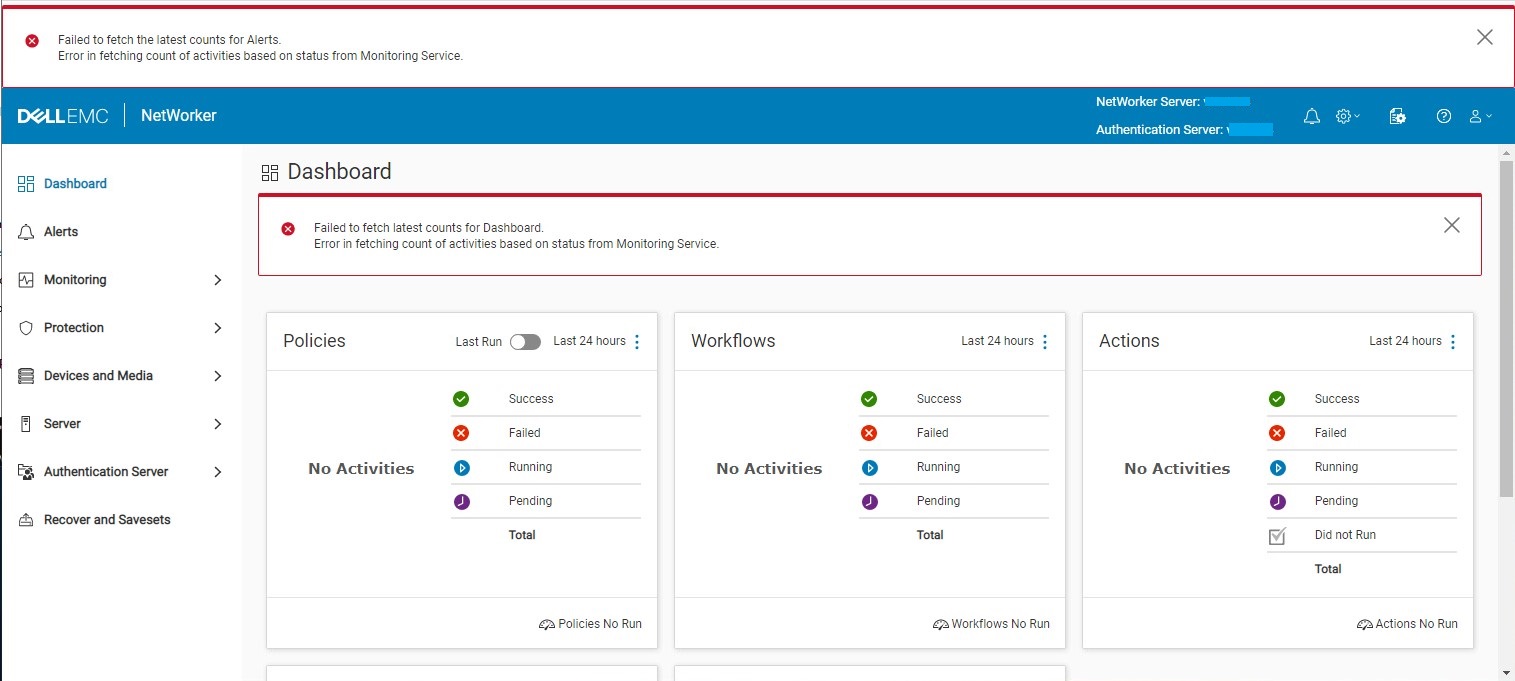
可使用 C:\Program Files\EMC NetWorker\nsr\authc-server\tomcat\logs\nwui.log 顯示:
HH:MM:SS [https-jsse-nio-9090-exec-2] ERROR c.e.n.c.n.i.MonitoringApi - Error in fetching count of activities based on status from Monitoring Service. javax.net.ssl.SSLHandshakeException: sun.security.validator.ValidatorException: PKIX path validation failed: java.security.cert.CertPathValidatorException: signature check failedCause
NetWorker Runtime Environment (NRE) 金鑰存放區中無法取得 NWUI 監控金鑰存放區憑證。NWUI 監控需要 NRE 金鑰存放區中的權限,才能對 NetWorker 資料區進行驗證。不知道 NWUI 監控程序金鑰存放區憑證遺失的原因。
NRE 金鑰存放區應顯示 emcnwuimonitoring 憑證詳細資料:
C:\Program Files\NRE\java\jre1.8.0_321\bin>keytool.exe -list -keystore ..\lib\security\cacerts | findstr emcnwuimonitoring
Enter keystore password:  changeit
emcnwuimonitoring, Apr 27, 2022, trustedCertEntry,

C:\Program Files\NRE\java\jre1.8.0_321\bin>
Resolution
NWUI 監控金鑰存放區憑證必須匯入到 NRE 金鑰存放區。
- 使用 「以系統管理員身分執行」 選項開啟命令提示字元視窗。
- 變更為 NRE bin 目錄。NRE 路徑會因安裝的 NRE 版本和伺服器作業系統而有所不同:
Linux:
cd /opt/nre/java/latest/bin/
Windows:
cd "C:\Program Files\NRE\java\jre1.8.0_321\bin>"
- 列出 NRE 金鑰存放區內容以驗證
emcnwuimonitoring不存在。預設密碼為"changeit."
Linux:
./keytool -list -keystore ../lib/security/cacerts | grep emcnwuimonitoring
Windows:
keytool.exe -list -keystore ..\lib\security\cacerts | findstr emcnwuimonitoring
- 將 NWUI 監控金鑰存放區匯入 NRE 金鑰存放區:
Linux:
./keytool -import -alias emcnwuimonitoring -file /nsr/nwui/monitoring/app/conf/emcnwuimonitoring.cer -keystore ../lib/security/cacertsWindows:
keytool.exe -importcert -alias emcnwuimonitoring -file "C:\Program Files\EMC NetWorker\nwui\monitoring\app\conf\emcnwuimonitoring.cer" -keystore ..\lib\security\cacerts
- 停止
"NetWorker Backup and Recover Server"服務:
Linux:
nsr_shutdown
Windows:
net stop nsrd
- 啟動
"NetWorker Backup and Recover Server"服務:
Linux:
systemctl start networkerWindows:
net start nsrd
- 列出 NRE 金鑰存放區內容以驗證
emcnwuimonitoring存在,預設密碼為"changeit"。
Linux:
./keytool -list -keystore ../lib/security/cacerts | grep emcnwuimonitoring
Windows:
keytool.exe -list -keystore ..\lib\security\cacerts | findstr emcnwuimonitoring
- 驗證 NWUI 中不再發生症狀。
Article Properties
Article Number: 000201603
Article Type: Solution
Last Modified: 18 Nov 2025
Version: 4
Find answers to your questions from other Dell users
Support Services
Check if your device is covered by Support Services.