NWUI 无法获取控制面板监视的最新计数
Summary: NetWorker Web 用户界面 (NWUI) 用于管理 NetWorker 数据区。NWUI 控制面板选项卡显示错误“无法获取控制面板的最新计数”,并且不显示策略、工作流和作的详细信息。
This article applies to
This article does not apply to
This article is not tied to any specific product.
Not all product versions are identified in this article.
Symptoms
NWUI 控制台显示:
Failed to fetch latest counts for Dashboard
Error is fetching count of activities based on status from Monitoring Service
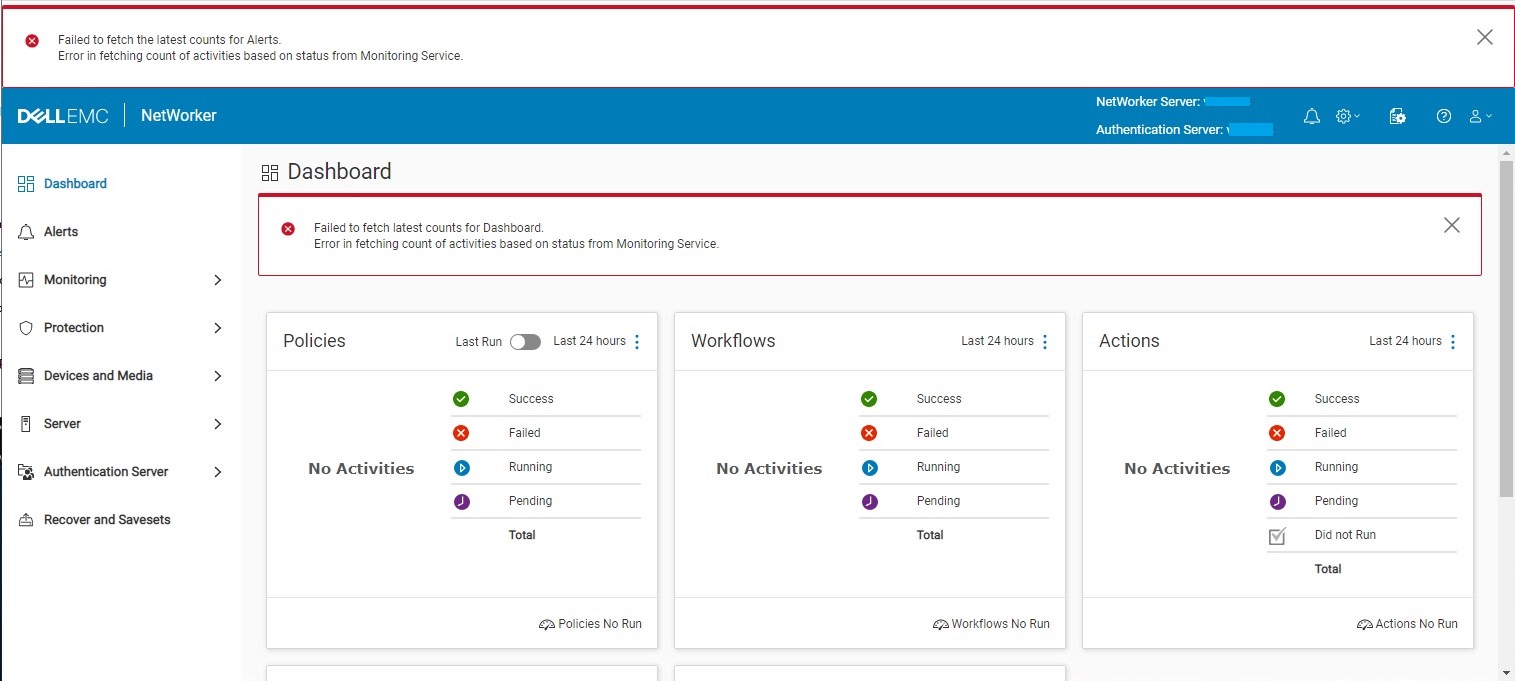
而 C:\Program Files\EMC NetWorker\nsr\authc-server\tomcat\logs\nwui.log 显示:
HH:MM:SS [https-jsse-nio-9090-exec-2] ERROR c.e.n.c.n.i.MonitoringApi - Error in fetching count of activities based on status from Monitoring Service. javax.net.ssl.SSLHandshakeException: sun.security.validator.ValidatorException: PKIX path validation failed: java.security.cert.CertPathValidatorException: signature check failedCause
NetWorker Runtime Environment (NRE) 密钥库中不提供 NWUI 监视密钥库证书。NWUI 监视需要 NRE 密钥库中的权限才能向 NetWorker 数据区进行身份验证。NWUI 监视进程密钥库证书缺失的原因未知。
NRE 密钥库应显示 emcnwuimonitoring 证书详细信息:
C:\Program Files\NRE\java\jre1.8.0_321\bin>keytool.exe -list -keystore ..\lib\security\cacerts | findstr emcnwuimonitoring
Enter keystore password:  changeit
emcnwuimonitoring, Apr 27, 2022, trustedCertEntry,

C:\Program Files\NRE\java\jre1.8.0_321\bin>
Resolution
必须将 NWUI 监视密钥库证书导入 NRE 密钥库。
- 使用 “以管理员身份运行” 选项打开命令提示符窗口。
- 更改为 NRE bin 目录。NRE 路径因安装的 NRE 版本和服务器作系统而异:
Linux:
cd /opt/nre/java/latest/bin/
Windows:
cd "C:\Program Files\NRE\java\jre1.8.0_321\bin>"
- 列出 NRE 密钥库内容以验证
emcnwuimonitoring不存在。默认密码为"changeit."
Linux:
./keytool -list -keystore ../lib/security/cacerts | grep emcnwuimonitoring
Windows:
keytool.exe -list -keystore ..\lib\security\cacerts | findstr emcnwuimonitoring
- 将 NWUI 监视密钥库导入 NRE 密钥库:
Linux:
./keytool -import -alias emcnwuimonitoring -file /nsr/nwui/monitoring/app/conf/emcnwuimonitoring.cer -keystore ../lib/security/cacertsWindows:
keytool.exe -importcert -alias emcnwuimonitoring -file "C:\Program Files\EMC NetWorker\nwui\monitoring\app\conf\emcnwuimonitoring.cer" -keystore ..\lib\security\cacerts
- 停止
"NetWorker Backup and Recover Server"服务:
Linux:
nsr_shutdown
Windows:
net stop nsrd
- 启动
"NetWorker Backup and Recover Server"服务:
Linux:
systemctl start networkerWindows:
net start nsrd
- 列出 NRE 密钥库内容以验证
emcnwuimonitoring存在,默认密码为"changeit"。
Linux:
./keytool -list -keystore ../lib/security/cacerts | grep emcnwuimonitoring
Windows:
keytool.exe -list -keystore ..\lib\security\cacerts | findstr emcnwuimonitoring
- 验证是否在 NWUI 中不再遇到症状。
Article Properties
Article Number: 000201603
Article Type: Solution
Last Modified: 18 Nov 2025
Version: 4
Find answers to your questions from other Dell users
Support Services
Check if your device is covered by Support Services.