Beim Flashen eines nicht unterstützten BIOS auf Precision-, OptiPlex-, Vostro- und Inspiron-Desktop-PCs wird keine Fehlermeldung angezeigt.
Summary: Dieser Artikel enthält Informationen zu einer Meldung, die angezeigt werden sollte, wenn ein nicht unterstütztes BIOS auf Precision-, OptiPlex-, Vostro- oder Inspiron-Desktop-PCs aktualisiert wird. ...
This article applies to
This article does not apply to
This article is not tied to any specific product.
Not all product versions are identified in this article.
Symptoms
Es wird erwartet, dass der Precision-, OptiPlex-, Vostro- oder Inspiron-Desktop beim Aktualisieren eines nicht unterstützten BIOS einen Fehler anzeigt.
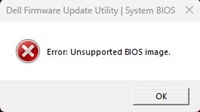
Einige Computer zeigen jedoch möglicherweise keine Fehlermeldung an und zeigen an, dass der Fortschritt fortgesetzt wird. Sie zeigen keine Fehlermeldung an und bleiben nach dem Doppelklicken auf einer nicht unterstützten BIOS-Datei im EXE-BIOS-Flash-Tool. Das ist ein falsches Verhalten.
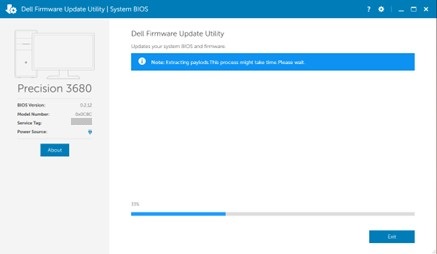
Betroffene Plattformen:
- Inspiron 3030 Desktop-PC
- Inspiron 3030 Desktop-PC im Kleinformat
- OptiPlex Small Form Factor 7020
- OptiPlex Small Form Factor Plus 7020
- OptiPlex Tower 7020
- OptiPlex Tower Plus 7020
- Precision 3460 Small Form Factor
- Precision 3660 Tower
- Precision 3680 Tower
- Vostro 3030-Desktop-PC
- Vostro 3030-Desktop-PC im Kleinformat
Cause
Dies ist auf das BIOS-Codierungsproblem zurückzuführen.
Resolution
Das Aktualisieren auf die neueste BIOS-Version für Ihren Computer behebt das Problem. Informationen zum Herunterladen und Installieren des BIOS finden Sie im Handbuch zur BIOS-Aktualisierung.
Affected Products
Inspiron 3030 Desktop, Inspiron 3030 Small Desktop, OptiPlex Small Form Factor Plus 7020, OptiPlex Small Form Factor 7020, OptiPlex Tower 7020, OptiPlex Tower Plus 7020, Precision 3460 Small Form Factor, Precision 3660 Tower, Precision 3680 Tower
, Vostro 3030 Desktop, Vostro 3030 Small Desktop
...
Article Properties
Article Number: 000222841
Article Type: Solution
Last Modified: 13 Nov 2025
Version: 6
Find answers to your questions from other Dell users
Support Services
Check if your device is covered by Support Services.