Precision, OptiPlex, Vostro ve Inspiron Masaüstünde Desteklenmeyen Bir BIOS u Yanıp Sönerken Hata Mesajı Görüntülenmiyor
Summary: Bu makalede Precision, OptiPlex, Vostro veya Inspiron masaüstü bilgisayarlarda desteklenmeyen bir BIOS u yanıp sönerken ne görünmesi gerektiği mesajı hakkında bilgiler yer almaktadır.
This article applies to
This article does not apply to
This article is not tied to any specific product.
Not all product versions are identified in this article.
Symptoms
Precision, OptiPlex, Vostro veya Inspiron masaüstü bilgisayarların desteklenmeyen bir BIOS u yanıp sönerken bir hata görüntülemesi beklenir.
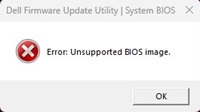
Ancak bazı bilgisayarlar hiçbir hata mesajı göstermeyebilir ve ilerleme durumunun devam ettiğini gösterebilir. Hiçbir hata mesajı göstermezler ve desteklenmeyen bir BIOS dosyasına çift tıkladıktan sonra EXE BIOS Yükseltme aracında kalırlar. Bu yanlış bir davranıştır.
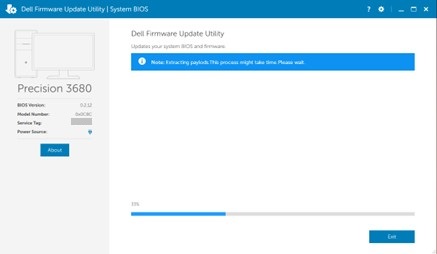
Etkilenen Platformlar:
- Inspiron 3030 Masaüstü Bilgisayar
- Inspiron 3030 Küçük Masaüstü Bilgisayar
- OptiPlex Küçük Form Faktörü 7020
- OptiPlex Küçük Form Faktörü Plus 7020
- OptiPlex Tower 7020
- OptiPlex Tower Plus 7020
- Precision 3460 Küçük Form Faktörü
- Precision 3660 Tower
- Precision 3680 Tower
- Vostro 3030 Masaüstü Bilgisayar
- Vostro 3030 Küçük Masaüstü Bilgisayar
Cause
Bunun nedeni BIOS kodlama sorunudur.
Resolution
Bilgisayarınızın BIOS unu en yeni sürüme güncelleştirmek bu sorunu çözer. BIOS'u indirmek ve kurmak için BIOS Güncelleştirme Kılavuzu na başvurun.
Affected Products
Inspiron 3030 Desktop, Inspiron 3030 Small Desktop, OptiPlex Small Form Factor Plus 7020, OptiPlex Small Form Factor 7020, OptiPlex Tower 7020, OptiPlex Tower Plus 7020, Precision 3460 Small Form Factor, Precision 3660 Tower, Precision 3680 Tower
, Vostro 3030 Desktop, Vostro 3030 Small Desktop
...
Article Properties
Article Number: 000222841
Article Type: Solution
Last Modified: 13 Nov 2025
Version: 6
Find answers to your questions from other Dell users
Support Services
Check if your device is covered by Support Services.