在 Precision、OptiPlex、Vostro 和 Inspiron 桌上型電腦上更新不支援的 BIOS 時,不會顯示任何錯誤訊息
Summary: 本文提供在 Precision、OptiPlex、Vostro 或 Inspiron 等桌上型電腦上更新不支援的 BIOS 時,應顯示訊息的相關資訊。
This article applies to
This article does not apply to
This article is not tied to any specific product.
Not all product versions are identified in this article.
Symptoms
Precision、OptiPlex、Vostro 或 Inspiron 桌上型電腦在更新不支援的 BIOS 時,預計會顯示錯誤。
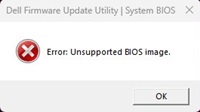
但是,有些電腦可能不會顯示任何錯誤訊息,並顯示進度仍在繼續。連按兩下不支援的 BIOS 檔案後,它們不會顯示任何錯誤訊息,並停留在 EXE BIOS 刷新工具上。這是一種錯誤的行為。
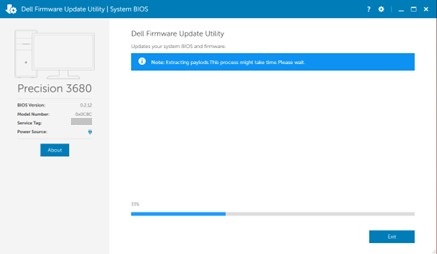
受影響的平台:
- Inspiron 3030 桌上型電腦
- Inspiron 3030 小型桌上型電腦
- OptiPlex 小機型 (SFF) 7020
- OptiPlex 小機型 (SFF) Plus 7020
- OptiPlex Tower 7020
- OptiPlex Tower Plus 7020
- Precision 3460 小機型 (SFF)
- Precision 3660 直立式
- Precision 3680 直立式
- Vostro 3030 桌上型電腦
- Vostro 3030 小型桌上型電腦
Cause
這是因為 BIOS 程式碼問題所導致。
Resolution
為電腦更新至最新 BIOS 版本可解決問題。若要下載和安裝 BIOS,請參閱 BIOS 更新指南。
Affected Products
Inspiron 3030 Desktop, Inspiron 3030 Small Desktop, OptiPlex Small Form Factor Plus 7020, OptiPlex Small Form Factor 7020, OptiPlex Tower 7020, OptiPlex Tower Plus 7020, Precision 3460 Small Form Factor, Precision 3660 Tower, Precision 3680 Tower
, Vostro 3030 Desktop, Vostro 3030 Small Desktop
...
Article Properties
Article Number: 000222841
Article Type: Solution
Last Modified: 13 Nov 2025
Version: 6
Find answers to your questions from other Dell users
Support Services
Check if your device is covered by Support Services.