ECS: Menu kontekstowe GeoDrive niedostępne w Eksploratorze Windows
Summary: Menu kontekstowe GeoDrive niedostępne w Eksploratorze Windows
This article applies to
This article does not apply to
This article is not tied to any specific product.
Not all product versions are identified in this article.
Symptoms
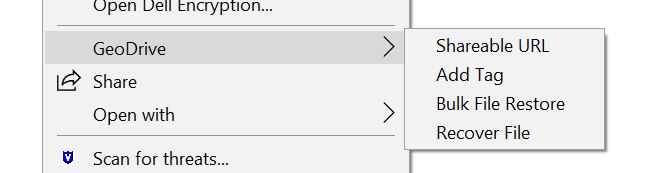
Podczas przeglądania folderu GeoDrive i podświetlania pliku i folderu, na liście brakuje menu GeoDrive:
Cause
Zwykle dzieje się tak, gdy oprogramowanie zabezpieczające (McAfee) blokuje dodanie rozszerzenia GeoDrive Explorer do Eksploratora Windows.
Aby to sprawdzić, wstrzymaj bieżące oprogramowanie zabezpieczające i uruchom ponownie Eksploratora Windows za pomocą Menedżera zadań:
Następnie powinno być dostępne menu GeoDrive:
Resolution
Zezwól rozszerzeniu eksploratora w oprogramowaniu zabezpieczającym na dodawanie do Eksploratora Windows.
Biblioteka DLL, którą można zablokować, nazywa się: "atemc_shell.dll"
Affected Products
GeoDrive for WindowsProducts
GeoDrive for Windows, ECS Appliance, ECS Appliance Hardware Gen2 U-Series, Elastic Cloud StorageArticle Properties
Article Number: 000040069
Article Type: Solution
Last Modified: 30 May 2025
Version: 5
Find answers to your questions from other Dell users
Support Services
Check if your device is covered by Support Services.