Dell UnityVSA: Modifying a UnityVSA VM Is Not Supported
Summary: Modifying the physical configuration of a Dell UnityVSA Virtual Machine (VM) using vSphere is not supported, except for adding virtual disks for data storage.
Symptoms
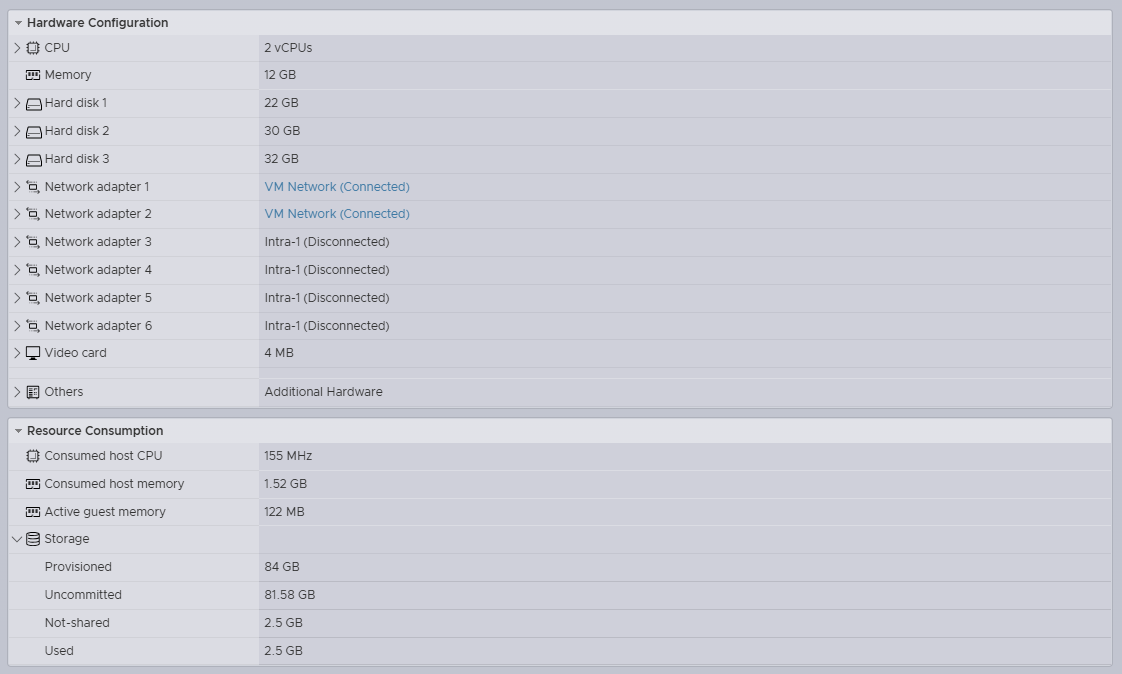
- An administrator removed vNICs from the physical configuration of the Dell Unity
- A reboot occurred during a Non-Disruptive Upgrade (NDU)
- As a result, data became unavailable (D/U) after the Storage Processor (SP) reboot during the upgrade procedure
- The SP failed to boot into normal mode on the Dell UnityVSA and is in service mode
/var/log/boot.out2016-10-31 13:53:14.649 Area from 00000001a1600000 ( 6678M), size 0000000020000000 ( 512M), name GmsPersistWrCa.1, checksum c51b07002016-10-31 13:53:14.654 Completely in E820 region from <0000000100000000> to <000000033fffffff> type <usable>2016-10-31 13:53:14.892 Refreshing registry, see /var/log/registry_load_dump.txt for details.2016-10-31 13:53:15.353 ===== virtual_hw_checks =====2016-10-31 13:53:16.789 Got bogus speed line in ethtool output for 'eth1' ( Speed: Unknown!). at /EMC/Platform/bin/virtual_hw_check.pl line 196.2016-10-31 13:53:17.058 0xFC1B3001 Virtual hardware configuration doesn't match supported profiles. Going to service mode.2016-10-31 13:53:17.144 12016-10-31 13:53:17.361 =================================================================2016-10-31 13:53:17.370 === *** Going into service mode because of a fault *** ===2016-10-31 13:53:17.379 =================================================================2016-10-31 13:53:17.387 === When escalating to platform services, please make sure to ===2016-10-31 13:53:17.398 === include the messages ABOVE this notice. You can ignore ===2016-10-31 13:53:17.408 === any errors below. ===2016-10-31 13:53:17.416 =================================================================
Cause
Modifying a Dell UnityVSA physical configuration in vSphere is not supported and can cause data unavailability issues. Issues are typically triggered after an SP reboot.
"Using vSphere to modify the physical configuration of a UnityVSA VM (such as adding or removing network interfaces or modifying the VM's cache size) is not supported, except for adding virtual disks to store user data." Dell EMC UnityVSA Installation Guide 5.x June 2021 (page 13)
Resolution
- Add back removed vNICs using vSphere and reboot the SP
- Undo all physical changes made in vSphere and reboot the SP