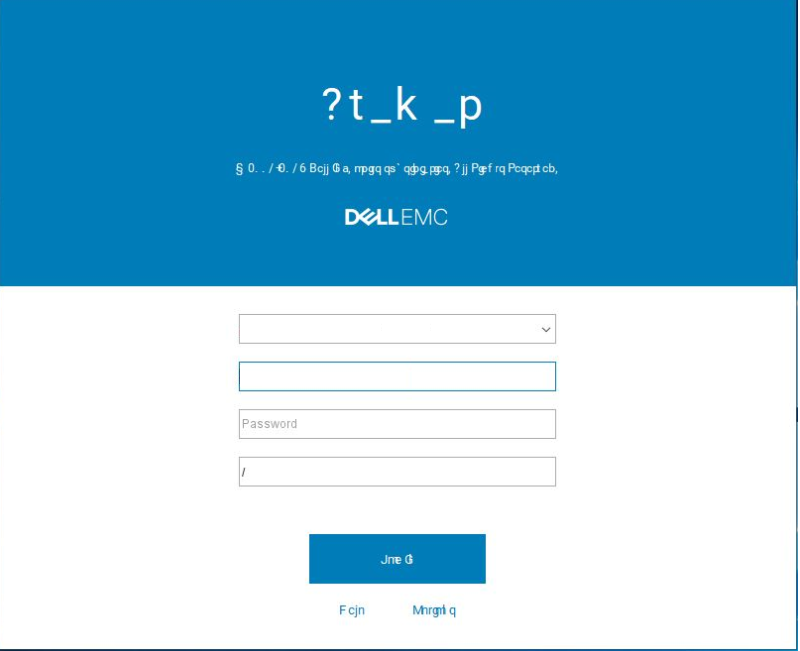
Avamar: UI-skærmen er ulæselig på grund af Roboto-skrifttypen
Summary: Avamar: UI-skærmen er ulæselig på grund af Roboto-skrifttypen.
This article applies to
This article does not apply to
This article is not tied to any specific product.
Not all product versions are identified in this article.
Symptoms
Avamar-brugergrænsefladen er ulæselig:
Cause
Avamar bruger en gammel version af Roboto-skrifttypen.
Resolution
Løsning #1:
1. Fra den arbejdsstation, hvor Avamar UI er installeret, skal du gå til skrifttyperne i kontrolpanelet.
2. Slet Roboto-skrifttypen.
3. Download den nye Roboto-skrifttype fra https://fonts.google.com/specimen/Roboto(eksternt link) og installer den.
Problemet skulle nu være løst, og skrifttypen for brugergrænsefladen bør vises korrekt.
Løsning #2:
1. På administratorens personlige computer skal du redigere følgende fil: c:\Users\{USER_NAME}\.avamardata\var\mc\gui_data\prefs\mcclient.xml
2. Foretag følgende ændringer:
Fra:
entry key="roboto_font_enabled" value="true"
Til:
entry key="roboto_font_enabled" value="false"
Bemærk: Hvis ovenstående flag ikke findes, skal du tilføje det manuelt.
Affected Products
AvamarProducts
AvamarArticle Properties
Article Number: 000060433
Article Type: Solution
Last Modified: 13 Oct 2025
Version: 6
Find answers to your questions from other Dell users
Support Services
Check if your device is covered by Support Services.