Windows 11 報告的作業系統版本不正確
Summary: 瞭解 Windows 11 上的特定應用程式和電腦設定 會偵測到作業系統是否為 Windows 10。
This article applies to
This article does not apply to
This article is not tied to any specific product.
Not all product versions are identified in this article.
Symptoms
在多個應用程式和電腦設定中,Windows 11 會識別為 Windows 10,以防止應用程式不相容。
識別為 Windows 10 的系統設定。
- Microsoft Edge 和其他 Chromium 型瀏覽器,例如 Google Chrome 瀏覽器、Brave 等會在使用者代理程式字串中顯示 Windows 10。
- Mozilla/5.0 (Windows NT 10.0;Win64;x64) AppleWebKit/537.36 (KHTML,像是 Gecko) Chrome/95.0.4638.69 Safari/537.36
- 採用使用者代理程式字串來識別數位內容的實際 Windows 版本 (例如驅動程式下載和自助) 的網站,可能會導向不正確的內容。
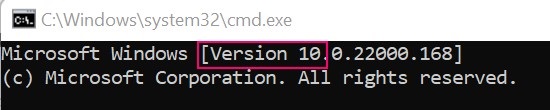
- Windows 命令提示字元識別為版本 10。
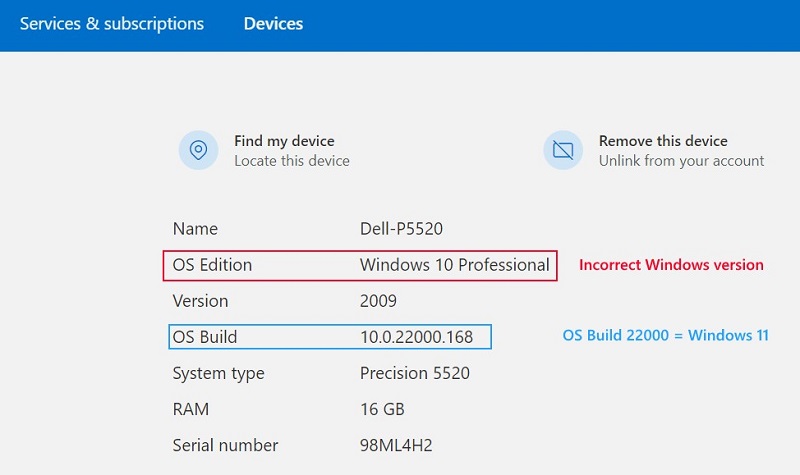
- Microsoft帳戶裝置屬性
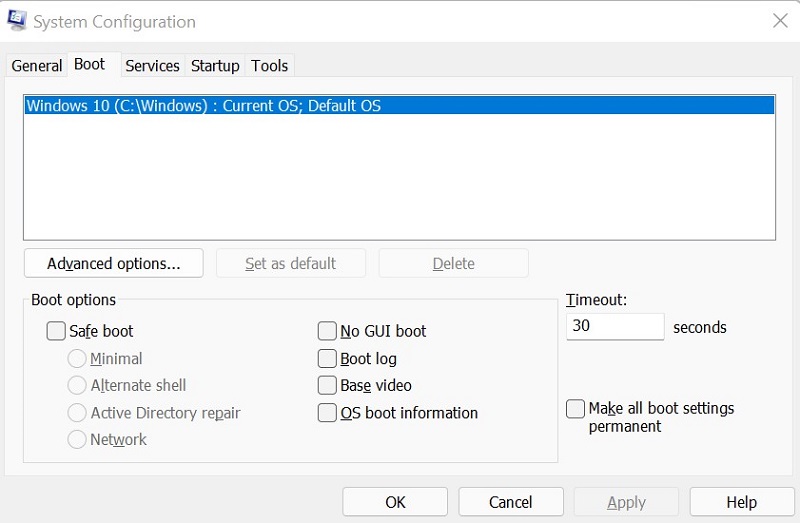
- 系統組態 (MSCONFIG)
Cause
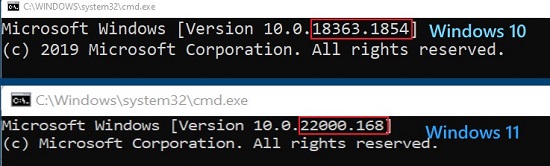
Windows 使用內部組建編號來區分 Windows 11 (組建 22000 及更新版本) 和 Windows 10 (組建低於 22000)。
Resolution
若要正確識別電腦上的 Windows 版本,請使用 Winver。如需指示,請參閱 Microsoft 知識文章:我執行的是哪個版本的 Windows 作業系統
Affected Products
Alienware, Inspiron, OptiPlex, Vostro, XPS, G Series, G Series, Alienware, Inspiron, Latitude, Vostro, XPS, Fixed Workstations, Mobile WorkstationsProducts
Vostro, XPS, Vostro, XPSArticle Properties
Article Number: 000193571
Article Type: Solution
Last Modified: 12 May 2026
Version: 8
Find answers to your questions from other Dell users
Support Services
Check if your device is covered by Support Services.