Avamar: 22602 - The database encountered an error: numeric field overflow
Summary: The unacknowledged events show that "The database encountered an error" when the Avamar server load average is above 999.
This article applies to
This article does not apply to
This article is not tied to any specific product.
Not all product versions are identified in this article.
Symptoms
The Avamar Administrator console or Avamar User Interface (AUI) shows this event error:
The database encountered an error.
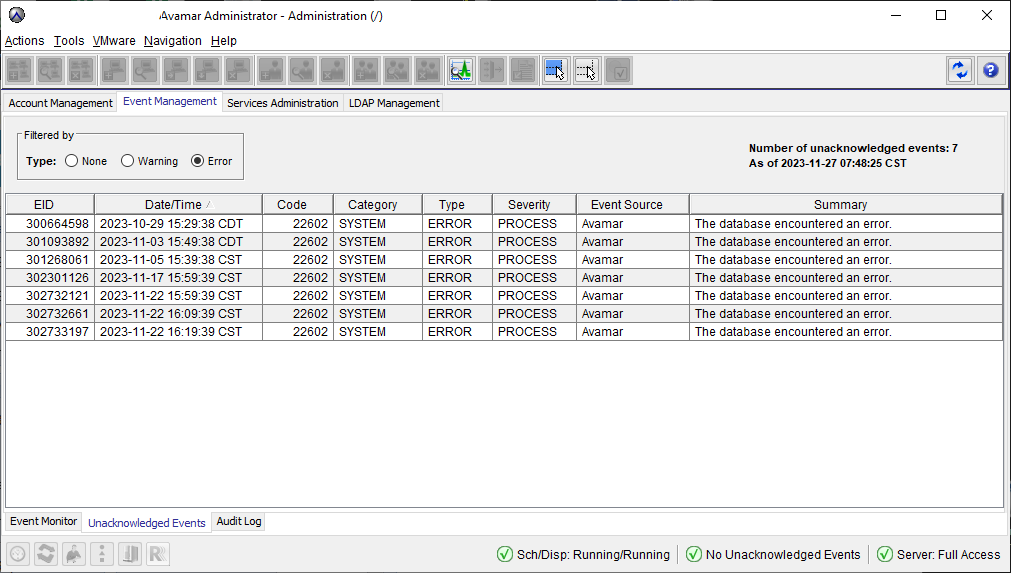
Code: 22602
Error: numeric field overflow
Detail: A field with precision 5, scale 2 must round to an absolute value less than 10^3.
Cause
This alert occurs because load_avg exceeds 999.99, which cannot be stored during insert due to the numeric(5,2) type constraint on the load_avg column.
In some scenarios, this event occurs during the Garbage Collection (GC) process.
In some scenarios, this event occurs during the Garbage Collection (GC) process.
Resolution
This alert can be safely ignored.
-
This issue was fixed in version 19.12.0-186
-
It was discovered however, that for environments upgraded to this version, the column
load_avgwas not corrected and remained as "numeric(5,2)" instead of "numeric(6,2)"
From a new install of Avamar 19.12.0-186:
admin@avamar-lab1:~/>: psql -d mcdb -p 5555 -U admin -c "\d sv_node_util"
Table "public.sv_node_util"
         Column         |            Type             | Collation | Nullable | Default
------------------------+-----------------------------+-----------+----------+---------
 date_time              | timestamp without time zone |           | not null |
 node                   | character varying           |           | not null |
 load_avg               | numeric(6,2)                |           |          |
 cpu_user_pct           | numeric(5,2)                |           |          |
 cpu_sys_pct            | numeric(5,2)                |           |          |
 net_ping               | numeric(6,2)                |           |          |
 net_in_kbytes_per_sec  | integer                     |           |          |
 net_out_kbytes_per_sec | integer                     |           |          |
 disk_reads_per_sec     | integer                     |           |          |
 disk_writes_per_sec    | integer                     |           |          |
 state                  | character varying           |           |          |
 utilization            | numeric(5,2)                |           |          |
 diskreadonly           | smallint                    |           |          |
Indexes:
    "sv_node_util_pkey" PRIMARY KEY, btree (date_time, node)
From an upgrade version of Avamar 19.12.0-186:
admin@avamar-lab2:~/>: psql -d mcdb -p 5555 -U admin -c "\d sv_node_util"
                              Table "public.sv_node_util"
         Column         |            Type             | Collation | Nullable | Default
------------------------+-----------------------------+-----------+----------+---------
 date_time              | timestamp without time zone |           | not null |
 node                   | character varying           |           | not null |
 load_avg               | numeric(5,2)                |           |          |
 cpu_user_pct           | numeric(5,2)                |           |          |
 cpu_sys_pct            | numeric(5,2)                |           |          |
 net_ping               | numeric(6,2)                |           |          |
 net_in_kbytes_per_sec  | integer                     |           |          |
 net_out_kbytes_per_sec | integer                     |           |          |
 disk_reads_per_sec     | integer                     |           |          |
 disk_writes_per_sec    | integer                     |           |          |
 state                  | character varying           |           |          |
 utilization            | numeric(5,2)                |           |          |
 diskreadonly           | smallint                    |           |          |
Indexes:
    "sv_node_util_pkey" PRIMARY KEY, btree (date_time, node)
The Engineering team prepared a workaround document to manually correct the database.
Contact Dell Technical Support to apply this workaround.
Affected Products
Avamar, Avamar ServerArticle Properties
Article Number: 000175128
Article Type: Solution
Last Modified: 18 Mar 2026
Version: 8
Find answers to your questions from other Dell users
Support Services
Check if your device is covered by Support Services.