Data Protection Advisor — 预览自定义报告时出错 500
Summary: 预览自定义报告时发生错误 500。 报告在计划时运行正常。
This article applies to
This article does not apply to
This article is not tied to any specific product.
Not all product versions are identified in this article.
Symptoms
预览自定义报告时,观察到以下错误 500:
RendererFactory could not create the RendererParametersXML
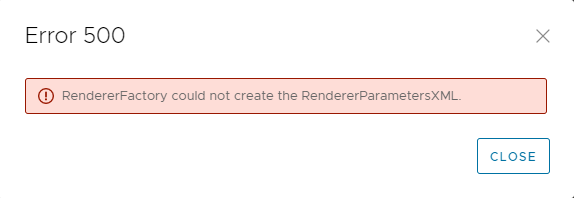 报告在计划时运行正确。
只有在“自定义报告模板”下预览报告时,才会发生此问题。
以下消息在应用程序服务器上的 DPA server.log 中看到:
2022-11-07 15:00:07,170 ERROR [com.emc.dpa.command.reporter.execution.ReportRendererMDB] (Thread-56839) 从运行 id 7d326f70-0ac2-4d48-9b3d-300c306b86ad 的报告引擎获取响应时出错:com.emc.dpa。
datamodel.render.RendererServiceException:RendererFactory 无法创建 RendererParametersXML
...
原因: com.ctc.wstx.exc.WstxUnexpectedCharException:意外字符 “ ”(代码 32)(缺少名称?)
[row,col {unknown-source}]:[3,69]
RendererFactory could not create the RendererParametersXML
报告在计划时运行正确。
只有在“自定义报告模板”下预览报告时,才会发生此问题。
以下消息在应用程序服务器上的 DPA server.log 中看到:
2022-11-07 15:00:07,170 ERROR [com.emc.dpa.command.reporter.execution.ReportRendererMDB] (Thread-56839) 从运行 id 7d326f70-0ac2-4d48-9b3d-300c306b86ad 的报告引擎获取响应时出错:com.emc.dpa。
datamodel.render.RendererServiceException:RendererFactory 无法创建 RendererParametersXML
...
原因: com.ctc.wstx.exc.WstxUnexpectedCharException:意外字符 “ ”(代码 32)(缺少名称?)
[row,col {unknown-source}]:[3,69]
Cause
此问题是由报告标题中的“&”特殊字符引起的。
请注意,这不是自定义报告模板的名称,而是在“报告格式”选项中配置的报告标题。
请注意,这不是自定义报告模板的名称,而是在“报告格式”选项中配置的报告标题。
Resolution
& 符号需要从报告标题中删除。
- 在 自定义报告模板 中选择报告,然后单击 编辑 。
- 单击 Preview 选项卡,然后单击 REPORT FORMAT > TABLE FORMAT 。
- 在 表格式 屏幕中,从 标题 字段中的文本中删除 & 符号。
- 保存报告并确认预览运行没有错误。
Affected Products
Data Protection AdvisorArticle Properties
Article Number: 000205086
Article Type: Solution
Last Modified: 26 May 2026
Version: 5
Find answers to your questions from other Dell users
Support Services
Check if your device is covered by Support Services.