PowerStore: What to expect while VASA provider is down?
Summary: With VMware vSphere, vVol architecture utilizes a control plane and a data plane between the Storage environment and the vSphere environment. They communicate using vStorage APIs for Storage Awareness (VASA). Some PowerStore storage operations, such as software upgrades, lock the VASA Provider and temporarily pause VASA commands in the control plane while the storage operation is running. ...
Symptoms
When the PowerStore VASA Provider is paused, the vSphere UI can list either local (PowerStore-X) VVol datastores as inaccessible, or hosted VVol datastores (PowerStore-T or PowerStore-X) as inaccessible. This is observed when the vSphere to PowerStore VASA control plane communication is paused. The vSphere UI VASA information is stale and is presented as (inaccessible).
Any vVols using the VASA provider will not be accessible in the UI. Data is using the unaffected data plane. This can be concerning but should not be acted upon without confirmation of an actual problem.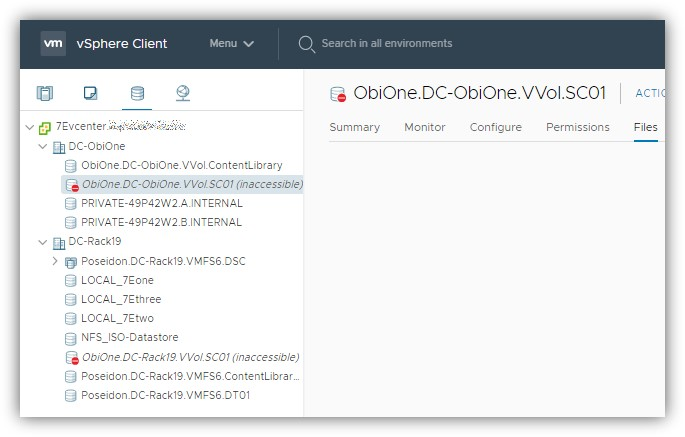
Note: When the PowerStore VASA provider is in the described state, some vSphere operations are restricted:
- VM Creation
- Clone a VM
- Power on a VM.
- Power off a VM.
- Shut down a VM.
- Storage vMotion to another SC on the same PowerStore
- Compute vMotion
- Delete a VM.
- Create a Snapshot
Some operations may fail with a vCenter errors similar to: Module MonitorLoop power on failed. Failed to start the virtual machine.
Other operations may also not be supported while the VASA provider is inaccessible or offline, including in-guest limitations.
Cause
Resolution
With PowerStore OS version 3.0 (or later versions), VASA downtime was minimized by improving and lowering failover & startup times.
When experiencing this, DO NOT try to reboot ESXi hosts or PowerStore nodes.
How to check VASA status?
Using the vSphere UI
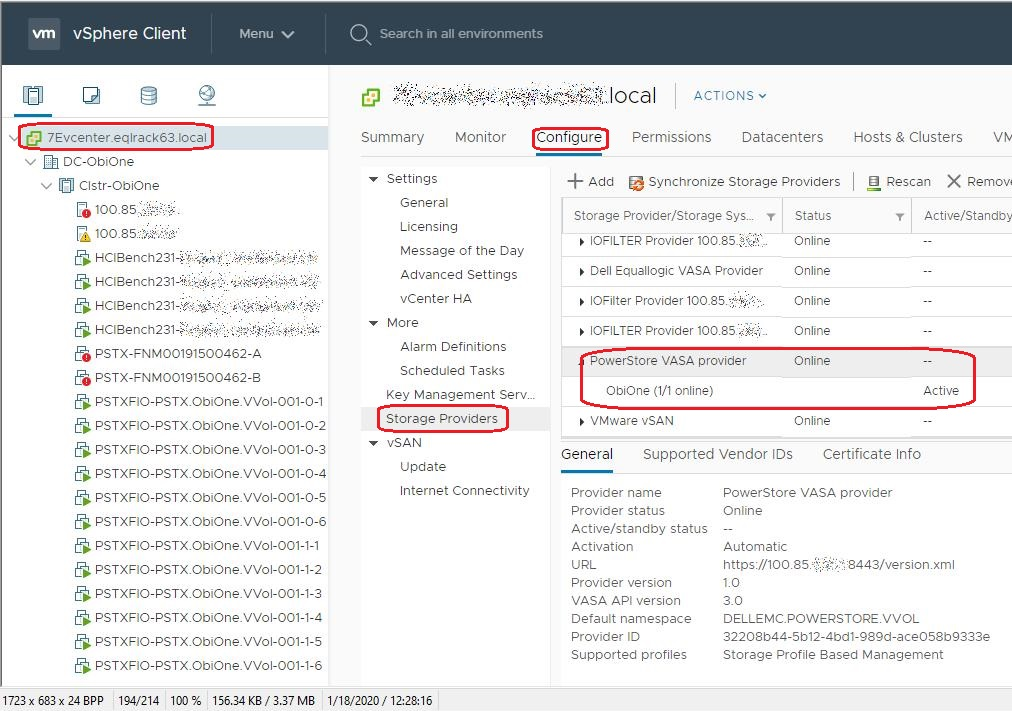
Navigate to the vCenter Server > Configure > Storage Providers and locate the PowerStore VASA Provider.
-
The status should be online
Using the ESXi Command Line
- Ssh to the ESXi host
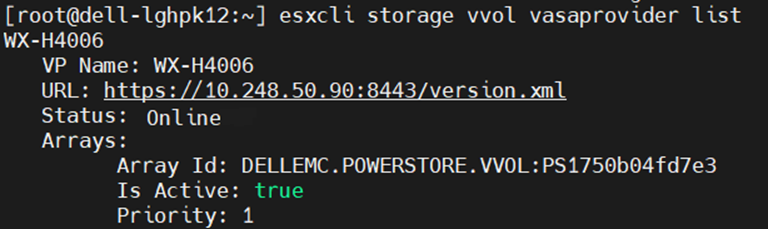
- Run the command: esxcli storage vvol vasaprovider list
- Status should be Online
When to reach out PowerStore Global Support?
- If there is a data plane disruption to a vVol-based VM
- The VASA control plane does not auto-recover after a period of time.
- This varies depending on usage from 5-10 minutes to 30-60+ minutes for an environment with thousands of vVols.
Additional Information
Related KB articles:
KBA000185595 - vVol ESXi Alert during Primary Node Reboot
KBA000182011 - vCenter VASA Provider states
KBA000197835 - VASA provider becomes offline if vCenter FQDN is changed (Log in as registered Dell Support user may be required to view article.)