No Audio After Windows Update On Inspiron Or Vostro 5x20 Computers
Summary: This article describes what to do when a Windows Update causes an Inspiron or Vostro 5x20 with Cirrus audio to lose sound output.
This article applies to
This article does not apply to
This article is not tied to any specific product.
Not all product versions are identified in this article.
Symptoms
Affected Platforms:
- Inspiron 14 5420
- Inspiron 16 5620
- Vostro 5620
Affected Products:
- Cirrus Audio driver
Affected Version:
- v2.1.42
Following a Windows update that modifies the Cirrus Audio driver, the computer no longer has sound output.
Cause
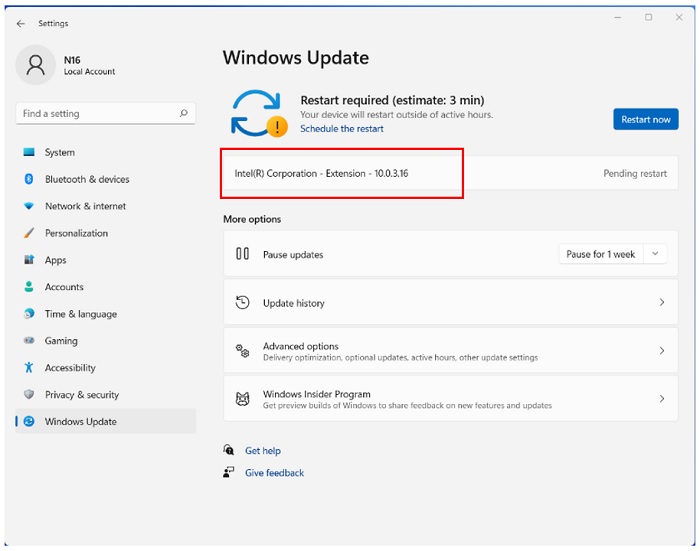
Windows Update modifies intcoed_oemlibpath from version 11.1.1.1 to version 10.0.3.16. This change causes the output sound failure. This change can be verified in Windows Update:
Resolution
Resolution:
- Uninstall Cirrus Audio driver version 2.1.42:
- Select Start > Settings > Apps > Installed Apps.
- Select and uninstall Cirrus driver version 2.1.42 from the Installed Apps page.
- Restart the computer.
- Download and install the latest Cirrus Audio driver (version 10.0.7.46, A02 or newer) from the Dell Drivers & Downloads webpage.
- Reboot the computer and check the Cirrus Audio driver version in Device Manager once the driver is installed.
Affected Products
Inspiron 14 5420, Inspiron 16 5620, Vostro 5620Article Properties
Article Number: 000207392
Article Type: Solution
Last Modified: 24 Apr 2025
Version: 5
Find answers to your questions from other Dell users
Support Services
Check if your device is covered by Support Services.