VxRail:節點擴充失敗,並顯示錯誤「擴充 ESXI 主機 pnic 成組原則初始化」
Summary: 節點擴充失敗,因為缺少私人管理網路、私人 VM 網路或未配置 VLAN。
This article applies to
This article does not apply to
This article is not tied to any specific product.
Not all product versions are identified in this article.
Symptoms
Error message: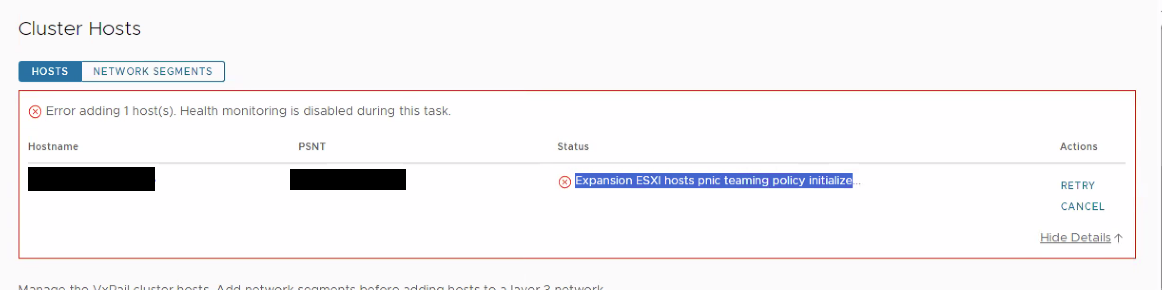
Cause
由於缺少私人管理網路、私人 VM 網路或 vlan 未設定,無法對應團隊Dayone.log:
Resolution
在新節點上,確定管理網路已指派給 vmk2。
如果缺少專用管理網路和專用 VM 網路,請使用以下命令建立它們:
- 首先將連接埠群組 (私人管理網路) & (私人 VM 網路) 新增至標準交換器:
esxcli network vswitch standard portgroup add --portgroup-name=portgroup --vswitch-name=vSwitch - 然後透過以下命令連接從用戶端設定的 vlan:
esxcli network vswitch standard portgroup set -p "Private Management Network" -v [vlan]esxcli network vswitch standard portgroup set -p "Private VM Network" -v [vlan] - 將私人管理網路連接埠群組新增至 vmk0:
esxcli network ip interface add --interface-name=vmk0 --portgroup-name="Private Management Network" - 然後重新啟動管理服務:
/etc/init.d/hostd restart/etc/init.d/vpxa restart
Affected Products
VxRail, VxRail Appliance Series, VxRail SoftwareArticle Properties
Article Number: 000221275
Article Type: Solution
Last Modified: 29 Dec 2025
Version: 2
Find answers to your questions from other Dell users
Support Services
Check if your device is covered by Support Services.