NetWorker:如何在 SQL 插件用户界面中启用调试
Summary: 本文介绍如何在 NetWorker Module for Microsoft (NMM) SQL 插件中启用调试。 这用于调试用户界面问题,而不是调试模块备份/恢复问题。
This article applies to
This article does not apply to
This article is not tied to any specific product.
Not all product versions are identified in this article.
Instructions
本文介绍如何在 NetWorker Module for Microsoft (NMM) SQL 插件中启用调试。
这用于调试用户界面问题,而不是调试模块备份/恢复问题。
所需步骤
- 从 SQL Server Management Studio 中的工具栏打开插件用户界面,或单击开始菜单,选择 EMC NetWorker、NetWorker Plugin for SQL Server 模块。
- 插件打开后,使用按 Control 键并双击 SQL 插件界面底部的击键组合键。这将打开一个像记事本一样的窗口。
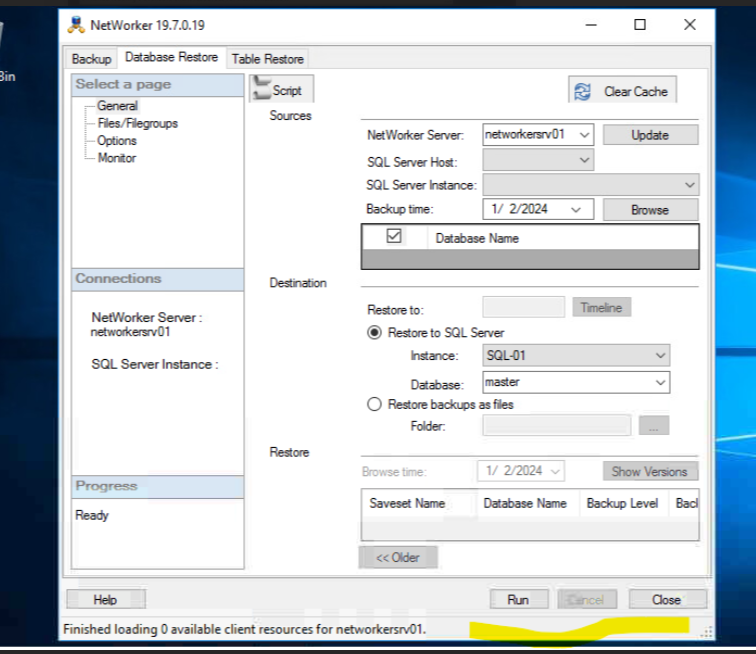
- 在新的 wIndow 中,选中窗口底部的 “已启用 ”复选框。再次双击底部以返回到正常用户界面。
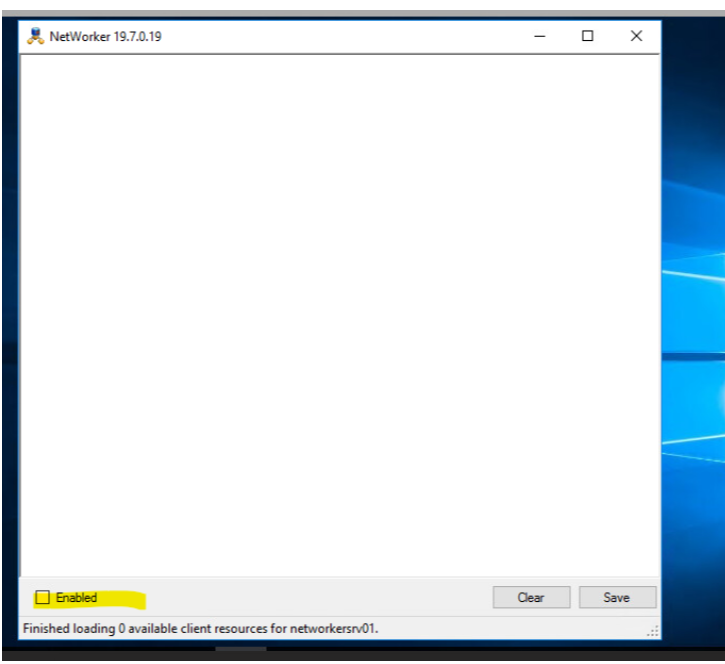
- 重现用户界面显示问题,并收集用户界面中显示的调试消息。
Article Properties
Article Number: 000223805
Article Type: How To
Last Modified: 07 Feb 2025
Version: 1
Find answers to your questions from other Dell users
Support Services
Check if your device is covered by Support Services.