NetWorker: Azure Subscriptions Missing after Changing NetWorker Datazone Pass Phrase.
Summary: After adding or updating the NetWorker "Datazone Pass Phrase," previously configured 'Azure Subscription' resources are no longer visible to NetWorker. This
Symptoms
The NetWorker server's "Datazone Pass Phrase" was recently changed.
The following messages can be seen in the NetWorker server's daemon.raw:
- Linux:
/nsr/logs/daemon.raw - Windows (Default):
C:\Program Files\EMC NetWorker\nsr\logs\daemon.raw - NetWorker: How to use nsr_render_log to render .raw log files
98582 MM/DD/YY HH:mm:SS  nsrd NSR info Permission allowed, user 'USER_PATH' on 'HOST' has 'Change Security Settings' privilege to change datazone pass phrase.
53115 MM/DD/YY HH:mm:SS  nsrd NSR info Successfully modified Resource type: 'NSR', Resource name: 'SERVER_NAME' for Attribute: 'datazone pass phrase' by user: 'USER_PATH' on host: 'HOST'
The NetWorker server is configured with Azure Subscriptions. After the Datazone Pass Phrase has been modified, the Azure Subscriptions no longer appear in the NetWorker Web User Interface (NWUI):
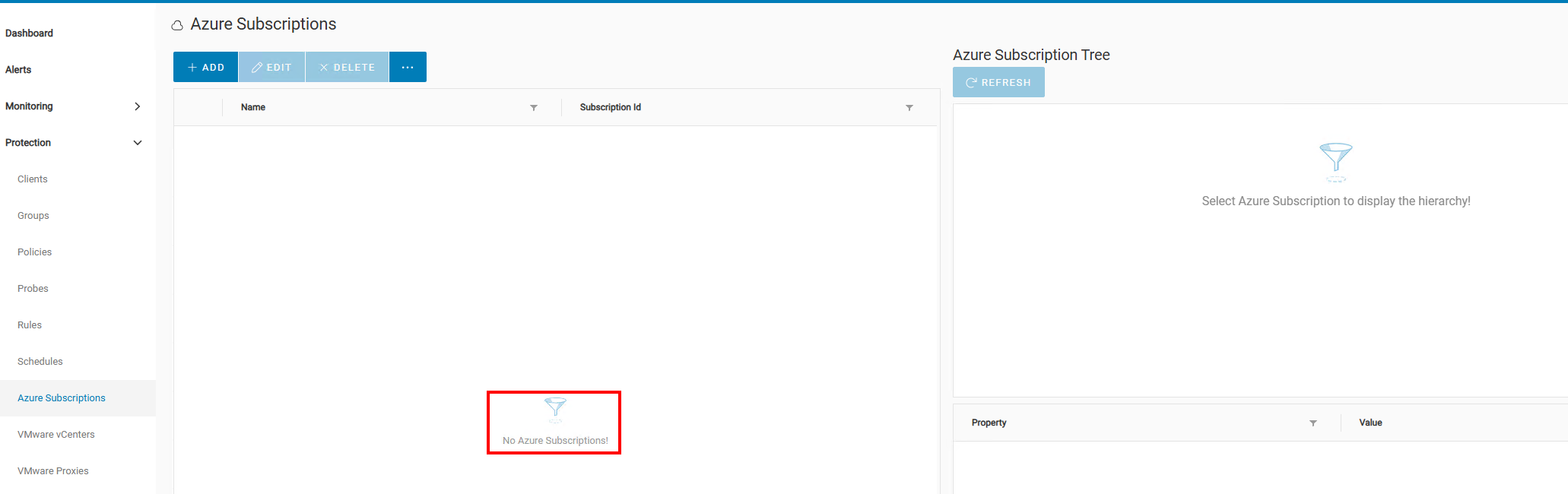
The daemon.raw logs the following message from when the NWUI attempted to view the Azure Subscriptions:
101059 MM/DD/YY HH:mm:SS  nsrd NSR critical Unable to decrypt data: error:1C800064:Provider routines::bad decrypt
101059 MM/DD/YY HH:mm:SS  nsrd NSR critical Unable to decrypt data: error:1C800064:Provider routines::bad decrypt
Azure Backups fail with the following error:
- Linux:
/nsr/logs/policy/POLICY_NAME/WORKFLOW_NAME/ACTION_JOBID_logs/JOBID.log - Windows (Default):
C:\Program Files\EMC NetWorker\nsr\logs\policy\POLICY_NAME\WORKFLOW_NAME\ACTION_JOBID_logs\JOBID.log
208101:nsrazure_save: azure_lib_init: error while fetching subscription details.
207815:nsrazure_save: Azure subscription resource AZURE_SUBSCRIPTION_RESOURCE_NAME does not exists.
The Azure subscription still exists in the NetWorker Server Resource Database (NSRDB):
azure-nve:~ # nsradmin
NetWorker administration program.
Use the "help" command for help, "visual" for full-screen mode.
nsradmin> print type: nsr azure subscription
                        type: NSR Azure Subscription;
                        name: AZURE_SUBSCRIPTION_RESOURCE_NAME;
                     comment: ;
                   tenant id: 94XXXXXX-XXXX-XXXX-XXXX-XXXXXXXXX2dd;
             subscription id: 50XXXXXX-XXXX-XXXX-XXXX-XXXXXXXXXfe3;
                   client id: 3bXXXXXX-XXXX-XXXX-XXXX-XXXXXXXXX38b;
               client secret: *******;
                    endpoint: management.azure.com;
                     command: nsrazure_discovery;
nsradmin> quit
Cause
Resolution
This article will be updated once a solution is determined. For the time being, one of the following workarounds can be used.
Workaround One:
If the previous Datazone Pass Phrase is known, set the pass phrase back to its old value. If there was no Datazone Pass Phrase previously, remove the pass phrase.
The Datazone Pass Phrase can be set in the following location in either the NetWorker Management Console (NMC) or NetWorker Web User Interface (NWUI): Server -> Server Properties -> Configuration -> Datazone Pass Phrase.
Alternatively, it can be set from an nsradmin prompt:
azure-nve:~ # nsradmin
NetWorker administration program.
Use the "help" command for help, "visual" for full-screen mode.
nsradmin> . type: nsr
Current query set
nsradmin> update datazone pass phrase: OLD_PASS_PHRASE
        datazone pass phrase: OLD_PASS_PHRASE;
Update? y
updated resource id 3.0.53.124.0.0.0.0.233.61.161.103.10.164.158.89(789)
nsradmin> q
The Azure Subscription becomes visible in NWUI again, and backup operations should function normally again.
Workaround Two:
If the old Datazone Pass Phrase is not known, you must delete and readd the Azure subscriptions to NetWorker. This allows operations to continue using the new Datazone Pass Phrase.
Perform the following from an Administrator prompt or root shell on the NetWorker server.
- Access the
nsradminconsole:nsradmin - Get the details of the Azure subscriptions:
print type: nsr azure subscriptionIMPORTANT: Collect the output for each Azure subscription and make note of it in a text document. You cannot get the client secret. If you do not have the client secret stored, a new client secret must be created from Azure under: App Registrations -> App Name -> Manage -> Certificates & Secrets. If you do not have access to Azure, the Azure Administrator must provide these details. - Delete the Azure subscriptions:
delete - You are prompted to confirm the deletion for each Azure subscription. Enter:
y - Log in to the NWUI and re-create the Azure subscriptions using the information collected in step 2.
After re-creating the Azure subscriptions, they appear in the NWUI and backup operations should function normally again.