Avamar:如何启用调试模式以对 Avamar Client 迁移问题进行故障处理
Summary: 如何启用调试模式以对迁移问题进行故障处理。
This article applies to
This article does not apply to
This article is not tied to any specific product.
Not all product versions are identified in this article.
Instructions
在处理 Avamar Client 迁移问题时(例如,使用 Avamar 到 Avamar/Data Domain (av2avdd) 迁移实用程序时),启用调试模式可能非常有用。
为此,请执行以下操作:
1.打开从中配置迁移任务的 Avamar Server 的 Avamar Administrator UI。
2.转到“Replication/Migration”选项卡。
3.编辑迁移组。
4.转到“概述”
5.单击“More Options”
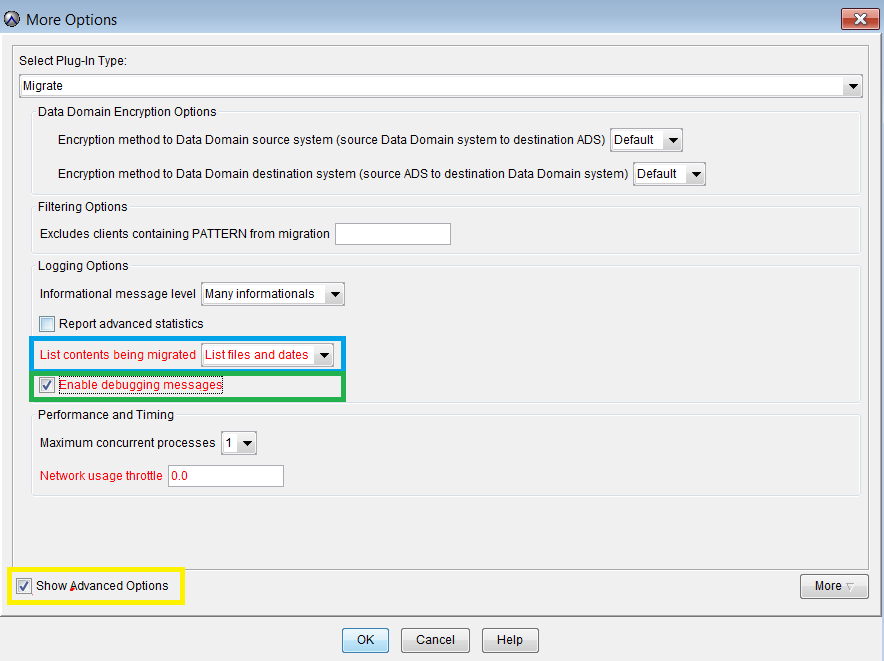
6.确保将“List contents being miggrated”设置为“List files and dates”(上面以蓝色突出显示)
7.确保选中“Enable debugging messages”(上面以绿色突出显示)
8.单击“显示高级选项”(上方以黄色突出显示)
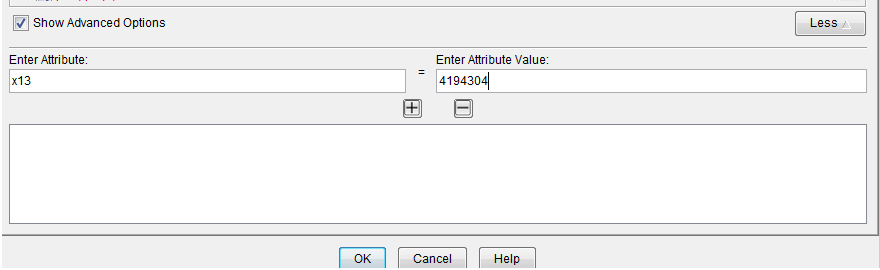
9.在“显示高级选项”中,单击“更多”
10.添加“Attribute”“x13”和“Attribute value”4194304,如下所示:
11.根据需要单击确定 2-3 次,以保存对迁移组所做的更改。
Affected Products
AvamarProducts
AvamarArticle Properties
Article Number: 000010268
Article Type: How To
Last Modified: 06 Sept 2026
Version: 8
Find answers to your questions from other Dell users
Support Services
Check if your device is covered by Support Services.