PowerEdge: El sistema de archivos BTRFS causa retrasos en SUSE Linux

Summary: SUSE Linux Enterprise Server con un sistema de archivos BTRFS como raíz puede experimentar problemas de rendimiento y retrasos intermitentes.

This article applies to This article does not apply to This article is not tied to any specific product. Not all product versions are identified in this article.

Symptoms

El servidor se retrasa o deja de responder durante unos segundos, minutos de evento cuando se ejecutan los comandos "ls", "mv."
Ejecute el comando "top" para ver el estado del proceso en tiempo real.
Podemos ver los procesos btrfs-cleanero btrfs-transacti está funcionando con el 100 % de la CPU.
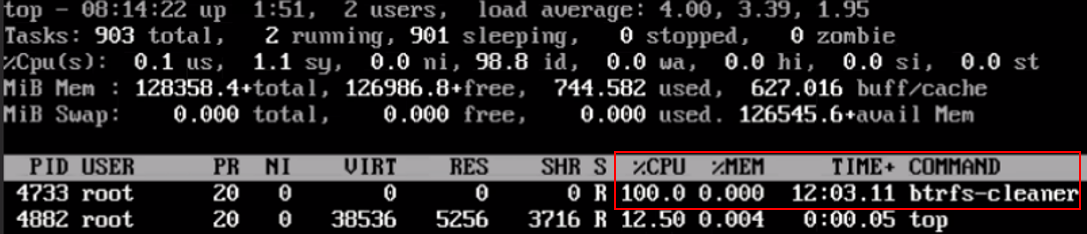
btrfs-top1 

btrfs-top2 

Incluso pensé en arrancar desde ISO y montar el sistema de archivos raíz con BTRFS. También se está retrasando de forma intermitente.

Cause

Hay un problema de rendimiento conocido que puede ocurrir cuando las cuotas están habilitadas y subvolume Se produce una eliminación. Para que ocurra el problema, la eliminación debe incluir la eliminación y la limpieza de un subárbol compartido grande. 

Esto significa que, si el subvolume La eliminación no es una instantánea, no causará ningún problema. Si la solicitud en subvolume ha sufrido muchos cambios pero casi no tiene subárbol compartido con el original, de nuevo no habrá ningún problema. Si la solicitud en subvolume en sí mismo es pequeño, entonces todavía no hay problema.

Este problema se está discutiendo en un hilo ascendente con el fin de crear una solución al problema.

Resolution

Una solución alternativa disponible es identificar el btrfs El sistema de archivos está en dificultades (a veces puede ser el sistema de archivos raíz) y deshabilite las cuotas en ese sistema de archivos con la siguiente sintaxis:

#  btrfs quota disable <filesystem>
Por ejemplo, para deshabilitar las cuotas en el sistema de archivos raíz:
#  btrfs quota disable /

Affected Products

SUSE Linux Enterprise Server 12, OEMR R240, OEMR R250, OEMR R260, OEMR R340, OEMR R350, OEMR R360, OEMR R440, OEMR R450, OEMR R540, OEMR R550, OEMR R640, OEMR R6415, OEMR R650, OEMR R650xs, OEMR R6515, OEMR R6525, OEMR R660, OEMR R660xs, OEMR R6615 , OEMR R6625, OEMR R740, OEMR R740xd, OEMR R740xd2, OEMR R7415, OEMR R7425, OEMR R750, OEMR R750xa, OEMR R750xs, OEMR R7515, OEMR R7525, OEMR R760, OEMR R760xa, OEMR R760XD2, OEMR R760xs, OEMR R7615, OEMR R7625, OEMR R840, OEMR R860, OEMR R940, OEMR R940xa, OEMR R960, OEMR XR4510c, OEMR XR4520c, OEMR XR5610, OEMR XR8610t, OEMR XR8620t, PowerEdge R240, PowerEdge R250 Rack Server, PowerEdge R260 Rack Server, PowerEdge R340, PowerEdge R350 Rack Server, PowerEdge R360 Rack Server, PowerEdge R440, PowerEdge R450 Rack Server, PowerEdge R540, PowerEdge R550 Rack Server, PowerEdge R640, PowerEdge R6415, PowerEdge R650 Rack Server, PowerEdge R650xs Rack Server, PowerEdge R6515 Rack Server, PowerEdge R6525 Rack Server, PowerEdge R660 Rack Server, PowerEdge R660xs Rack Server, PowerEdge R6615 Rack Server, PowerEdge R6625 Rack Server, PowerEdge R740, PowerEdge R740XD, PowerEdge R740XD2, PowerEdge R7415, PowerEdge R7425, PowerEdge R750 Rack Server, PowerEdge R750xa Rack Server, PowerEdge R750xs Rack Server, PowerEdge R7515 Rack Server, PowerEdge R7525 Rack Server, PowerEdge R760 Rack Server, PowerEdge R760XA Rack Server, PowerEdge R760xd2 Rack Server, PowerEdge R760xs Rack Server, PowerEdge R7615 Rack Server, PowerEdge R7625 Rack Server, PowerEdge R840 Rack Server, PowerEdge R860 Rack Server, PowerEdge R940 Rack Server, PowerEdge R960 Rack Server, PowerEdge XR4510c, PowerEdge XR4520c, PowerEdge XR5610, PowerEdge XR8610t, PowerEdge XR8620t, SUSE Linux Enterprise Server 15 ...
Article Properties
Article Number: 000201630
Article Type: Solution
Last Modified: 02 Sept 2025
Version:  2
Find answers to your questions from other Dell users
Support Services
Check if your device is covered by Support Services.