NetWorker DD Boost Volumes are Going in Read-only Mode
Summary: Disk type volumes are found in read-only mode. The scanner command did run.
This article applies to
This article does not apply to
This article is not tied to any specific product.
Not all product versions are identified in this article.
Symptoms
Volumes are found to be read-only:
Message in daemon log:
$ /usr/sbin/mminfo -aVm -q "readonly"
state volume written (%) expires read mounts capacity flags
myvolume.123 42 TB 100% 01/28/2029 0 KB 19 0 KB r
Message in daemon log:
07/26/2025 05:46:21 AM 0 1249888000 6096 nsrmmdbd Volume DB.104 mode changed to read-only.The volume cannot be used for backup, and cleanup does not run.
Message in daemon log:
185765 2025-07-26 08:08:15 AM 2 5 0 3567675136 8898 0 myserver nsrsnmd NSR warning The 'read only' flag is set for the volume myvolume.123. Cannot recover space from the device mydevice.
Cause
Volumes are set to read-only when the scanner command runs. This is by design to support any Disaster Recovery scenarios.
Resolution
Note: The volume can be changed back to not read-only after it is confirmed that no other scanner runs or maintenance activities are in progress or needed.
With NMC:
- Check the volume status: NMC > Disk Volumes

- Unmount the device: NMC > Devices > Devices > select the device > right click the device > unmount

- Change volume back to appendable: NMC > Disk Volumes > right click the volume > change mode > Appendable
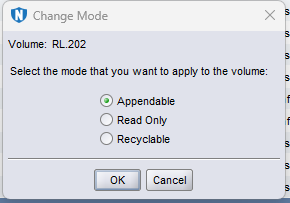

- Mount the device: NMC > Devices > Devices > select the device > right click the device > mount

With CLI:
Run the following:
$   scanner -i -F -m -S 465737716 dev202
8909:scanner: using 'dev202' as the device name
8936:scanner: scanning Data Domain disk RL.202 on dev202
8939:scanner: Data Domain disk RL.202 already exists in the media index
29485:scanner: ssid 465737716: scan complete
8786:scanner: ssid 465737716: 498 KB, 23 file(s)

$  /usr/sbin/mminfo -aVm -q "readonly"
 state volume                  written  (%)  expires     read mounts capacity flags
       RL.202                  6997 KB 100%  10/31/25    0 KB     7      0 KB r

$  nsrmm | grep RL.202
Data Domain disk RL.202 mounted on dev202, write protected

$  nsrmm -y -u RL.202
Unmounted device: dev202

$  nsrmm -y -o notreadonly RL.202

$  nsrmm -y -m -f dev202
Data Domain disk RL.202 mounted on dev202, write enabled
Affected Products
NetWorkerProducts
NetWorker FamilyArticle Properties
Article Number: 000376204
Article Type: Solution
Last Modified: 06 Nov 2025
Version: 2
Find answers to your questions from other Dell users
Support Services
Check if your device is covered by Support Services.