「VPLEX:承認された長さと特殊文字でユーザー パスワードのリセットが失敗する
Summary: この記事では、パスワードがすべてのルールに従い、承認された特殊文字が含まれているにもかかわらず、ユーザーがユーザーのパスワードをリセットできない場合の対処方法について説明します。
This article applies to
This article does not apply to
This article is not tied to any specific product.
Not all product versions are identified in this article.
Symptoms
「VPLEX:VPlexcliでユーザー アカウント パスワードをリセットする方法 (この記事を表示するにはDellサポート アカウントが必要です)
- 有効なパスワードの長さと特殊文字でユーザー パスワードをリセットできません
- 以下のエラーは次のとおりです。
VPlexcli:/> user reset -u testuser
Enter admin password:
Enter password for testuser:
Confirm password for testuser:
user reset: Evaluation of <<user reset ********>> failed.
cause: Command execution failed.
cause: Password can only contain A-Z a-z 0-9 . ? / * @ ^ % # + = - _ : space character(s),and the password cannot start with space(s).
Cause
- ここでの問題は、ユーザー プロファイル用に選択したパスワードではなく、管理者パスワードにあります。
- ここでVPLEXにログインしてユーザー パスワードをリセットするために使用される管理者パスワードが、『VPLEXセキュリティ構成ガイド(SCG)』に記載されているガイダンスに準拠していません
- 以下のステートメントは、adminまたは任意のユーザーであるすべてのユーザーアカウントのパスワードに対して保持されます。
Password can only contain A-Z a-z 0-9 . ? / * @ ^ % # + = - _ : space character(s),and the password cannot start with space(s).
Resolution
管理者パスワードをSCGのガイドラインに準拠した新しいパスワードに変更してから、パスワード リセット アクション(ユーザー パスワードのリセット)を続行できます。
以下に示すSCGおよびKB記事を参照してください
セキュリティ構成ガイド:
https://support.emc.com/docu31419_VPLEX-GeoSynchrony-Security-Configuration-Guide.pdf
万が一、このガイドが更新され、上記のリンクが機能しない場合は、[ https://www.dell.com/support/home ]に移動して、以下に示すように各フィールドの値を入力することもできます。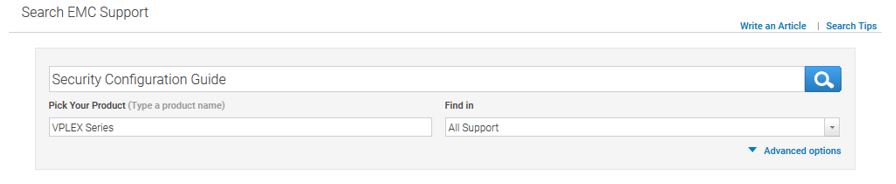
記事:
- KB 000166110: 「VPLEX:管理者パスワードを忘れた場合、紛失した場合、または会社のポリシーに従って変更した場合にリセットする方法 (この記事を表示するにはDellサポート アカウントが必要です)
- KB 000156259: 「VPLEX:VPlexcliでユーザー アカウント パスワードをリセットする方法 (この記事を表示するにはDellサポート アカウントが必要です)
- KB 000160933: 「VPLEX:VPLEXユーザー パスワードでの使用が許可されている文字 (この記事を表示するにはDellサポート アカウントが必要です)
Affected Products
VPLEX SeriesProducts
VPLEX for All Flash, VPLEX Series, VPLEX VS2, VPLEX VS6Article Properties
Article Number: 000167720
Article Type: Solution
Last Modified: 12 Nov 2025
Version: 5
Find answers to your questions from other Dell users
Support Services
Check if your device is covered by Support Services.