Dell Unity: After SP reboot, the Audit log path has been reset to default (Dell Correctable)
Summary: The Audit Log path was set by the customer in the user file system. After rebooting SP in Unity OE 5.1, the path was changed to the default location.
This article applies to
This article does not apply to
This article is not tied to any specific product.
Not all product versions are identified in this article.
Symptoms
After rebooting SP in Unity OE 5.1, the audit log location may become the default location and the log size may also become the default.
Default log location = 'c:\.etc\audit\security.evt'.
Default log size = 524288 Bytes
As a result, the audit log (security.evt) for the location configured by the customer will not be updated.
Also, if the auto archive function is being used, it will not work properly.
Default log location = 'c:\.etc\audit\security.evt'.
Default log size = 524288 Bytes
As a result, the audit log (security.evt) for the location configured by the customer will not be updated.
Also, if the auto archive function is being used, it will not work properly.
Cause
The problem was caused by a new parameter (cifs.userDefinedLogFiles) added in Unity OE 5.1.
This parameter is set to the default settings if the path where the security.evt file is saved does not exist, but in this case, it reverted to the default setting after rebooting SP.
-----
# svc_nas <NAS Server> -param -facility cifs -info userDefinedLogFiles -v
<NAS Server> :
name = userDefinedLogFiles
facility_name = cifs
default_value = 1
current_value = 1
configured_value =
param_type = global
user_action = restart NAS Server << In this explanation, the NAS Server needs to be restarted, but in fact, the SP needs to be rebooted.
change_effective = restart NAS Server << In this explanation, the NAS Server needs to be restarted, but in fact, the SP needs to be rebooted.
range = (0,1)
description = To avoid the CIFS outage caused if the user has a incorrect/wrong configuration for the security and system log files.
detailed_description
This parameter specifies to avoid the CIFS outage caused if the user has a incorrect/wrong configuration for the security and system log files.:
1 (true) Updates the Security and system log files with the default values if the user defined path for the Security and system log files doesn't exist.:
0 (false) Still considers the user defined path for the Security and system log files even if doesn't exist.:
Default = true
-----
This parameter is set to the default settings if the path where the security.evt file is saved does not exist, but in this case, it reverted to the default setting after rebooting SP.
-----
# svc_nas <NAS Server> -param -facility cifs -info userDefinedLogFiles -v
<NAS Server> :
name = userDefinedLogFiles
facility_name = cifs
default_value = 1
current_value = 1
configured_value =
param_type = global
user_action = restart NAS Server << In this explanation, the NAS Server needs to be restarted, but in fact, the SP needs to be rebooted.
change_effective = restart NAS Server << In this explanation, the NAS Server needs to be restarted, but in fact, the SP needs to be rebooted.
range = (0,1)
description = To avoid the CIFS outage caused if the user has a incorrect/wrong configuration for the security and system log files.
detailed_description
This parameter specifies to avoid the CIFS outage caused if the user has a incorrect/wrong configuration for the security and system log files.:
1 (true) Updates the Security and system log files with the default values if the user defined path for the Security and system log files doesn't exist.:
0 (false) Still considers the user defined path for the Security and system log files even if doesn't exist.:
Default = true
-----
Resolution
Resolution:
A fix is expected in an upcoming release of Unity OE.
Workaround:
The problem can be corrected by setting the userDefinedLogFiles parameter to 0 and rebooting the SP.
Note: In order to apply the settings to both SPs, it is necessary to reboot the SPs one by one.
-----
# svc_nas ALL -param -facility cifs -modify userDefinedLogFiles -value 0
SPA : done
SPB : done
Please make sure that the "done" is displayed in both SPA and SPB.
-----
If attempting to resolve the issue without rebooting SP, it is necessary to use Remote Registry and Computer Management from the Windows server side to reconfigure the log location and log size.
In this case, the following KB is helpful.
Dell EMC Unity: How To Change the location of the Unity NAS/SMB Server Security Log file [c:security.evt] and increase the log size
https://www.dell.com/support/kbdoc/en-us/000010690/dell-emc-unity-how-to-change-the-location-of-the-unity-nas-smb-server-security-log-file-c-security-evt-and-increase-the-log-size-user-correctable
Even if recovery is performed by manually changing the location and size settings, it is recommended to set the userDefinedLogFiles setting to 0 to prevent the problem from recurring on the next reboot.
[Note]
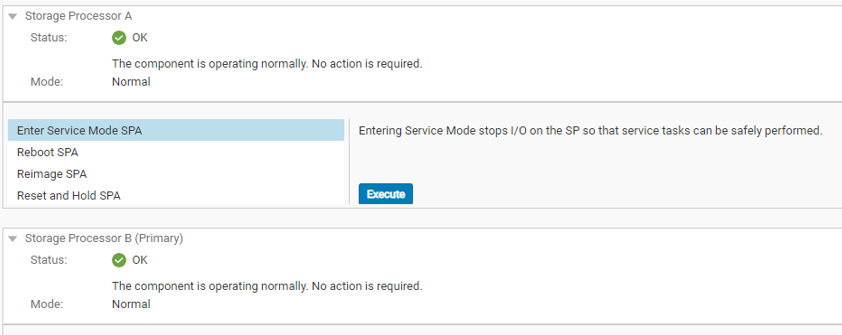
Please do not attempt to start the next reboot with the following status of SP.

Please make sure that the status of the SPA and SPB is OK before rebooting the SP.
A fix is expected in an upcoming release of Unity OE.
Workaround:
The problem can be corrected by setting the userDefinedLogFiles parameter to 0 and rebooting the SP.
Note: In order to apply the settings to both SPs, it is necessary to reboot the SPs one by one.
-----
# svc_nas ALL -param -facility cifs -modify userDefinedLogFiles -value 0
SPA : done
SPB : done
Please make sure that the "done" is displayed in both SPA and SPB.
-----
If attempting to resolve the issue without rebooting SP, it is necessary to use Remote Registry and Computer Management from the Windows server side to reconfigure the log location and log size.
In this case, the following KB is helpful.
Dell EMC Unity: How To Change the location of the Unity NAS/SMB Server Security Log file [c:security.evt] and increase the log size
https://www.dell.com/support/kbdoc/en-us/000010690/dell-emc-unity-how-to-change-the-location-of-the-unity-nas-smb-server-security-log-file-c-security-evt-and-increase-the-log-size-user-correctable
Even if recovery is performed by manually changing the location and size settings, it is recommended to set the userDefinedLogFiles setting to 0 to prevent the problem from recurring on the next reboot.
[Note]
Please do not attempt to start the next reboot with the following status of SP.
Please make sure that the status of the SPA and SPB is OK before rebooting the SP.
Additional Information
If the KB is followed and the parameter is configured, it is recommended to revert the parameter to default after upgrading to a future version that includes the fix.
- The Unity OE 5.2 and 5.3 release notes list this event as a known issue.
-----
Description:
After upgrading to Unity OE version 5.1.x, the audit log path and size are reset to the defaults.
Workaround/Solution:
Change the "cifs userDefinedLogFiles" parameter to 0 and restart the VDM. Refer to Knowledge Base article 000193985 for more information.
-----
- Starting from Unity OE 5.3.0, when the audit log path is reset to default, event ID 13:10380010 appears on the Unisphere alerts screen.
-----
Severity:
Notice
Massage ID:
13:10380010
Massage:
The user defined audit log path of the Nas Server <NAS server name> does not exist.
This may cause a failed initialization of the registry. The path was set to the default path of 'c:\.etc\audit'.
Description:
The user defined audit log path does not exist.
This may cause a failed initialization of the registry.
The path was set to the default path of 'c:\.etc\audit'.
-----
- The Unity OE 5.2 and 5.3 release notes list this event as a known issue.
-----
Description:
After upgrading to Unity OE version 5.1.x, the audit log path and size are reset to the defaults.
Workaround/Solution:
Change the "cifs userDefinedLogFiles" parameter to 0 and restart the VDM. Refer to Knowledge Base article 000193985 for more information.
-----
- Starting from Unity OE 5.3.0, when the audit log path is reset to default, event ID 13:10380010 appears on the Unisphere alerts screen.
-----
Severity:
Notice
Massage ID:
13:10380010
Massage:
The user defined audit log path of the Nas Server <NAS server name> does not exist.
This may cause a failed initialization of the registry. The path was set to the default path of 'c:\.etc\audit'.
Description:
The user defined audit log path does not exist.
This may cause a failed initialization of the registry.
The path was set to the default path of 'c:\.etc\audit'.
-----
Affected Products
Dell Unity 300, Dell EMC Unity 300F, Dell EMC Unity 350F, Dell EMC Unity 400, Dell EMC Unity 400F, Dell EMC Unity 450F, Dell EMC Unity 500, Dell EMC Unity 500F, Dell EMC Unity 550F, Dell EMC Unity 600Products
Dell EMC Unity XT 380, Dell EMC Unity XT 380F, Dell EMC Unity XT 480, Dell EMC Unity XT 480F, Dell EMC Unity 600F, Dell EMC Unity 650F, Dell EMC Unity XT 680, Dell EMC Unity XT 680F, Dell EMC Unity XT 880, Dell EMC Unity XT 880F
, Dell EMC Unity Family |Dell EMC Unity All Flash, Dell EMC Unity Family, Dell EMC Unity Hybrid, Dell EMC UnityVSA Professional Edition/Unity Cloud Edition
...
Article Properties
Article Number: 000193985
Article Type: Solution
Last Modified: 19 May 2023
Version: 5
Find answers to your questions from other Dell users
Support Services
Check if your device is covered by Support Services.