PERC: Driver debug prints are continuously logged in the OS log with Ubuntu OS
Summary: The PowerEdge RAID Controller (PERC) driver continuously logs debug prints in the OS syslog file when large I/O operations are running on the system.
Symptoms
Repeated driver debug prints occur only when large I/O operations are running on the system.
Example:
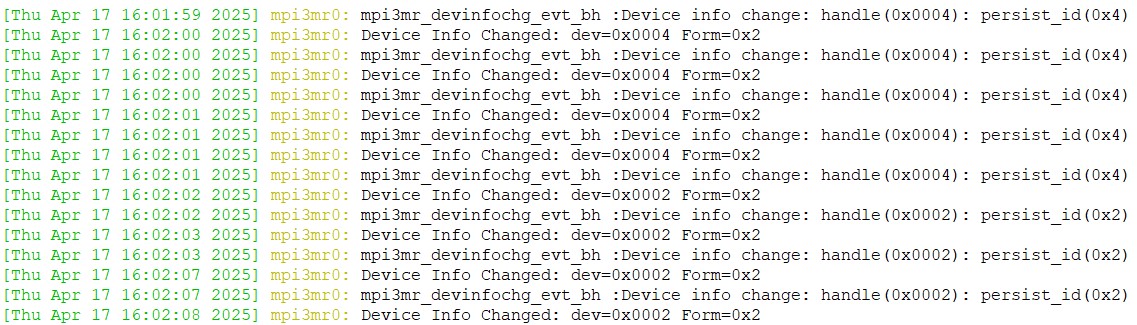
Impacted controllers:
- H965i Front, H965i Adapter, H965i MX, and H965e Adapter
- H965i Front for Dell PowerEdge 17G Generation of Servers
- H365i Front and H365i Adapter for Dell PowerEdge 17G Generation of Servers
- H975i Front for Dell PowerEdge 17G Generation of Servers
Impacted drivers:
- Ubuntu 8.9.1.0.51 version and less
This excessive log entry condition is only observed with virtual disks (VD). It is not observed with PERC-connected JBOD/passthrough drives.
Cause
When the system runs a script/workload that continuously writes large chunks of data to a virtual disk (VD) and deletes the files once the VD is full, in a loop, it results in driver debug prints flooding the OS log.
Resolution
Dell Technologies and Broadcom have implemented a check to prevent repeated driver messages from being printed in the OS log. These changes have been up streamed to Canonical. The fix is available in the out-of-box (OOB) driver, but current Ubuntu support is limited to inbox driver updates only.
Canonical will implement the fix for this issue.