How to Assign an Initial Company Administrator
Summary: This article explains how to assign an Initial Company Administrator.
Instructions
If you created a service request, it will be processed as soon as possible.
If you need to assign a company administrator, create a service request online. Do not start a chat to assign a company administrator.
Company administrator overview:
Infrastructure and enterprise customers are required to define administrators within their organization online at Dell Support. Organizations with fewer than five employees need to identify at least one company administrator. Organizations with five or more employees need to identify at least three company administrators.
The company administrator role in Dell Support gives applicable users a centralized view of company and contact information affiliated with your organization. Company administrators have full capabilities for managing company profile settings, sites, and contacts for their respective organizations.
For more information on the company administrator role, visit Company Administration - View and Manage Sites & Contacts | Dell US.
How to assign a company administrator:
1. Sign-in to the Manage Company Information area of the online support site.
2. Review the contact list for your organization and decide which users will have a company administrator assignment.
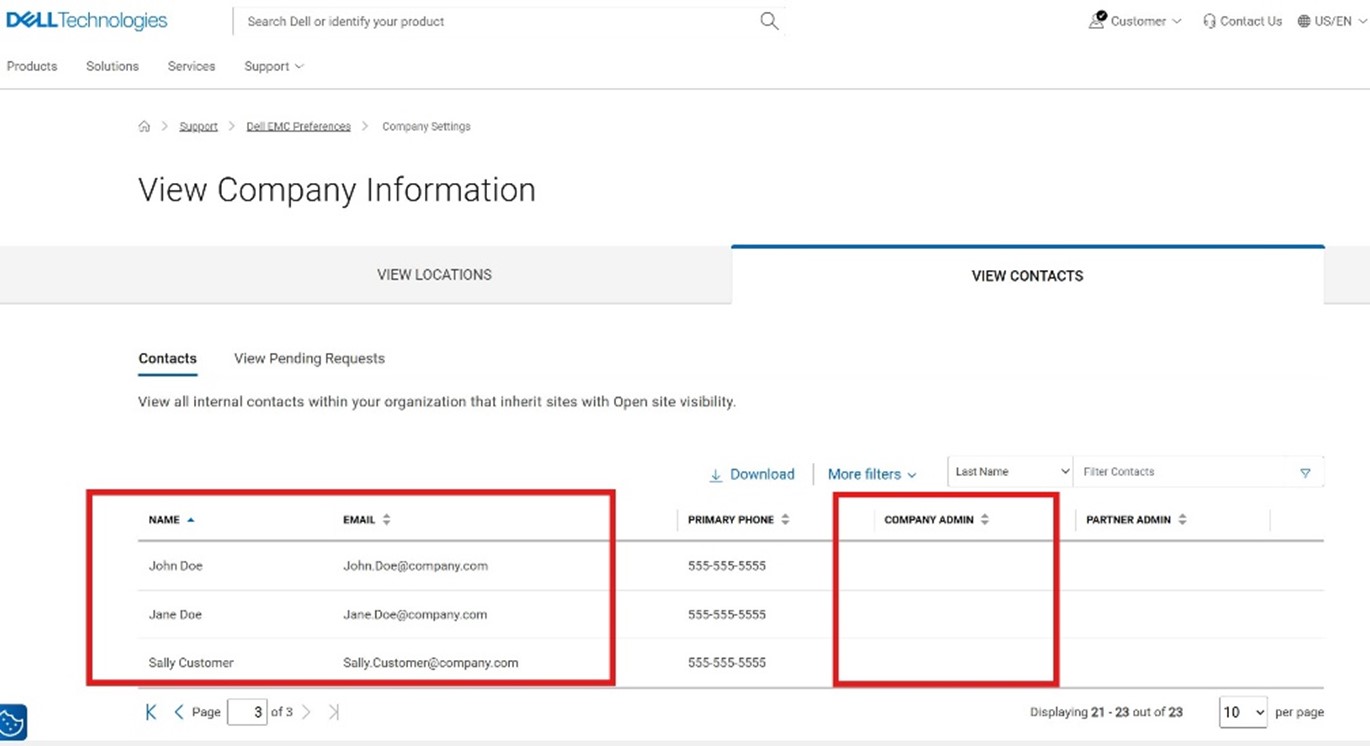
3. Submit a service request via the Administrative Support page.
- Select Enterprise Online Account Help

- Open the Tell Us More menu and select Account Access Issues then select your location.

- In the expanded section, select Create Service Request.

- Provide the names and emails from the reviewed list of contacts for company administrator role assignment. You can assign yourself or a different contact.
Reach out to your business account manager or sign in with your credentials to contact Administrative Support for further assistance.