Data Protection Advisor:DPA:ライセンスを追加しようとすると、「バッチを実行できませんでした」というエラーが発生する
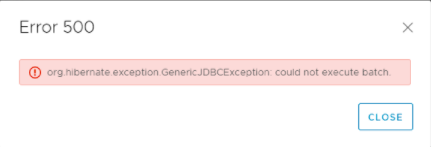
Summary: DPA UI内で新しいライセンスを追加しようとすると、「バッチを実行できませんでした」というエラーが返されます。
This article applies to
This article does not apply to
This article is not tied to any specific product.
Not all product versions are identified in this article.
Symptoms
ユーザーがDPA UI内でライセンスを追加しようとすると、次のエラーが発生します。
DPAアプリケーション サーバー上の次のディレクトリー パスに移動します。
DPAアプリケーション サーバー上の次のディレクトリー パスに移動します。
- ウィンドウズ:
Install Path: <Install Directory>\Services\Logs\server.log - UNIXの場合:
Install Path: <Install Directory>/dpa/services/logs/server.log
2021-04-25 04:33:36,389 ERROR [org.hibernate.engine.jdbc.spi.SqlExceptionHelper] (Thread-20599) Error
2021-04-25 04:33:36,389 ERROR [org.hibernate.engine.jdbc.batch.internal.BatchingBatch] (Thread-20599) HHH000315: Exception executing batch [could not execute batch]
2021-04-25 04:33:36,389 WARN  [com.arjuna.ats.arjuna] (Thread-20599) ARJUNA012125: TwoPhaseCoordinator.beforeCompletion - failed for SynchronizationImple< 0:ffff0a047c2a:-519e9284:607c0a4b:416c3d, org.hibernate.engine.transaction.synchronization.internal.RegisteredSynchronization@7d5820a7 >: javax.persistence.PersistenceException: org.hibernate.exception.GenericJDBCException: could not execute batch
.
Caused by: org.hibernate.exception.GenericJDBCException: could not execute batch
ログのさらにその先に、次のエラーが表示されます。
No space left on device
    Line 170582: Caused by: org.postgresql.util.PSQLException: ERROR: could not extend file "pg_tblspc/16390/PG_10_201707211/16385/22146": No space left on device
Cause
DPAデータストアに使用可能なディスク領域がなくなったため、ライセンスを追加できません。
Resolution
データストア ディレクトリーのファイル システムにディスク領域を追加して、ライセンスをデータベースに入力できるようにします
データストア上のディスク領域の不足を調査して、原因を特定し、解決策を策定する必要があります。
詳細または情報については、 Dellテクニカル サポート にお問い合わせください。
データストア上のディスク領域の不足を調査して、原因を特定し、解決策を策定する必要があります。
詳細または情報については、 Dellテクニカル サポート にお問い合わせください。
Affected Products
Data Protection AdvisorArticle Properties
Article Number: 000185823
Article Type: Solution
Last Modified: 19 Feb 2025
Version: 4
Find answers to your questions from other Dell users
Support Services
Check if your device is covered by Support Services.