Connectrix B-serie: De webbrowsers melden "Cipher Mismatch, No Matching Ciphers" bij het openen van de WebTools UI via HTTPS
Summary: AES256-SHA256 (0x3d) en AES128-SHA256 (0x3c) worden geblokkeerd voor TLS.
This article applies to
This article does not apply to
This article is not tied to any specific product.
Not all product versions are identified in this article.
Symptoms
De webbrowsers (Chrome, New Edge of Firefox) weigert de WebTools te openen via HTTPS.
De foutmelding bevat "Cipher Mismatch" of "No Matching Ciphers".
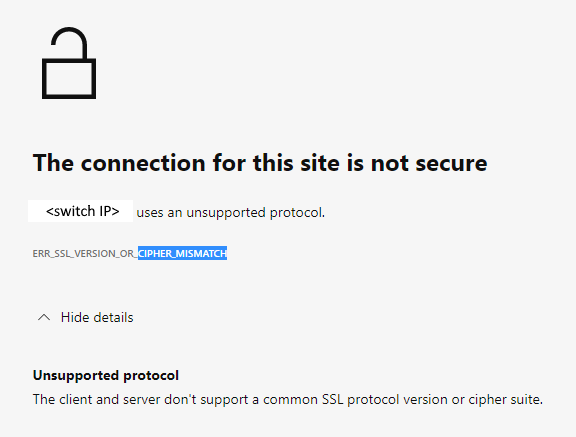
Afbeelding 1: Schermafbeelding van het foutbericht met de melding 'Connection Not Secure, Unsupported Protocol'
De switch wordt uitgevoerd in FOS 8.1- of 8.2-firmware.
De foutmelding bevat "Cipher Mismatch" of "No Matching Ciphers".
Afbeelding 1: Schermafbeelding van het foutbericht met de melding 'Connection Not Secure, Unsupported Protocol'
De switch wordt uitgevoerd in FOS 8.1- of 8.2-firmware.
Cause
De https-cipher-instelling van de switch staat alleen AES256-SHA256 en AES128-SHA256 toe voor TLS 1.2 (de "default_generic" of "default_strong sjablonen" van FOS 8.1 of 8.2).
De Wireshark-dump laat zien dat de client AES256-SHA256 (0x3d) of AES128-SHA256 (0x3c) niet accepteert, waardoor de TLS-handshake mislukt.
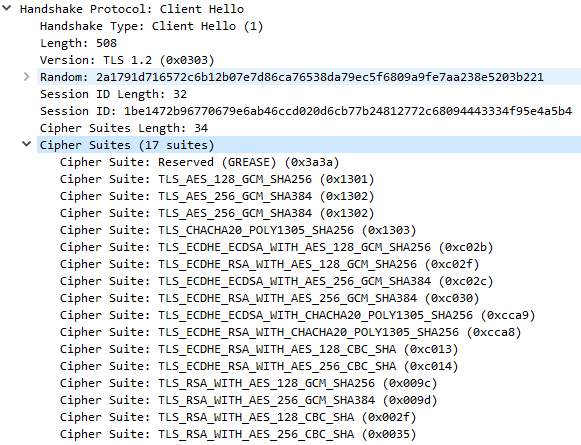
Afbeelding 2: Schermafbeelding van Wireshark Dump met handshake-fout
:root> seccryptocfg --show | grep HTTPS
HTTPS                    : !ECDH:!DH:HIGH:-MD5:!CAMELLIA:!SRP:!PSK:!AESGCM:!SSLv3
HTTPS                    : TLSv1.2

 openssl ciphers -v '!ECDH:!DH:HIGH:-MD5:!CAMELLIA:!SRP:!PSK:!AESGCM:!SSLv3'
AES256-SHA256           TLSv1.2 Kx=RSA      Au=RSA  Enc=AES(256)  Mac=SHA256
AES128-SHA256           TLSv1.2 Kx=RSA      Au=RSA  Enc=AES(128)  Mac=SHA256
De Wireshark-dump laat zien dat de client AES256-SHA256 (0x3d) of AES128-SHA256 (0x3c) niet accepteert, waardoor de TLS-handshake mislukt.
Afbeelding 2: Schermafbeelding van Wireshark Dump met handshake-fout
Resolution
Wijzig de HTTPS-cipher-instelling van de switch om de client te dekken.
Voorbeeld:
In dit voorbeeld is de huidige HTTPS cipher-instelling "! ECDH:! DH: HOOG:-MD5:! CAMELLIA:! SRP:! PSK:! AESGCM:! SSLv3"
Om AES256-GCM-SHA384 (0x9d) en AES128-GCM-SHA256 (0x9c) in te schakelen, verwijdert u "! AESGCM" vanuit de instelling met de opdracht:
Voorbeeld:
In dit voorbeeld is de huidige HTTPS cipher-instelling "! ECDH:! DH: HOOG:-MD5:! CAMELLIA:! SRP:! PSK:! AESGCM:! SSLv3"
Om AES256-GCM-SHA384 (0x9d) en AES128-GCM-SHA256 (0x9c) in te schakelen, verwijdert u "! AESGCM" vanuit de instelling met de opdracht:
seccryptocfg --replace -type https -cipher '!ECDH:!DH:HIGH:-MD5:!CAMELLIA:!SRP:!PSK:!SSLv3'
Additional Information
OpenSSL ciphernamen toewijzen (weergegeven in de OpenSSL-opdracht) met IANA cipher-namen (weergegeven in Wireshark dump) met behulp van het Mozilla-document, Security/Cipher Suites - MozillaWiki

Affected Products
Connectrix B-SeriesArticle Properties
Article Number: 000213633
Article Type: Solution
Last Modified: 18 May 2026
Version: 6
Find answers to your questions from other Dell users
Support Services
Check if your device is covered by Support Services.