Connectrix:B 系列:执行 configdownload 命令时遇到配置文件中的标头无效错误
Summary: 使用 configdownload 命令将备份的交换机配置加载到交换机时,会出现此问题。
Symptoms
Error: Invalid header in config file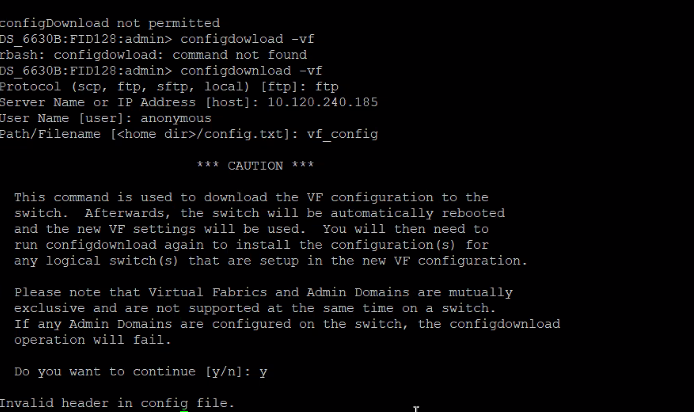
Cause
在交换机更换过程中会遇到这种情况,其中旧交换机配置文件包含不同的交换机横幅。新的交换机配置文件具有不同的模式,从而导致不匹配。
Resolution
步骤 1:比较旧交换机配置文件和新交换机配置文件,并注意横幅中的差异。
步骤2:例如:
旧交换机横幅============================================================= ATTENTION: It is recommended that you change the default passwords for all the switch accounts. Refer to the product release notes and the administrator's guide if you need further information. =============================================================
新交换机横幅: -------------------------------------------------------------------------------------------- ATTENTION It is recommended that you change the default passwords for all the switch accounts. Refer to the product release notes and the administrator's guide if you need further information. --------------------------------------------------------------------------------------------
步骤 3:根据旧交换机横幅手动编辑新交换机横幅。
步骤4:保存配置文件,然后尝试执行 configdownload。