VxRail:部署叢集在驗證步驟失敗,因為發生錯誤「主機中不存在提供的 pnic vmnic4」
Summary: 本文說明當使用 4x25G 或 4x10G NIC 卡部署叢集,且因在 iDRAC 上停用 LOM 而失敗的問題。
This article applies to
This article does not apply to
This article is not tied to any specific product.
Not all product versions are identified in this article.
Symptoms
使用 4x25G 或 4x10G NIC 卡部署叢集時,驗證失敗並顯示錯誤:
The provided pnic vmnic4 does not exist in host
檢查 VxRail Manager dayone.log。
"2023-07-03 09:42:36,726" microservice.nano-service "2023-07-03T09:42:36.204582606Z stdout F 2023-07-03 09:42:36,204 [ERROR] <Dummy-397:140103318611016> validator.py execute() (90): Validation errors: errors=[\{'type': 'THOROUGH-VALIDATOR', 'field': 'network.vds.nic_mappings', 'code': 'E3100_VAL_60', 'placeholders': ('vmnic4', '*******'), 'message': 'The provided pnic vmnic4 does not exist in host *******.'}, \{'type': 'THOROUGH-VALIDATOR', 'field': 'network.vds.nic_mappings', 'code': 'E3100_VAL_60', 'placeholders': ('vmnic5', '*******'), 'message': 'The provided pnic vmnic5 does not exist in host *******.'}]"
Cause
根據不同的伺服器硬體機型,部署配備 4x25 G 或 4x10G 高速 NIC 卡的叢集時,VxRail 預期以下兩種有效的 NIC 對應情境:
- vmnic0 和 vmnic1 對應至 LOM,vmnic2~5 對應至高速 NIC 卡。
- vmnic0 對應至 LOM,vmnic1~4 則對應至高速 NIC 卡。
如果在 iDRAC 上停用 LOM,ESXi 只會偵測到高速 NIC 卡連接埠,並將 vminc0~3 對應至這些連接埠,因此叢集部署驗證在驗證 vmnic4 和/或 vmnic5 時會失敗。
Resolution
-
登入 iDRAC UI
-
停用組態 > BIOS 設定 > 下方的所有 NIC 卡 (NDC/PCIE/OCP) 整合式裝置>
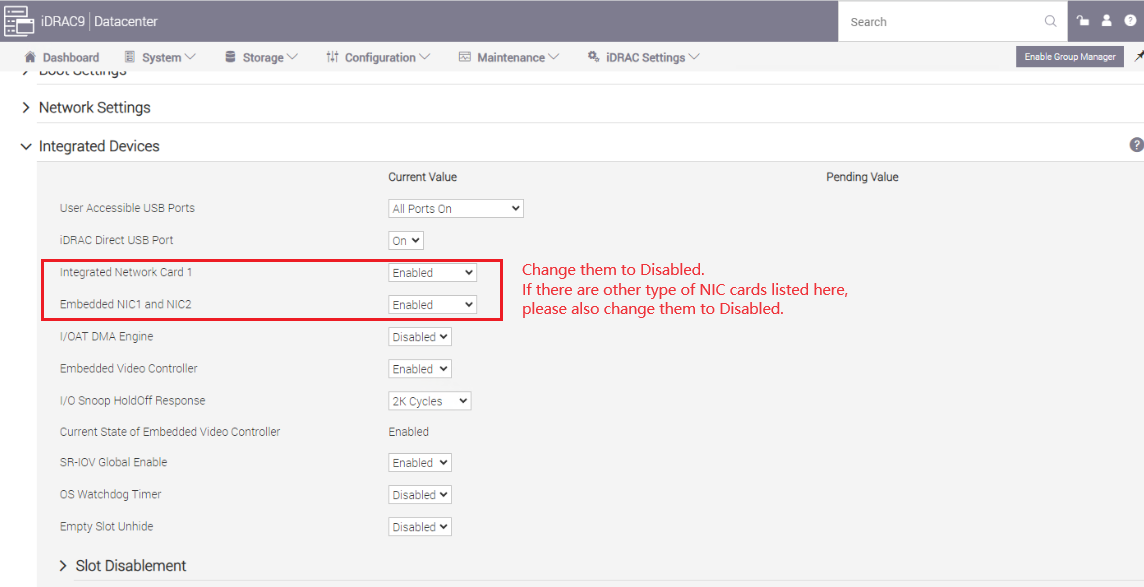
-
套用變更,然後重新啟動 iDRAC。
-
啟用所有在步驟 2 中停用的 NIC 卡 (如果打算停用任何 NIC 卡,請保持停用)。
-
請確定 iDRAC 網路網路介面卡已啟用。
iDRAC 設定>連線能力網路>>設定>
啟用 NIC = 啟用
NIC 選取 = 專用

-
套用變更,然後重新啟動 iDRAC。
-
重試叢集部署驗證。
Article Properties
Article Number: 000216749
Article Type: Solution
Last Modified: 31 Jul 2024
Version: 3
Find answers to your questions from other Dell users
Support Services
Check if your device is covered by Support Services.