OpenManage Enterprise:Power Control Wizardの[Power Cycle]オプションで、最初にOSがシャット ダウンされない。
Summary: OpenManage Enterpriseから電源制御ジョブを作成し、次のウィザード オプションが選択されている場合は、電源オプションを選択します。パワーサイクルを行い、[最初にOSをシャットダウンする]チェックボックスをオンにすると、ターゲット ホスト システムがForceResetされます。
This article applies to
This article does not apply to
This article is not tied to any specific product.
Not all product versions are identified in this article.
Symptoms
ターゲット ホスト システムがOSの異常なシャットダウンを報告する:
ProviderName: Microsoft-Windows-Kernel-Power

TimeCreated                      Id LevelDisplayName Message
-----------                      -- ---------------- -------
10/5/2023 10:38:09 AM            41 Critical         The system has rebooted without cleanly shutting down first. This error could be caused if the system stopped responding, crashed, or lost power unexpectedly.
OpenManage Enterpriseジョブ実行の詳細には、次のテキストが表示されます。
Messages:
Running
Verifying if the device Service Tag is valid.
The device Service Tag is valid.
Retrieving system power state.
System power state is ON. Proceeding with power state change to MASTER_BUS_RESET.
Executing power state change action.
Completed
Cause
OpenManage Enterpriseは、次の電源管理デバイス ウィザード オプションが選択されている場合、ホスト オペレーティング システムを正常にシャットダウンしない強制再起動を送信します。
注:[More Actions ->System Reset (Warm Boot)]は、上記のウィザード オプションにマップされます。 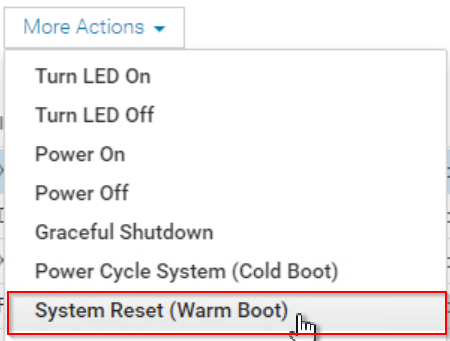
Resolution
この動作は、OpenManage Enterprise 4.2リリースで対処されています。
回避策
OpenManage Enterpriseから正常なシャットダウンを送信するには、ユーザーは次のオプションを選択する必要があります。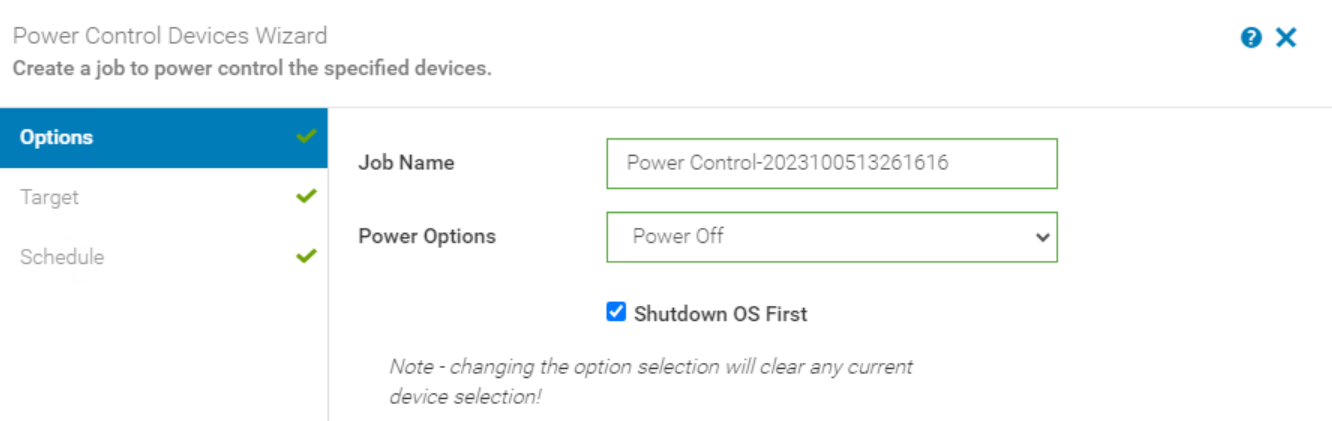
別の電源制御アクションをトリガーして、システムの電源を再びオンにすることができます。 
Affected Products
Dell OpenManage Enterprise, Dell EMC OpenManage EnterpriseProducts
C Series, Modular Infrastructure, Rack Servers, Tower Servers, XE Servers, XR ServersArticle Properties
Article Number: 000218293
Article Type: Solution
Last Modified: 08 May 2025
Version: 4
Find answers to your questions from other Dell users
Support Services
Check if your device is covered by Support Services.