SCCMタスク シーケンスでDell Optimizerアプリケーションを設定する際のエラー
Summary: この記事では、Dell OptimizerソフトウェアとSystem Center Configuration Manager (SCCM)の導入に関するエラーについて説明します。
This article applies to
This article does not apply to
This article is not tied to any specific product.
Not all product versions are identified in this article.
Symptoms
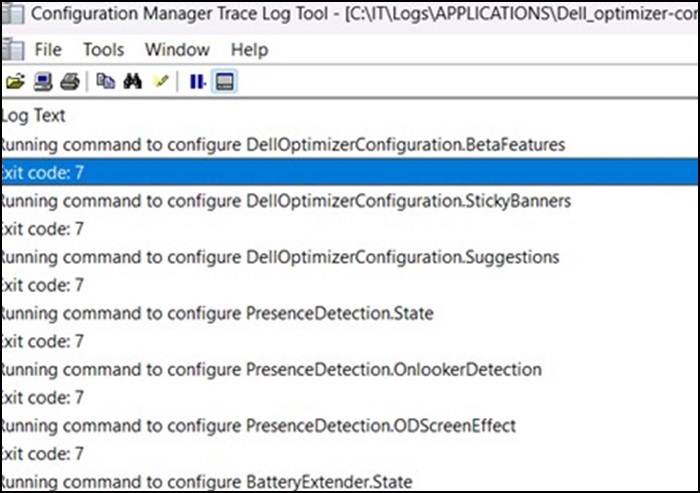
Cause
これは設計どおりの正常な動作です。
Resolution
オペレーティング システム内で初期化するにはサービスが必要なため、設計どおりに動作しています。Dell Optimizerはタスク シーケンスを使用して導入することはできませんが、アプリケーションはベース オペレーティング システム(OS WIM)に挿入できます。
タスク シーケンスの完了後にアプリケーションを導入することをお勧めします。
Affected Products
Alienware, Dell All-in-One, Dell Pro All-in-One, Dell Pro Max Micro, Dell Pro Max Slim, Dell Pro Max Tower, Dell Pro Micro, Dell Pro Slim, Dell Pro Tower, Dell Slim, Dell Tower, Inspiron, OptiPlex, Vostro, XPS, G Series, G Series, Alienware
, Dell Plus, Dell Pro, Dell Pro Max, Dell Pro Plus, Dell Pro Premium, Inspiron, Latitude, Dell Pro Rugged, Vostro, XPS, Fixed Workstations, Mobile Workstations, Dell Pro Max Micro XE FCM2250, Dell Pro Max Slim XE FCS1250, Dell Pro Max Tower T2 XE FCT2250, Dell Pro Max 16 XE MC16250, Dell Pro Micro Plus XE QBM1250, Dell Pro Slim Plus XE5 QBS1250, Dell Pro Tower Plus XE5 QBT1250
...
Article Properties
Article Number: 000227659
Article Type: Solution
Last Modified: 21 May 2026
Version: 3
Find answers to your questions from other Dell users
Support Services
Check if your device is covered by Support Services.