NVP-vProxy : le plug-in vSphere génère Impossible de se connecter au NetWorker Server demandé
Summary: Le plug-in de sauvegarde et de restauration de la machine virtuelle (VM) vSphere Web Client ne parvient pas à se connecter avec le message « Impossible de se connecter au NetWorker Server demandé. Veuillez vérifier vos informations d’identification. » ...
Symptoms
L’intégration NetWorker VMware Protection est configurée avec l’appliance vProxy. La commande emcauthctomcat peut être supprimé lors de la mise à niveau de l’installation de Java Runtime Environment (JRE) sur le NetWorker Server. Le plug-in vSphere Web Client ne parvient pas à se connecter à NetWorker Server avec l’erreur suivante :
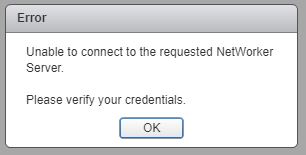
Figure 1 : Impossible de se connecter au NetWorker Server demandé.
Le localhost_access_log. YYYY-MM-DD.txt affiche la demande reçue :
/nsr/authc/logs/localhost_access_log.YYYY-MM-DD.txt
Windows. :
C:\Program Files\EMC NetWorker\nsr\authc-server\tomcat\logs\localhost_access_log.YYYY-MM-DD.txt
xxx.xxx.xxx.xxx - - [DD/MM/YYYY:HH:MM:SS -0500] "GET /nwrestapi/v2/ HTTP/1.1" 500 690
xxx.xxx.xxx.xxx - - [DD/MM/YYYY:HH:MM:SS -0500] "GET /nwrestapi/v2/internal/users/administrator HTTP/1.1" 500 718
xxx.xxx.xxx.xxx - - [DD/MM/YYYY:HH:MM:SS -0500] "POST /ebr-server/auth/login HTTP/1.1" 204 -
Le ebr-server.log affiche la demande d’authentification :
/nsr/authc/logs/ebr-server.log
Windows. :
C:\Program Files\EMC NetWorker\authc-server\tomcat\logs\ebr-server.log
YYYY-MM-DD HH:MM:SS INFO Logging into appliance with type: networker
YYYY-MM-DD HH:MM:SS INFO Attempting connection in NwConnectService
YYYY-MM-DD HH:MM:SS INFO Testing provided credentials for nw calls
YYYY-MM-DD HH:MM:SS INFO Call NW: [https://xxx.xxx.xxx.xxx:9090/nwrestapi/v2/]
YYYY-MM-DD HH:MM:SS INFO Testing provided credentials for nw calls
YYYY-MM-DD HH:MM:SS INFO Call NW: [https://xxx.xxx.xxx.xxx:9090/nwrestapi/v2/internal/users/administrator]
YYYY-MM-DD HH:MM:SS ERROR NetWorker login failed with given credentials - not admin
YYYY-MM-DD HH:MM:SS ERROR Failed to authentciate nw credentials for Administrator
org.apache.http.auth.AuthenticationException: Authentication Invalid
    at com.emc.nw.business.NwConnectBusiness.assertValidNetWorkerLogin(NwConnectBusiness.java:86)
...
YYYY-MM-DD HH:MM:SS ERROR Failed To Get VDR Info
org.apache.http.auth.AuthenticationException: Authentication with nw was unsuccessfull.
    at com.emc.nw.business.NwConnectBusiness.sessionConnect(NwConnectBusiness.java:44)
....
YYYY-MM-DD HH:MM:SS FATAL normally fatal, but seeing what happens when coming from vCenter for goldfish.
Le restapi.log présente une exception :
/nsr/logs/restapi/restapi.log
Windows. :
C:\Program Files\EMC NetWorker\nsr\logs\restapi.log
YYYY-MM-DD HH:MM:SS DEBUG [http-nio-9090-exec-1] c.e.n.w.a.AuthcClient - Auth request: tenant 'null', domain 'null', userId 'administrator'.
YYYY-MM-DD HH:MM:SS WARN  [http-nio-9090-exec-1] o.a.c.p.PhaseInterceptorChain - Interceptor for {https://localhost:9090/auth-server/api/v1/sec/authenticate}WebClient has thrown exception, unwinding now
org.apache.cxf.interceptor.Fault: Could not send Message.
    at org.apache.cxf.interceptor.MessageSenderInterceptor$MessageSenderEndingInterceptor.handleMessage(MessageSenderInterceptor.java:64) ~[cxf-core-3.1.0.jar:3.1.0]
....
Caused by: javax.net.ssl.SSLHandshakeException: SSLHandshakeException invoking https://localhost:9090/auth-server/api/v1/sec/authenticate: sun.security.validator.ValidatorException: PKIX path building failed: sun.security.provider.certpath.SunCertPathBuilderException: unable to find valid certification path to requested target
    at sun.reflect.NativeConstructorAccessorImpl.newInstance0(Native Method) ~[na:1.8.0_121]
....
Caused by: javax.net.ssl.SSLHandshakeException: sun.security.validator.ValidatorException: PKIX path building failed: sun.security.provider.certpath.SunCertPathBuilderException: unable to find valid certification path to requested target
    at sun.security.ssl.Alerts.getSSLException(Unknown Source) ~[na:1.8.0_121]
....
YYYY-MM-DD HH:MM:SS ERROR [http-nio-9090-exec-1] c.e.n.w.WebApiExceptionMapper - Status 'Internal Server Error', msg: javax.net.ssl.SSLHandshakeException: SSLHandshakeException invoking https://localhost:9090/auth-server/api/v1/sec/authenticate: sun.security.validator.ValidatorException: PKIX path building failed: sun.security.provider.certpath.SunCertPathBuilderException: unable to find valid certification path to requested target
javax.ws.rs.ProcessingException: javax.net.ssl.SSLHandshakeException: SSLHandshakeException invoking https://localhost:9090/auth-server/api/v1/sec/authenticate: sun.security.validator.ValidatorException: PKIX path building failed: sun.security.provider.certpath.SunCertPathBuilderException: unable to find valid certification path to requested target
    at org.apache.cxf.jaxrs.client.AbstractClient.checkClientException(AbstractClient.java:557) ~[cxf-rt-rs-client-3.1.0.jar:3.1.0]
....
Cause
L’installation de JRE ne dispose plus de l’authentification NetWorker Tomcat (emcauthctomcat) utilisé par le plug-in de sauvegarde et restauration de machine virtuelle vSphere Web Client.
Resolution
Le certificat emcauthctomcat doit être importé dans la configuration du magasin de clés Java JRE. Voici une présentation permettant de vérifier si le certificat existe et de l’importer.
- Ouvrez une invite de commande Windows ou une session de terminal Linux sur le NetWorker Server.
- Accédez au répertoire d’installation de Java JRE. Le répertoire change en fonction de la version de Java JRE installée.
- Windows. :
C:\Program Files\Java\jre1.8.0_151\bin> - Linux :
/usr/java/jre1.8.0_151/bin
- Windows. : C :\Program Files\NRE\java\jre#.#.#_###\bin
- Linux : /opt/nre/java/latest/bin
- Utilisez l’utilitaire de ligne de commande keytool pour vérifier si le certificat n’existe pas dans le magasin de clés Java JRE cacerts :
- Windows. :
keytool -list -storepass changeit -keystore ..\lib\security\cacerts | findstr emc
- Linux :
keytool -storepass changeit -list keystore ../lib/security/cacerts | grep emc
- Utilisez l’utilitaire de ligne de commande keytool pour importer le fichier
emcauthctomcatcertificat:- Windows. :
keytool -importcert -storepass changeit -trustcacerts -alias emcauthctomcat -file "C:\Program Files\EMC NetWorker\nsr\authc-server\tomcat\conf\emcauthctomcat.cer" -keystore ..\lib\security\cacerts
- Linux :
keytool -importcert -storepass changeit -trustcacerts -alias emcauthctomcat -file /nsr/authc/conf/emcauthctomcat.cer -keystore ../lib/security/cacerts
- Utilisez l’utilitaire de ligne de commande keytool pour vérifier si le certificat existe désormais dans le magasin de clés Java JRE cacerts :
- Windows. :
keytool -list -storepass changeit -keystore ..\lib\security\cacerts | findstr emc
- Linux :
keytool -storepass changeit -list keystore ../lib/security/cacerts | grep emc
Additional Information
Exemple de sortie sur un serveur NetWorker Windows avec JRE version 1.8.0_151.
C:\Program Files\Java\jre1.8.0_151\bin>keytool -list -storepass changeit -keystore ..\lib\security\cacerts |findstr emc

C:\Program Files\Java\jre1.8.0_151\bin>
C:\Program Files\Java\jre1.8.0_151\bin>keytool -importcert -storepass changeit -trustcacerts -alias emcauthctomcat -file "C:\Program Files\EMC NetWorker\nsr\authc-server\tomcat\conf\emcauthctomcat.cer"  -keystore ..\lib\security\cacerts
Owner: CN=mynetworkerserver.mydomain.emc.com
Issuer: CN=mynetworkerserver.mydomain.emc.com
Serial number: f492a88f
Valid from: Thu May 11 13:45:42 PDT 2017 until: Mon May 05 13:45:42 PDT 2042
Certificate fingerprints:
         MD5:  BA:A6:DC:CE:4F:96:9E:57:3D:2A:57:07:D9:CC:A8:1F
         SHA1: 4D:F6:B4:54:44:24:B9:B7:E7:7A:DB:C2:6E:AE:4F:CD:F9:57:F3:45
         SHA256: FA:A8:88:CD:A1:A4:45:3D:AF:50:D9:E1:6E:F0:E7:60:61:61:24:11:ED:34:91:CE:DE:92:DA:C8:ED:4C:CD:13
Signature algorithm name: SHA512withRSA
Subject Public Key Algorithm: 3072-bit RSA key
Version: 3

Extensions:

#1: ObjectId: 2.5.29.17 Criticality=false
SubjectAlternativeName [
  DNSName: localhost
  IPAddress: 127.0.0.1
  DNSName: mynetworkerserver.mydomain.emc.com
]

Trust this certificate? [no]:  yes
Certificate was added to keystore

C:\Program Files\Java\jre1.8.0_151\bin>
C:\Program Files\Java\jre1.8.0_151\bin>keytool -list -storepass changeit -keystore ..\lib\security\cacerts |findstr emc
emcauthctomcat, Nov 15, 2017, trustedCertEntry,
C:\Program Files\Java\jre1.8.0_151\bin>