NVP-vProxy: il plug-in vSphere genera Impossibile connettersi al server NetWorker richiesto
Summary: Il plug-in vSphere Web Client virtual machine (VM) Backup and Recovery non riesce a connettersi con "Unable to connect to the requested NetWorker Server. Si prega di verificare le proprie credenziali." ...
This article applies to
This article does not apply to
This article is not tied to any specific product.
Not all product versions are identified in this article.
Symptoms
L'integrazione NetWorker VMware Protection è configurata con l'appliance vProxy. La colonna emcauthctomcat può essere rimossa quando si aggiorna l'installazione di JRE (Java Runtime Environment) sul server NetWorker. Il plug-in vSphere Web Client non riesce a connettersi al server NetWorker con il seguente errore:
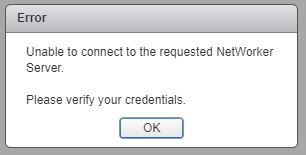
Figura 1. Impossibile connettersi al server NetWorker richiesto.
Il localhost_access_log. YYYY-MM-DD.txt mostra la richiesta ricevuta:
Linux:
Windows:
/nsr/authc/logs/localhost_access_log.YYYY-MM-DD.txt
Windows:
C:\Program Files\EMC NetWorker\nsr\authc-server\tomcat\logs\localhost_access_log.YYYY-MM-DD.txt
xxx.xxx.xxx.xxx - - [DD/MM/YYYY:HH:MM:SS -0500] "GET /nwrestapi/v2/ HTTP/1.1" 500 690
xxx.xxx.xxx.xxx - - [DD/MM/YYYY:HH:MM:SS -0500] "GET /nwrestapi/v2/internal/users/administrator HTTP/1.1" 500 718
xxx.xxx.xxx.xxx - - [DD/MM/YYYY:HH:MM:SS -0500] "POST /ebr-server/auth/login HTTP/1.1" 204 -
La ebr-server.log mostra la richiesta di autenticazione:
Linux:
Windows:
/nsr/authc/logs/ebr-server.log
Windows:
C:\Program Files\EMC NetWorker\authc-server\tomcat\logs\ebr-server.log
YYYY-MM-DD HH:MM:SS INFO Logging into appliance with type: networker
YYYY-MM-DD HH:MM:SS INFO Attempting connection in NwConnectService
YYYY-MM-DD HH:MM:SS INFO Testing provided credentials for nw calls
YYYY-MM-DD HH:MM:SS INFO Call NW: [https://xxx.xxx.xxx.xxx:9090/nwrestapi/v2/]
YYYY-MM-DD HH:MM:SS INFO Testing provided credentials for nw calls
YYYY-MM-DD HH:MM:SS INFO Call NW: [https://xxx.xxx.xxx.xxx:9090/nwrestapi/v2/internal/users/administrator]
YYYY-MM-DD HH:MM:SS ERROR NetWorker login failed with given credentials - not admin
YYYY-MM-DD HH:MM:SS ERROR Failed to authentciate nw credentials for Administrator
org.apache.http.auth.AuthenticationException: Authentication Invalid
    at com.emc.nw.business.NwConnectBusiness.assertValidNetWorkerLogin(NwConnectBusiness.java:86)
...
YYYY-MM-DD HH:MM:SS ERROR Failed To Get VDR Info
org.apache.http.auth.AuthenticationException: Authentication with nw was unsuccessfull.
    at com.emc.nw.business.NwConnectBusiness.sessionConnect(NwConnectBusiness.java:44)
....
YYYY-MM-DD HH:MM:SS FATAL normally fatal, but seeing what happens when coming from vCenter for goldfish.
Il restapi.log mostra un'eccezione:
Linux:
Windows:
/nsr/logs/restapi/restapi.log
Windows:
C:\Program Files\EMC NetWorker\nsr\logs\restapi.log
YYYY-MM-DD HH:MM:SS DEBUG [http-nio-9090-exec-1] c.e.n.w.a.AuthcClient - Auth request: tenant 'null', domain 'null', userId 'administrator'.
YYYY-MM-DD HH:MM:SS WARN  [http-nio-9090-exec-1] o.a.c.p.PhaseInterceptorChain - Interceptor for {https://localhost:9090/auth-server/api/v1/sec/authenticate}WebClient has thrown exception, unwinding now
org.apache.cxf.interceptor.Fault: Could not send Message.
    at org.apache.cxf.interceptor.MessageSenderInterceptor$MessageSenderEndingInterceptor.handleMessage(MessageSenderInterceptor.java:64) ~[cxf-core-3.1.0.jar:3.1.0]
....
Caused by: javax.net.ssl.SSLHandshakeException: SSLHandshakeException invoking https://localhost:9090/auth-server/api/v1/sec/authenticate: sun.security.validator.ValidatorException: PKIX path building failed: sun.security.provider.certpath.SunCertPathBuilderException: unable to find valid certification path to requested target
    at sun.reflect.NativeConstructorAccessorImpl.newInstance0(Native Method) ~[na:1.8.0_121]
....
Caused by: javax.net.ssl.SSLHandshakeException: sun.security.validator.ValidatorException: PKIX path building failed: sun.security.provider.certpath.SunCertPathBuilderException: unable to find valid certification path to requested target
    at sun.security.ssl.Alerts.getSSLException(Unknown Source) ~[na:1.8.0_121]
....
YYYY-MM-DD HH:MM:SS ERROR [http-nio-9090-exec-1] c.e.n.w.WebApiExceptionMapper - Status 'Internal Server Error', msg: javax.net.ssl.SSLHandshakeException: SSLHandshakeException invoking https://localhost:9090/auth-server/api/v1/sec/authenticate: sun.security.validator.ValidatorException: PKIX path building failed: sun.security.provider.certpath.SunCertPathBuilderException: unable to find valid certification path to requested target
javax.ws.rs.ProcessingException: javax.net.ssl.SSLHandshakeException: SSLHandshakeException invoking https://localhost:9090/auth-server/api/v1/sec/authenticate: sun.security.validator.ValidatorException: PKIX path building failed: sun.security.provider.certpath.SunCertPathBuilderException: unable to find valid certification path to requested target
    at org.apache.cxf.jaxrs.client.AbstractClient.checkClientException(AbstractClient.java:557) ~[cxf-rt-rs-client-3.1.0.jar:3.1.0]
....
Cause
L'installazione JRE non dispone più di NetWorker Tomcat Authentication (emcauthctomcat) utilizzato dal plug-in vSphere Web Client VM Backup and Recovery.
Resolution
Il certificato emcauthctomcat deve essere importato nella configurazione dell'archivio chiavi Java JRE. Di seguito è riportata una panoramica per verificare se il certificato esiste e per importarlo.
- Aprire un prompt dei comandi di Windows o una sessione del terminale Linux sul server NetWorker.
- Passare alla directory di installazione di Java JRE. La directory cambia a seconda della versione di Java JRE installata.
Esempi di percorsi di installazione per JRE 1.8.0_151
- Windows:
C:\Program Files\Java\jre1.8.0_151\bin> - Linux:
/usr/java/jre1.8.0_151/bin
Esempio di installazione di NetWorker Runtime Environment (NRE):
- Windows: C:\Programmi\NRE\java\jre#.#.#_###\bin
- Linux: /opt/nre/java/latest/bin
- Utilizzare l'utilità della riga di comando keytool per verificare se il certificato non esiste nell'archivio chiavi cacerts Java JRE:
- Windows:
keytool -list -storepass changeit -keystore ..\lib\security\cacerts | findstr emc
- Linux:
keytool -storepass changeit -list keystore ../lib/security/cacerts | grep emc
- Utilizzare l'utilità della riga di comando keytool per importare il
emcauthctomcatcertificato:- Windows:
keytool -importcert -storepass changeit -trustcacerts -alias emcauthctomcat -file "C:\Program Files\EMC NetWorker\nsr\authc-server\tomcat\conf\emcauthctomcat.cer" -keystore ..\lib\security\cacerts
- Linux:
keytool -importcert -storepass changeit -trustcacerts -alias emcauthctomcat -file /nsr/authc/conf/emcauthctomcat.cer -keystore ../lib/security/cacerts
- Utilizzare l'utilità della riga di comando keytool per verificare se il certificato esiste ora nell'archivio chiavi cacerts Java JRE:
- Windows:
keytool -list -storepass changeit -keystore ..\lib\security\cacerts | findstr emc
- Linux:
keytool -storepass changeit -list keystore ../lib/security/cacerts | grep emc
Additional Information
Output di esempio su un server Windows NetWorker con JRE versione 1.8.0_151.
C:\Program Files\Java\jre1.8.0_151\bin>keytool -list -storepass changeit -keystore ..\lib\security\cacerts |findstr emc

C:\Program Files\Java\jre1.8.0_151\bin>
C:\Program Files\Java\jre1.8.0_151\bin>keytool -importcert -storepass changeit -trustcacerts -alias emcauthctomcat -file "C:\Program Files\EMC NetWorker\nsr\authc-server\tomcat\conf\emcauthctomcat.cer"  -keystore ..\lib\security\cacerts
Owner: CN=mynetworkerserver.mydomain.emc.com
Issuer: CN=mynetworkerserver.mydomain.emc.com
Serial number: f492a88f
Valid from: Thu May 11 13:45:42 PDT 2017 until: Mon May 05 13:45:42 PDT 2042
Certificate fingerprints:
         MD5:  BA:A6:DC:CE:4F:96:9E:57:3D:2A:57:07:D9:CC:A8:1F
         SHA1: 4D:F6:B4:54:44:24:B9:B7:E7:7A:DB:C2:6E:AE:4F:CD:F9:57:F3:45
         SHA256: FA:A8:88:CD:A1:A4:45:3D:AF:50:D9:E1:6E:F0:E7:60:61:61:24:11:ED:34:91:CE:DE:92:DA:C8:ED:4C:CD:13
Signature algorithm name: SHA512withRSA
Subject Public Key Algorithm: 3072-bit RSA key
Version: 3

Extensions:

#1: ObjectId: 2.5.29.17 Criticality=false
SubjectAlternativeName [
  DNSName: localhost
  IPAddress: 127.0.0.1
  DNSName: mynetworkerserver.mydomain.emc.com
]

Trust this certificate? [no]:  yes
Certificate was added to keystore

C:\Program Files\Java\jre1.8.0_151\bin>
C:\Program Files\Java\jre1.8.0_151\bin>keytool -list -storepass changeit -keystore ..\lib\security\cacerts |findstr emc
emcauthctomcat, Nov 15, 2017, trustedCertEntry,
C:\Program Files\Java\jre1.8.0_151\bin>
Article Properties
Article Number: 000048913
Article Type: Solution
Last Modified: 15 Oct 2025
Version: 4
Find answers to your questions from other Dell users
Support Services
Check if your device is covered by Support Services.