NVP-vProxy:vSphere 插件生成无法连接到请求的 NetWorker 服务器
Summary: vSphere Web Client 虚拟机 (VM) 备份和恢复插件无法连接,并显示“无法连接到请求的 NetWorker 服务器。 请验证您的凭据。”
This article applies to
This article does not apply to
This article is not tied to any specific product.
Not all product versions are identified in this article.
Symptoms
NetWorker VMware 保护集成配置了 vProxy Appliance。而 emcauthctomcat 在 NetWorker 服务器上升级 Java Runtime Environment (JRE) 安装时,可能会删除。vSphere Web Client 插件无法连接到 NetWorker 服务器,并显示以下错误:
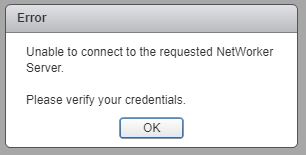
图 1:无法连接到请求的 NetWorker 服务器。
localhost_access_log。YYYY-MM-DD.txt显示收到的请求:
Linux:
Windows:
/nsr/authc/logs/localhost_access_log.YYYY-MM-DD.txt
Windows:
C:\Program Files\EMC NetWorker\nsr\authc-server\tomcat\logs\localhost_access_log.YYYY-MM-DD.txt
xxx.xxx.xxx.xxx - - [DD/MM/YYYY:HH:MM:SS -0500] "GET /nwrestapi/v2/ HTTP/1.1" 500 690
xxx.xxx.xxx.xxx - - [DD/MM/YYYY:HH:MM:SS -0500] "GET /nwrestapi/v2/internal/users/administrator HTTP/1.1" 500 718
xxx.xxx.xxx.xxx - - [DD/MM/YYYY:HH:MM:SS -0500] "POST /ebr-server/auth/login HTTP/1.1" 204 -
ebr-server.log显示身份验证请求:
Linux:
Windows:
/nsr/authc/logs/ebr-server.log
Windows:
C:\Program Files\EMC NetWorker\authc-server\tomcat\logs\ebr-server.log
YYYY-MM-DD HH:MM:SS INFO Logging into appliance with type: networker
YYYY-MM-DD HH:MM:SS INFO Attempting connection in NwConnectService
YYYY-MM-DD HH:MM:SS INFO Testing provided credentials for nw calls
YYYY-MM-DD HH:MM:SS INFO Call NW: [https://xxx.xxx.xxx.xxx:9090/nwrestapi/v2/]
YYYY-MM-DD HH:MM:SS INFO Testing provided credentials for nw calls
YYYY-MM-DD HH:MM:SS INFO Call NW: [https://xxx.xxx.xxx.xxx:9090/nwrestapi/v2/internal/users/administrator]
YYYY-MM-DD HH:MM:SS ERROR NetWorker login failed with given credentials - not admin
YYYY-MM-DD HH:MM:SS ERROR Failed to authentciate nw credentials for Administrator
org.apache.http.auth.AuthenticationException: Authentication Invalid
    at com.emc.nw.business.NwConnectBusiness.assertValidNetWorkerLogin(NwConnectBusiness.java:86)
...
YYYY-MM-DD HH:MM:SS ERROR Failed To Get VDR Info
org.apache.http.auth.AuthenticationException: Authentication with nw was unsuccessfull.
    at com.emc.nw.business.NwConnectBusiness.sessionConnect(NwConnectBusiness.java:44)
....
YYYY-MM-DD HH:MM:SS FATAL normally fatal, but seeing what happens when coming from vCenter for goldfish.
restapi.log显示异常:
Linux:
Windows:
/nsr/logs/restapi/restapi.log
Windows:
C:\Program Files\EMC NetWorker\nsr\logs\restapi.log
YYYY-MM-DD HH:MM:SS DEBUG [http-nio-9090-exec-1] c.e.n.w.a.AuthcClient - Auth request: tenant 'null', domain 'null', userId 'administrator'.
YYYY-MM-DD HH:MM:SS WARN  [http-nio-9090-exec-1] o.a.c.p.PhaseInterceptorChain - Interceptor for {https://localhost:9090/auth-server/api/v1/sec/authenticate}WebClient has thrown exception, unwinding now
org.apache.cxf.interceptor.Fault: Could not send Message.
    at org.apache.cxf.interceptor.MessageSenderInterceptor$MessageSenderEndingInterceptor.handleMessage(MessageSenderInterceptor.java:64) ~[cxf-core-3.1.0.jar:3.1.0]
....
Caused by: javax.net.ssl.SSLHandshakeException: SSLHandshakeException invoking https://localhost:9090/auth-server/api/v1/sec/authenticate: sun.security.validator.ValidatorException: PKIX path building failed: sun.security.provider.certpath.SunCertPathBuilderException: unable to find valid certification path to requested target
    at sun.reflect.NativeConstructorAccessorImpl.newInstance0(Native Method) ~[na:1.8.0_121]
....
Caused by: javax.net.ssl.SSLHandshakeException: sun.security.validator.ValidatorException: PKIX path building failed: sun.security.provider.certpath.SunCertPathBuilderException: unable to find valid certification path to requested target
    at sun.security.ssl.Alerts.getSSLException(Unknown Source) ~[na:1.8.0_121]
....
YYYY-MM-DD HH:MM:SS ERROR [http-nio-9090-exec-1] c.e.n.w.WebApiExceptionMapper - Status 'Internal Server Error', msg: javax.net.ssl.SSLHandshakeException: SSLHandshakeException invoking https://localhost:9090/auth-server/api/v1/sec/authenticate: sun.security.validator.ValidatorException: PKIX path building failed: sun.security.provider.certpath.SunCertPathBuilderException: unable to find valid certification path to requested target
javax.ws.rs.ProcessingException: javax.net.ssl.SSLHandshakeException: SSLHandshakeException invoking https://localhost:9090/auth-server/api/v1/sec/authenticate: sun.security.validator.ValidatorException: PKIX path building failed: sun.security.provider.certpath.SunCertPathBuilderException: unable to find valid certification path to requested target
    at org.apache.cxf.jaxrs.client.AbstractClient.checkClientException(AbstractClient.java:557) ~[cxf-rt-rs-client-3.1.0.jar:3.1.0]
....
Cause
JRE 安装不再具有 NetWorker Tomcat 身份验证 (emcauthctomcat) vSphere Web Client 虚拟机备份和恢复插件程序使用的证书。
Resolution
emcauthctomcat 证书必须导入到 Java JRE 密钥库配置中。下面是检查证书是否存在以及导入证书的概览。
- 在 NetWorker 服务器上打开 Windows 命令提示符或 Linux 终端会话。
- 切换到 Java JRE 安装目录。目录会根据安装的 Java JRE 版本进行更改。
JRE 1.8.0_151 的安装路径示例
- Windows:
C:\Program Files\Java\jre1.8.0_151\bin> - Linux:
/usr/java/jre1.8.0_151/bin
NetWorker Runtime Environment (NRE) 安装示例:
- Windows:C:\Program Files\NRE\java\jre#.#.#_###\bin
- Linux:/opt/nre/java/latest/bin
- 使用 keytool 命令行实用程序验证证书是否在 Java JRE cacerts 密钥库中不存在:
- Windows:
keytool -list -storepass changeit -keystore ..\lib\security\cacerts | findstr emc
- Linux:
keytool -storepass changeit -list keystore ../lib/security/cacerts | grep emc
- 使用 keytool 命令行实用程序导入
emcauthctomcat证书:- Windows:
keytool -importcert -storepass changeit -trustcacerts -alias emcauthctomcat -file "C:\Program Files\EMC NetWorker\nsr\authc-server\tomcat\conf\emcauthctomcat.cer" -keystore ..\lib\security\cacerts
- Linux:
keytool -importcert -storepass changeit -trustcacerts -alias emcauthctomcat -file /nsr/authc/conf/emcauthctomcat.cer -keystore ../lib/security/cacerts
- 使用 keytool 命令行实用程序验证证书现在是否存在于 Java JRE cacerts 密钥库中:
- Windows:
keytool -list -storepass changeit -keystore ..\lib\security\cacerts | findstr emc
- Linux:
keytool -storepass changeit -list keystore ../lib/security/cacerts | grep emc
Additional Information
JRE 版本为 1.8.0_151 的 Windows NetWorker 服务器上的输出示例。
C:\Program Files\Java\jre1.8.0_151\bin>keytool -list -storepass changeit -keystore ..\lib\security\cacerts |findstr emc

C:\Program Files\Java\jre1.8.0_151\bin>
C:\Program Files\Java\jre1.8.0_151\bin>keytool -importcert -storepass changeit -trustcacerts -alias emcauthctomcat -file "C:\Program Files\EMC NetWorker\nsr\authc-server\tomcat\conf\emcauthctomcat.cer"  -keystore ..\lib\security\cacerts
Owner: CN=mynetworkerserver.mydomain.emc.com
Issuer: CN=mynetworkerserver.mydomain.emc.com
Serial number: f492a88f
Valid from: Thu May 11 13:45:42 PDT 2017 until: Mon May 05 13:45:42 PDT 2042
Certificate fingerprints:
         MD5:  BA:A6:DC:CE:4F:96:9E:57:3D:2A:57:07:D9:CC:A8:1F
         SHA1: 4D:F6:B4:54:44:24:B9:B7:E7:7A:DB:C2:6E:AE:4F:CD:F9:57:F3:45
         SHA256: FA:A8:88:CD:A1:A4:45:3D:AF:50:D9:E1:6E:F0:E7:60:61:61:24:11:ED:34:91:CE:DE:92:DA:C8:ED:4C:CD:13
Signature algorithm name: SHA512withRSA
Subject Public Key Algorithm: 3072-bit RSA key
Version: 3

Extensions:

#1: ObjectId: 2.5.29.17 Criticality=false
SubjectAlternativeName [
  DNSName: localhost
  IPAddress: 127.0.0.1
  DNSName: mynetworkerserver.mydomain.emc.com
]

Trust this certificate? [no]:  yes
Certificate was added to keystore

C:\Program Files\Java\jre1.8.0_151\bin>
C:\Program Files\Java\jre1.8.0_151\bin>keytool -list -storepass changeit -keystore ..\lib\security\cacerts |findstr emc
emcauthctomcat, Nov 15, 2017, trustedCertEntry,
C:\Program Files\Java\jre1.8.0_151\bin>
Article Properties
Article Number: 000048913
Article Type: Solution
Last Modified: 15 Oct 2025
Version: 4
Find answers to your questions from other Dell users
Support Services
Check if your device is covered by Support Services.