Windows 자격 증명 관리자가 오류 코드 0x80070003과 함께 작동을 중지함
Summary: Dell Encryption Enterprise 정책 기반 암호화 및 SDE를 설치한 후 Windows 자격 증명 관리자가 오류 코드 0x80070003과 함께 작동을 중지합니다. 시스템이 지정된 경로를 찾을 수 없습니다.
This article applies to
This article does not apply to
This article is not tied to any specific product.
Not all product versions are identified in this article.
Symptoms
영향을 받는 제품:
- Dell Encryption Enterprise
영향을 받는 버전:
- v8.15~8.17
Dell Encryption Enterprise 정책 기반 암호화 및 SDE가 설치된 컴퓨터에서 Windows 자격 증명 관리자의 작동이 중지되고 다음과 같은 오류 메시지가 표시됩니다.
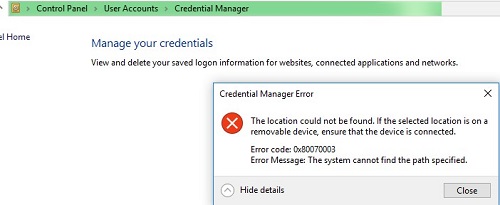
그림 1: (영어로만 제공) 자격 증명 관리자 오류
Dell Encryption Enterprise 정책 기반 암호화를 제거하고 컴퓨터의 암호를 해독하면 문제가 해결됩니다.
문제를 재현하는 동안 프로세스 모니터링 로그에서 연결된 사용자의 policy.vpol 파일에 대하여 PATH NOT FOUND가 표시될 수 있습니다.

그림 2: (영어로만 제공) Policy.vpol 경로를 찾을 수 없음
참고: 프로세스 모니터는 Windows
Sysinternals 도구.
C:\ProgramData\Dell\Dell Data Protection\Encryption의 CMGShieled.log에서 아래 동일한 Policy.vpol 파일에 대한 오류 0xC000003A를 볼 수 있습니다.
[04.10.18 11:35:16:671 CredUMES.cpp:13281 H] CmgFFE CFDE: Queue CefDb update retry for path="\Device\HarddiskVolume3\Users\ddpusr2\AppData\Local\Microsoft\Vault\4BF4C442-9B8A-41A0-B380-DD4A704DDB28\Policy.vpol", status=0xC000003A
Cause
해당 사항 없음
Resolution
이 문제를 해결하려면 다음 단계를 수행합니다.
- Dell Security Management Server에 연결합니다.
- Populations ->Enterprise ->Policy-Based Encryption ->SDE Encryption Rules로 이동합니다.
- 목록 끝으로 스크롤하여 아래에 제외 사항을 추가하고 Save를 클릭합니다.
-^%ENV:USERPROFILE%\AppData\Local\Microsoft\Vault
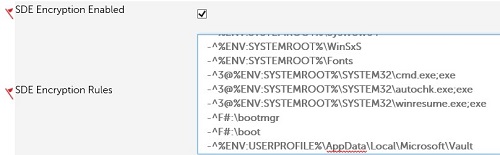
그림 3: (영어로만 제공) SDE 제외 사항
- Management-Commit>으로 이동하고 Commit Policies를 클릭하여 정책 변경 사항을 커밋합니다.
지원 부서에 문의하려면 Dell Data Security 국제 지원 전화번호를 참조하십시오.
온라인으로 기술 지원 요청을 생성하려면 TechDirect로 이동하십시오.
추가 정보 및 리소스를 보려면 Dell 보안 커뮤니티 포럼에 참여하십시오.
Affected Products
Dell EncryptionArticle Properties
Article Number: 000130912
Article Type: Solution
Last Modified: 19 Apr 2026
Version: 10
Find answers to your questions from other Dell users
Support Services
Check if your device is covered by Support Services.