Windows Server: 복구 체크포인트의 결과로 Hyper-V Live Migration이 실패할 수 있습니다.

Summary: 이 문서에는 가상 머신 백업을 수행하는 데 백업 소프트웨어를 사용할 때 Hyper-V Live Migration 중에 발생할 수 있는 오류에 대한 정보가 포함되어 있습니다. 오류는 다음과 같습니다. "Virtual machine failed to generate VHD tree: 'Catastrophic failure'('0x8000FFFF')." ad "Virtual machine failed to generate VHD tree: 'The system cannot find the file specified.'('0x80070002')." ...

This article applies to This article does not apply to This article is not tied to any specific product. Not all product versions are identified in this article.

Symptoms


문서 요약: VM에 복구 체크포인트를 사용하면 Hyper-V 호스트 간의 Hyper-V Live Migration이 실패할 수 있습니다.


문제:
 

Virtual machine failed to generate VHD tree: 'Catastrophic failure'('0x8000FFFF'). 

Virtual machine failed to generate VHD tree: 'The system cannot find the file specified.'('0x80070002').


Live Migration이 실패하고 시간이 초과됩니다. 이벤트 뷰어의 "Applications and Services Logs\Microsoft\Windows" 아래에 있는 Hyper-V-VMM 로그가 소스에서 Live Migration 시간 초과 또는 실패를 보고합니다. PowerShell을 사용하여 복구 체크포인트를 제거하려고 하면 다음 오류 중 하나가 생성될 수 있습니다.

참고: Hyper-V 백업 솔루션은 일반적으로 Hyper-V 복구 체크포인트를 사용하여 백업을 수행합니다. Avamar는 백업을 수행할 때 복구 체크포인트를 사용합니다.
참고: 이 문서에 설명된 증상을 해결하기 위해 다음 파일을 삭제하지 마십시오. "C:\ProgramData\Microsoft\Windows\Hyper-V\Groups\groupregistry.vmcx"로 이동되었습니다. 이 파일을 삭제하면 해당 문제를 해결하지 못할 수 있습니다. 아래 번호로 Dell 기술 지원에 문의하십시오.

Cause

이 문서에는 가상 머신 백업을 수행하는 데 백업 소프트웨어를 사용할 때 Hyper-V Live Migration 중에 발생할 수 있는 오류에 대한 정보가 포함되어 있습니다. 오류는 다음과 같습니다. "Virtual machine failed to generate VHD tree: 'Catastrophic failure'('0x8000FFFF')." ad "Virtual machine failed to generate VHD tree: 'The system cannot find the file specified.'('0x80070002')."

Resolution

해결 방법:


ProSupport 또는 ProSupport Plus 서비스를 보유한 Dell 고객은 Dell 기술 지원 부서에 문의(800-456-3355)하여 지원을 받아야 합니다. 그렇지 않으면 Dell Avamar 기술 지원 부서에 문의(800-782-4362)하여 지원을 받으십시오.
 

추가 정보:


이전에 Live Migration된 VM이 더 이상 원래 소스 노드에서 실행되지 않는 경우 Windows에서 체크포인트 또는 vmgroup을 제거하지 못합니다. 이 분리된 체크포인트 또는 vmgroup으로 인해 후속 Hyper-V 백업이 실패할 수 있습니다. 또한 분리된 vmgroup으로 인해 VM이 다른 클러스터 노드로 Live Migration이 되지 않을 수 있습니다.


수동 정리 절차를 수행하기 전에 아래의 Microsoft URL을 확인하십시오. KB 문서에서는 환경 요인으로 인한 Live Migration 실패를 해결할 수 있는 해결책을 제공합니다.


https://learn.microsoft.com/en-us/troubleshoot/windows-server/virtualization/troubleshoot-live-migration-issues이 하이퍼링크는 Dell Technologies 외부의 웹사이트로 연결됩니다.


Hyper-V 체크포인트 유형 식별

다음 두 가지 PowerShell 명령 예는 체크포인트 유형(스냅샷이라고도 함)을 확인하는 데 도움이 됩니다.

Hyper-V Manager에 표시된 가상 머신 체크포인트
그림 1: Hyper-V Manager에 표시된 가상 머신 체크포인트


표준 체크포인트: 이 예에서는 "TESTVM3" 이름을 고객 환경의 가상 머신 이름으로 변경합니다.

 체크포인트 유형을 식별하는 데 사용되는 PowerShell 명령
그림 2: 체크포인트 유형을 식별하는 데 사용되는 PowerShell 명령
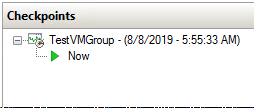

Hyper-V Manager에 표시된 가상 머신 체크포인트
그림 3: Hyper-V Manager에 표시된 가상 머신 체크포인트


복구 체크포인트: 이 예에서는 "MSCLOUD06"을 고객 환경에서 가상 머신이 상주하는 컴퓨터 이름으로 대체합니다. "TESTVM1"을 고객 환경의 가상 머신 이름으로 대체합니다.

체크포인트 유형을 식별하는 데 사용되는 PowerShell 명령
그림 4: 체크포인트 유형을 식별하는 데 사용되는 PowerShell 명령


Affected Products

Microsoft Windows Server 2016, Microsoft Windows Server 2019

Products

PowerEdge FC640, PowerEdge M640, PowerEdge M640 (for PE VRTX), PowerEdge MX740C, PowerEdge MX750c, PowerEdge MX760c, PowerEdge MX840C, PowerEdge R240, PowerEdge R250, PowerEdge R260, PowerEdge R340, PowerEdge R350, PowerEdge R360, PowerEdge R440 , PowerEdge R450, PowerEdge R540, PowerEdge R550, PowerEdge R640, PowerEdge R6415, PowerEdge R650, PowerEdge R650xs, PowerEdge R6515, PowerEdge R6525, PowerEdge R660, PowerEdge R660xs, PowerEdge R6615, PowerEdge R6625, PowerEdge R740, PowerEdge R740XD, PowerEdge R740XD2, PowerEdge R7415, PowerEdge R7425, PowerEdge R750, PowerEdge R750XA, PowerEdge R750xs, PowerEdge R7515, PowerEdge R7525, PowerEdge R760, PowerEdge R760XA, PowerEdge R760xd2, PowerEdge R760xs, PowerEdge R7615, PowerEdge R7625, PowerEdge R840, PowerEdge R860, PowerEdge R940, PowerEdge R940xa, PowerEdge R960, PowerEdge T140, PowerEdge T160, PowerEdge T340, PowerEdge T350, PowerEdge T360, PowerEdge T440, PowerEdge T550, PowerEdge T560, PowerEdge T640 ...
Article Properties
Article Number: 000134299
Article Type: Solution
Last Modified: 05 Feb 2025
Version:  7
Find answers to your questions from other Dell users
Support Services
Check if your device is covered by Support Services.