Windows Server:Hyper-V 实时迁移可能会因恢复检查点而失败。

Summary: 本文包含有关使用备份软件执行虚拟机备份时 Hyper-V 实时迁移期间可能发生的错误的信息。错误是“Virtual machine failed to generate VHD tree: 'Catastrophic failure'('0x8000FFFF').”以及“Virtual machine failed to generate VHD tree: 'The system cannot find the file specified.'('0x80070002')”。 ...

This article applies to This article does not apply to This article is not tied to any specific product. Not all product versions are identified in this article.

Symptoms


文章摘要:当恢复检查点用于虚拟机 (VM) 时,Hyper-V 主机之间的 Hyper-V 实时迁移可能会失败。


问题:
 

Virtual machine failed to generate VHD tree: 'Catastrophic failure'('0x8000FFFF'). 

Virtual machine failed to generate VHD tree: 'The system cannot find the file specified.'('0x80070002').


实时迁移失败并超时。事件查看器中位于“Applications and Services Logs\Microsoft\Windows”下面的 Hyper-V-VMMS 日志会报告源上的实时迁移超时或失败。尝试使用 PowerShell 删除恢复检查点可能会生成以下错误之一。

提醒:Hyper-V 备份解决方案通常使用 Hyper-V 恢复检查点来执行备份。Avamar 在执行备份时使用恢复检查点。
提醒:请勿为了解决本文中描述的症状而删除以下方面。”C:\ProgramData\Microsoft\Windows\Hyper-V\Groups\groupregistry.vmcx”。删除此文件可能会导致无法解决此问题。请拨打以下号码联系戴尔技术支持。

Cause

本文包含有关使用备份软件执行虚拟机备份时 Hyper-V 实时迁移期间可能发生的错误的信息。错误是“Virtual machine failed to generate VHD tree: 'Catastrophic failure'('0x8000FFFF').”以及“Virtual machine failed to generate VHD tree: 'The system cannot find the file specified.'('0x80070002')”。

Resolution

解决方案:


具有 ProSupport 或 ProSupport Plus 服务的戴尔客户应致电 800-456-3355 联系戴尔技术支持以获得帮助。否则,请致电 800-782-4362 联系 Dell Avamar 技术支持以获得帮助。
 

其它信息:


如果之前实时迁移的虚拟机不再在原始源节点上运行,则 Windows 无法删除检查点或虚拟机组。此孤立的检查点或虚拟机组可能会导致后续 Hyper-V 备份失败。由于孤立的虚拟机组的缘故,它还可能会阻止该虚拟机实时迁移到另一个群集节点。


在执行手动清理过程之前,请查看下面的 Microsoft URL。此知识库文章提供了解决方案,可解决因环境因素导致的实时迁移故障:


https://learn.microsoft.com/en-us/troubleshoot/windows-server/virtualization/troubleshoot-live-migration-issuesThis hyperlink is taking you to a website outside of Dell Technologies.


识别 Hyper-V 检查点类型

以下两个 PowerShell 命令示例可帮助确定检查点(也称为快照)的类型。
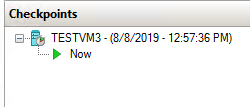
Hyper-V Manager 中显示的虚拟机检查点
图 1:Hyper-V Manager 中显示的虚拟机检查点


标准检查点:在此示例中,将“TESTVM3”名称更改为客户环境中的虚拟机的名称。

 用于识别检查点类型的 PowerShell 命令
图 2:用于识别检查点类型的 PowerShell 命令。


Hyper-V Manager 中显示的虚拟机检查点
图 3:Hyper-V Manager 中显示的虚拟机检查点


恢复检查点:在此示例中,将“MSCLOUD06”替换为客户环境中虚拟机所在的计算机的名称。将“TESTVM1”替换为客户环境中的虚拟机的名称。

用于识别检查点类型的 PowerShell 命令
图 4:用于识别检查点类型的 PowerShell 命令。


Affected Products

Microsoft Windows Server 2016, Microsoft Windows Server 2019

Products

PowerEdge FC640, PowerEdge M640, PowerEdge M640 (for PE VRTX), PowerEdge MX740C, PowerEdge MX750c, PowerEdge MX760c, PowerEdge MX840C, PowerEdge R240, PowerEdge R250, PowerEdge R260, PowerEdge R340, PowerEdge R350, PowerEdge R360, PowerEdge R440 , PowerEdge R450, PowerEdge R540, PowerEdge R550, PowerEdge R640, PowerEdge R6415, PowerEdge R650, PowerEdge R650xs, PowerEdge R6515, PowerEdge R6525, PowerEdge R660, PowerEdge R660xs, PowerEdge R6615, PowerEdge R6625, PowerEdge R740, PowerEdge R740XD, PowerEdge R740XD2, PowerEdge R7415, PowerEdge R7425, PowerEdge R750, PowerEdge R750XA, PowerEdge R750xs, PowerEdge R7515, PowerEdge R7525, PowerEdge R760, PowerEdge R760XA, PowerEdge R760xd2, PowerEdge R760xs, PowerEdge R7615, PowerEdge R7625, PowerEdge R840, PowerEdge R860, PowerEdge R940, PowerEdge R940xa, PowerEdge R960, PowerEdge T140, PowerEdge T160, PowerEdge T340, PowerEdge T350, PowerEdge T360, PowerEdge T440, PowerEdge T550, PowerEdge T560, PowerEdge T640 ...
Article Properties
Article Number: 000134299
Article Type: Solution
Last Modified: 05 Feb 2025
Version:  7
Find answers to your questions from other Dell users
Support Services
Check if your device is covered by Support Services.