IDPA:如果保護儲存容量超過 80%,操作介面會顯示紅色驚嘆號
Summary: 在 IDPA 版本 2.5 和 2.6 上,如果 Data Domain 容量超過 80%,Data Domain 儀表板可能會顯示紅色驚嘆號。這是已知問題,發生此問題是因為 ACM 無法 sendMail 通知此問題。
This article applies to
This article does not apply to
This article is not tied to any specific product.
Not all product versions are identified in this article.
Symptoms
Data Domain 儀表板會顯示紅色驚嘆號表示檔案系統和授權狀態。
UI 可能會顯示下列錯誤:
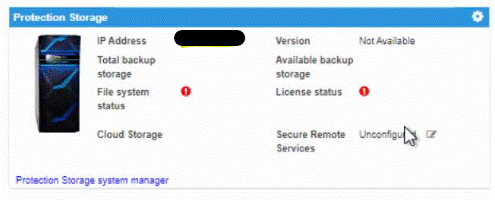
注意:此問題只會在下列情況下影響下列系統 (必須同時符合兩種情況):
- Data Domain 容量超過 80%
- IDPA ACM 無法傳送電子郵件警示,此 sendMail 工作失敗並顯示無效地址例外狀況。
- 在 IDPA 版本 2.5 和 2.6 中出現問題
在 ACM 上確認下列錯誤訊息為
/usr/local/dataprotection/var/server_data/logs/server.log:
2020-10-06 15:10:34,234 ERROR [Thread-44670]-dashboard.DataDomainDashboard: Used capacity 85.11485123384665% is more than threshold capacity 85.0%
2020-10-06 10:25:20,486 ERROR [Thread-41409]-> SMTP Email Send failedjavax.mail.SendFailedException: Send failure (com.sun.mail.util.MailConnectException: Couldn't connect to host, port: x.x.x.x, 25; timeout 10000 (java.net.SocketTimeoutException: connect timed out))
Cause
此 Data Domain 報告問題是 sendMail 失敗的副作用。ACM 嘗試擷取 Data Domain 儀表板的資訊,發現 DDVE 容量超過 85%。然後,它嘗試將警報發送到埠 25 的簡單郵件傳輸協定 (SMTP) 電子郵件伺服器。當 sendMail 無法發送電子郵件警報時,它會將不完整的資訊傳回 Web 應用程式。這就是為什麼 Data Domain 儀表板上會出現紅色標記的原因。若要診斷此問題,請嘗試在 ACM 上執行 sendmail,並檢查電子郵件伺服器和連接埠 25 是否可從 ACM 連線。
Resolution
此問題已在 IDPA 版本 2.6.1 及更新版本中解決。Dell Technologies 建議升級至目標程式碼。
Affected Products
PowerProtect Data Protection SoftwareArticle Properties
Article Number: 000180452
Article Type: Solution
Last Modified: 01 Apr 2025
Version: 5
Find answers to your questions from other Dell users
Support Services
Check if your device is covered by Support Services.