IDPA:如果保护存储容量超过 80%,仪表板会显示红色感叹号
Summary: 在 IDPA 版本 2.5 和 2.6 上,如果 Data Domain 容量超过 80%,Data Domain 控制面板可能会显示红色感叹号。这是一个已知问题,因为 ACM 无法发送邮件来通知此问题。
This article applies to
This article does not apply to
This article is not tied to any specific product.
Not all product versions are identified in this article.
Symptoms
Data Domain 控制面板对文件系统和许可证状态显示红色感叹号。
UI 可能会显示以下错误:
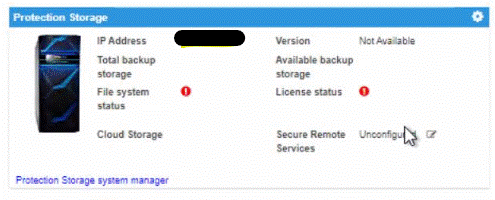
提醒:此问题仅影响满足以下条件的以下系统(必须同时满足这两个条件)
- Data Domain 容量超过 80%
- IDPA ACM 无法发送电子邮件警报,此 sendMail 任务失败,出现无效地址异常。
- IDPA 版本 2.5 和 2.6 中出现问题
在 ACM 上验证以下错误消息:
/usr/local/dataprotection/var/server_data/logs/server.log:
2020-10-06 15:10:34,234 ERROR [Thread-44670]-dashboard.DataDomainDashboard: Used capacity 85.11485123384665% is more than threshold capacity 85.0%
2020-10-06 10:25:20,486 ERROR [Thread-41409]-> SMTP Email Send failedjavax.mail.SendFailedException: Send failure (com.sun.mail.util.MailConnectException: Couldn't connect to host, port: x.x.x.x, 25; timeout 10000 (java.net.SocketTimeoutException: connect timed out))
Cause
此 Data Domain 报告问题是 sendMail 失败的副作用。ACM 尝试获取 Data Domain 控制面板的信息,发现 DDVE 容量超过 85%。然后,它尝试通过端口 25 将警报发送到简单邮件传输协议 (SMTP) 电子邮件服务器。当 sendMail 无法发送电子邮件警报时,它会将不完整的信息返回给 Web 应用程序。这就是为什么 Data Domain 控制面板上有红色标记的原因。要诊断问题,请尝试在 ACM 上运行 sendmail,并检查是否可以从 ACM 访问电子邮件服务器和端口 25。
Resolution
此问题已在 IDPA 版本 2.6.1 及更高版本中得到解决。Dell Technologies 建议升级到目标代码。
Affected Products
PowerProtect Data Protection SoftwareArticle Properties
Article Number: 000180452
Article Type: Solution
Last Modified: 01 Apr 2025
Version: 5
Find answers to your questions from other Dell users
Support Services
Check if your device is covered by Support Services.