快取的使用者認證無法用於 Dell Encryption Enterprise 的端點
Summary: 安裝 Dell Encryption Enterprise 原則式加密後,使用者便無法利用快取的登入資料解鎖端點。
This article applies to
This article does not apply to
This article is not tied to any specific product.
Not all product versions are identified in this article.
Symptoms
受影響的產品:
- Dell Encryption Enterprise
受影響的作業系統:
- Windows
Cause
不適用
Resolution
在使用 Dell Encryption Enterprise 原則式加密但未連線至網域網路的電腦上。使用者可在開機時成功登入端點,但在手動或透過螢幕保護程式或休眠鎖定端點後,便無法解鎖端點。

圖 1:(僅英文)Dell Encryption Enterprise 原則基礎加密錯誤
Dell Data Security 管理主控台上的此端點已啟用下列原則式加密原則:

圖 2:(僅英文)Polciy 型加密原則
使用者正在使用username@upn登入端點。
由於使用者名稱中的 UPN 未知,因此不會啟動此使用者的 Shield。Shield 本機主控台中的裝置啟用 ID 為紅色:
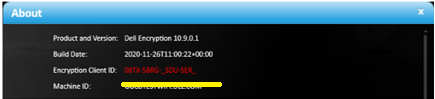
圖 3:(僅英文)關於
在 C:\ProgramData\Dell\Dell Data Protection\Encryption 的CMGShieled.log中,可以看到以下錯誤:
[04.16.21 14:38:16:017 XmlRpcActivate.: 129 H] Activation - Requesting activation for user@upn.com
[04.16.21 14:38:16:126 XmlRpcActivate.: 184 H] Activation - Sending activation request for user@upn.com
[04.16.21 14:38:16:456 XmlRpcActivate.: 207 E] Activation - Activation request failed [device server fault:0x13ec]: Auth failure: Error authenticating user user@upn.com
[04.16.21 14:38:16:456 Activator.cpp: 858 E] Activation - Unable to activate new user DOMAIN\user [MS error = 5100]
[04.16.21 14:38:16:456 Activator.cpp: 871 E] Activation - Verify network connectivity to the Dell Security Server at "servername.DOMAIN.local" and Dell Device Server at "https:// servername.DOMAIN.local:8443/xapi/"
此問題的發生是因為存在「 封鎖未受管理的網域認證存取 」原則,以及有未受管理的登入使用者。
若要解決此問題,請按照以下步驟在遠端管理控制臺上添加缺少的 UPN:
- 從網頁瀏覽器,前往位於 https://servername 的 Dell Data Security 管理主控台。DOMAIN.local:8443/webui。
注意:範例為 servername。DOMAIN.local 可能與環境中的伺服器 DNS 不同。連接埠 8443 可能與環境中的遠端管理主控台連接埠不同。如需存取遠端管理主控台的更多資訊,請參閱 如何存取 Dell Data Security 或 Dell Data Protection 伺服器管理主控台。
- 登入 Dell Data Security 管理主控台。

圖 4:(僅英文)Dell Data Security 登入。
- 在左側功能表窗格中,按一下填入,然後按一下網域。

圖 5:(僅英文)按一下網域。
- 按一下 「網域名稱」:
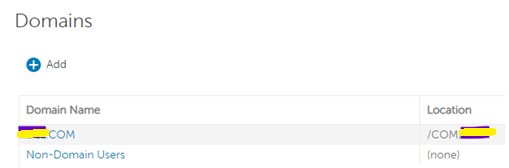
圖 6:(僅英文)按一下網域名稱。
- 按一下 設定 標籤,然後按照以下步驟操作:

圖 7:(僅英文)按一下設定。
- 填入網域服務帳戶的 密碼 。
- 在別名欄位中輸入每個缺少的 UPN 後綴,然後按下添加。
- 按一下更新網域。

圖 8:(僅英文)更新網域資訊。
注意:最佳實務是在 Dell Data Security 管理主控台上列出 AD 網域中使用的所有 UPN。
或者,作為因應措施,您可以在 Dell Data Security 管理主控台上停用以下原則式加密原則:
封鎖未受管理的網域登入資料存取。
這不會修復使用者的激活問題,但允許他們使用緩存的憑據。
如要聯絡支援部門,請參閱 Dell Data Security 國際支援電話號碼。
請前往 TechDirect,以線上產生技術支援要求。
如需更多深入見解與資源,請加入 Dell 安全性社群論壇。
Affected Products
Dell EncryptionArticle Properties
Article Number: 000185556
Article Type: Solution
Last Modified: 03 Jun 2024
Version: 11
Find answers to your questions from other Dell users
Support Services
Check if your device is covered by Support Services.