Stappen voor het resetten van de MaxxAudio Pro-functionaliteit
Summary: Informatie over het inschakelen van MaxxAudio Pro-functionaliteit nadat deze verloren is gegaan.
This article applies to
This article does not apply to
This article is not tied to any specific product.
Not all product versions are identified in this article.
Symptoms
Cause
Er is geen informatie over de oorzaak beschikbaar.
Resolution
MaxxAudio Pro resetten
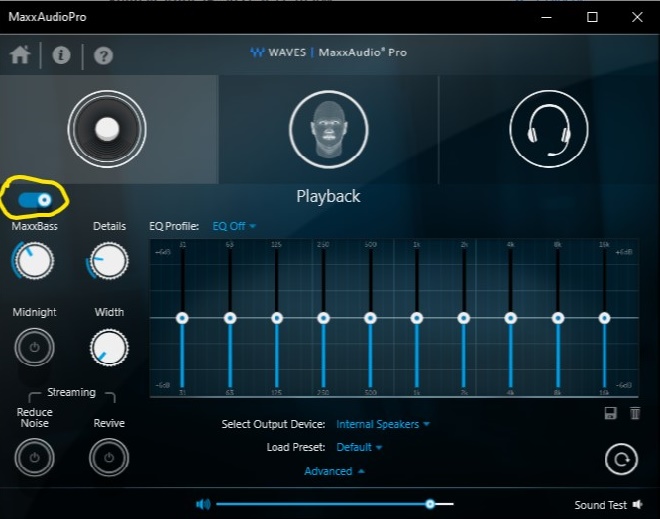
Om de MaxxAudio Pro-applicatie te resetten, schakelt u de functie "Playback" van MaxxAudio Pro uit en in. Hiermee worden alle functies in de MaxxAudio Pro-applicatie gereset en kunt u de audio-instellingen aanpassen.
Tijdelijke oplossing
De eenvoudigste manier om dit probleem op te lossen, is door de functie "Afspelen" in de MaxxAudio Pro-applicatie uit en in te schakelen.
Voor meer informatie:
De Waves "MaxxAudio Pro"-applicatie installeren via de opdrachtregel:
- Download de nieuwste versie van de Waves MaxxAudio Pro applicatie van de Dell Support website.
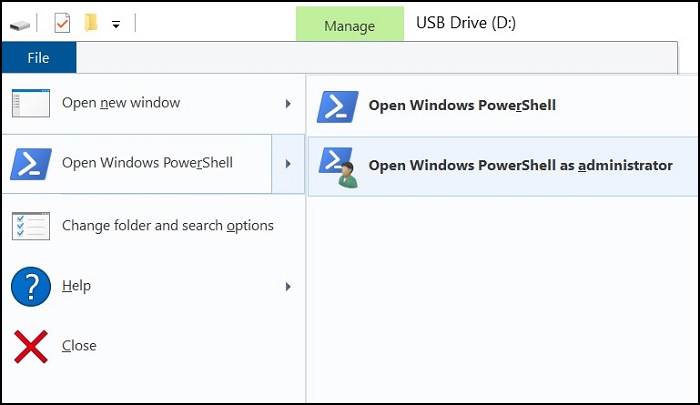
- Voer Powershell uit als beheerder.
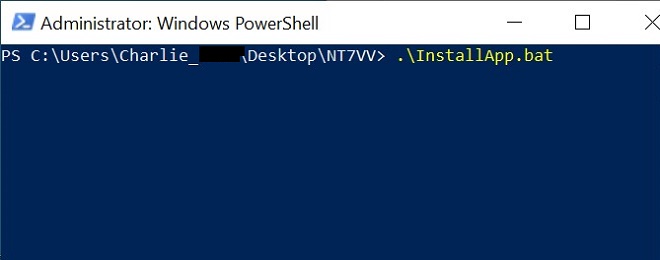
- Voer de volgende opdracht uit in de map waarin het applicatiebestand is gedownload: .\InstallApp.bat
Article Properties
Article Number: 000187742
Article Type: Solution
Last Modified: 10 May 2026
Version: 4
Find answers to your questions from other Dell users
Support Services
Check if your device is covered by Support Services.