Microsoft應用程式代理的 SSMS 外掛程式無法安裝
Summary: 適用於 Microsoft 應用程式代理的 SSMS 外掛程式無法安裝。
This article applies to
This article does not apply to
This article is not tied to any specific product.
Not all product versions are identified in this article.
Symptoms
在安裝 Microsoft 應用程式代理程式期間,安裝會報告以下錯誤:
應用程式事件記錄還報告以下錯誤:
此錯誤不會禁止應用程式代理程式正常運行:
"There is a problem with this Windows Installer Package. A program run as part of the setup did not finish as expected. Contact your support personnel or package vendor."
Product: Microsoft Application Agent -- Error 1722. There is a problem with this Windows Installer package. A program run as part of the setup did not finish as expected. Contact your support personnel or package vendor. Action AddinReg, location: C:\Program Files\DPSAPPS\MSAPPAGENT\bin\, command: "C:\Windows\Microsoft.NET\Framework\v4.0.30319\RegAsm.exe" /codebase /tlb "C:\Program Files\DPSAPPS\MSAPPAGENT\bin\DDSSMSAddin.dll"
- 可以從應用程式代理程式執行備份。
- TSQ 和命令行腳本是從應用程式代理程式正確生成的。
- 從應用程式代理複製的 TSQ 腳本從 SSMS 正確運行。
Cause
根本原因正在調查中。
Resolution
可以從命令列手動安裝外掛程式。若要確保外掛程式正確安裝,請在運行此命令時確認 SSMS 未在此主機上運行。
- 按一下 開始 並輸入 cmd。
- 右鍵按下 命令提示符程式物件並選擇 更多,然後按兩下 以管理員身份運行。
- 前往 VSIX 可執行檔所在的目錄路徑。
- 例如:C:\Program Files (x86)\Microsoft Visual Studio 14.0\Common7\IDE
- 此路徑可能因主機而略有不同。
- 使用以下範例命令解除安裝目前的 VSIX:
- Vsixinstaller /a /uninstall:89089cd1-c652-42b2-8fd1-209e9ade1a2c
- 使用此範例命令重新安裝 VSIX。這可能因主機而異。
- vsixinstaller /a “C:\Program Files\DPSAPPS\MSAPPAGENT\bin\plugin\NWSSMSVSIXPackage.vsix”
- 便條:如果 DDBMA 未安裝在預設位置,請務必變更此路徑。
注意:命令會立即執行,但可能會延遲數分鐘。片刻之後,螢幕上會出現以下框:
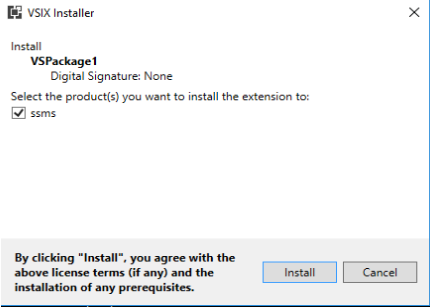
- 按一下安裝。

- 啟動 SSMS 以驗證外掛程式是否已安裝到 SSMS 中。

Affected Products
Data Backup & Protection SoftwareArticle Properties
Article Number: 000193124
Article Type: Solution
Last Modified: 31 Mar 2022
Version: 1
Find answers to your questions from other Dell users
Support Services
Check if your device is covered by Support Services.