适用于 Microsoft 应用程序代理的 SSMS 插件安装失败
Summary: 适用于 Microsoft 应用程序代理的 SSMS 插件安装失败。
This article applies to
This article does not apply to
This article is not tied to any specific product.
Not all product versions are identified in this article.
Symptoms
在安装 Microsoft 应用程序代理期间,安装报告以下错误:
应用程序事件日志还报告以下错误:
此错误不会禁止应用程序代理正常运行:
"There is a problem with this Windows Installer Package. A program run as part of the setup did not finish as expected. Contact your support personnel or package vendor."
Product: Microsoft Application Agent -- Error 1722. There is a problem with this Windows Installer package. A program run as part of the setup did not finish as expected. Contact your support personnel or package vendor. Action AddinReg, location: C:\Program Files\DPSAPPS\MSAPPAGENT\bin\, command: "C:\Windows\Microsoft.NET\Framework\v4.0.30319\RegAsm.exe" /codebase /tlb "C:\Program Files\DPSAPPS\MSAPPAGENT\bin\DDSSMSAddin.dll"
- 可以从应用程序代理运行备份。
- TSQ 和命令行脚本可从应用程序代理正确生成。
- 从应用程序代理复制的 TSQ 脚本在 SSMS 中正常运行。
Cause
根本原因正在调查中。
Resolution
可以从命令行手动安装插件程序。要确保插件程序正确安装,请在运行此命令时确认 SSMS 未在此主机上运行。
- 单击 开始 并键入 cmd。
- 右键单击 命令提示符程序对象并选择 更多,然后单击以 管理员身份运行。
- 转到 VSIX 可执行文件所在的目录路径。
- 例如:C:\Program Files (x86)\Microsoft Visual Studio 14.0\Common7\IDE
- 此路径可能因主机而略有不同。
- 使用此示例命令卸载当前 VSIX:
- vsixinstaller /a /uninstall:89089cd1-c652-42b2-8fd1-209e9ade1a2c
- 使用此示例命令重新安装 VSIX。这可能因主机而异。
- vsixinstaller /a “C:\Program Files\DPSAPPS\MSAPPAGENT\bin\plugin\NWSSMSVSIXPackage.vsix”
- 注意:如果 DDBMA 未安装在默认位置,请确保更改此路径。
提醒:该命令会立即运行,但可能会延迟几分钟。过了一会儿,屏幕上将显示以下框:
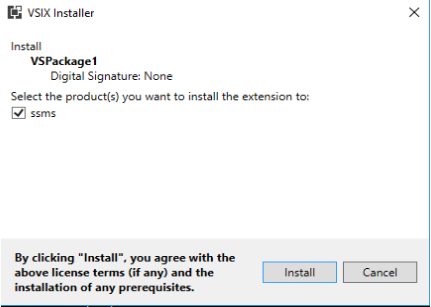
- 单击 Install。
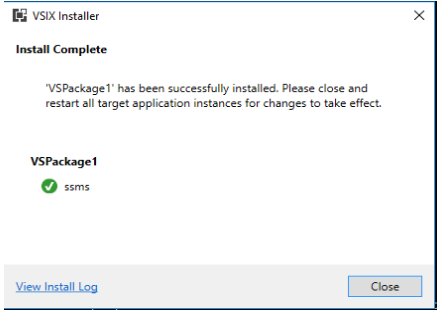
- 启动 SSMS 以验证插件是否已安装到 SSMS 中。

Affected Products
Data Backup & Protection SoftwareArticle Properties
Article Number: 000193124
Article Type: Solution
Last Modified: 31 Mar 2022
Version: 1
Find answers to your questions from other Dell users
Support Services
Check if your device is covered by Support Services.