Avamar: Hyper-V backup "GUID for target 'VM Name' not matching with any available target(s) on the host(s)"
Summary: This article addresses Hyper-V backup messages about VMs being skipped due to a GUID mismatch.
This article applies to
This article does not apply to
This article is not tied to any specific product.
Not all product versions are identified in this article.
Symptoms
A Hyper-V backup shows in the Avamar Administrator UI or AUI as Completed with Exceptions.
The logs report the following warning messages:
The logs report the following warning messages:
avhypervvss Warning <43708>: GUID '11111-AAAA-2222-3333-444444' for target 'TESTVM' not matching with any available target(s) on the host(s)
avhypervvss Warning <43709>: Target virtual machine 'TESTVM<11111-AAAA-2222-BB33-444444>' is not matching to any available targets. Please check GUID and Target name against available targets on the host(s) Skipping from backup.
avhypervvss Warning <41605>: The following Virtual Machines have failed:
avhypervvss Warning <41604>: [1] TESTVM<11111-AAAA-2222-BB33-444444>
Cause
The messages occur when manually selecting VMs to backup in the dataset.
When the VM (along with the GUID) was originally selected in the dataset, the GUID (VMID) of the VM then was different to what it is now.
The GUID may have been manually changed, or the VM was re-created with a new GUID.
When the VM (along with the GUID) was originally selected in the dataset, the GUID (VMID) of the VM then was different to what it is now.
The GUID may have been manually changed, or the VM was re-created with a new GUID.
Resolution
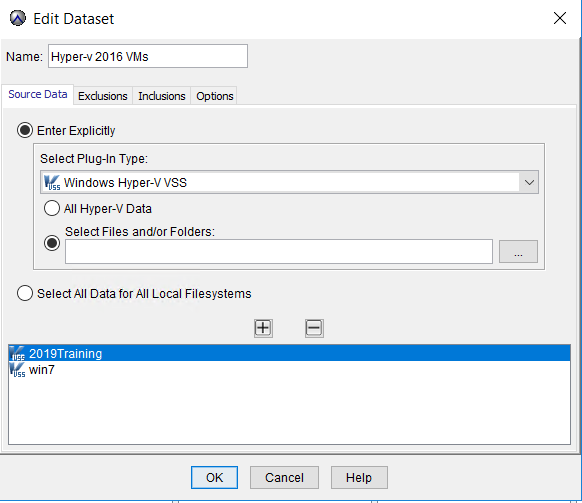
- Edit the Source Data tab in the dataset.
- Remove the failed VM
- Browse and select that same VM back into the dataset.
Affected Products
Avamar, Avamar Plug-in for Hyper-V VSSArticle Properties
Article Number: 000202398
Article Type: Solution
Last Modified: 20 Jul 2023
Version: 2
Find answers to your questions from other Dell users
Support Services
Check if your device is covered by Support Services.