Unisphere for PowerMAX:Unisphere GUI 僅列出遠端陣列,而非本機陣列。Symcli 可同時列出本機和遠端陣列。
Summary: Unisphere GUI 僅列出遠端陣列,而非本機陣列。Symcli 可同時列出本機和遠端陣列。
This article applies to
This article does not apply to
This article is not tied to any specific product.
Not all product versions are identified in this article.
Symptoms
Unisphere for PowerMAX GUI 僅列出遠端陣列,而非本機陣列。但是,我們可以從 symcli 列出本機和遠端陣列。
嘗試以包括smc在內的多個管理員使用者登入,但沒有變更:
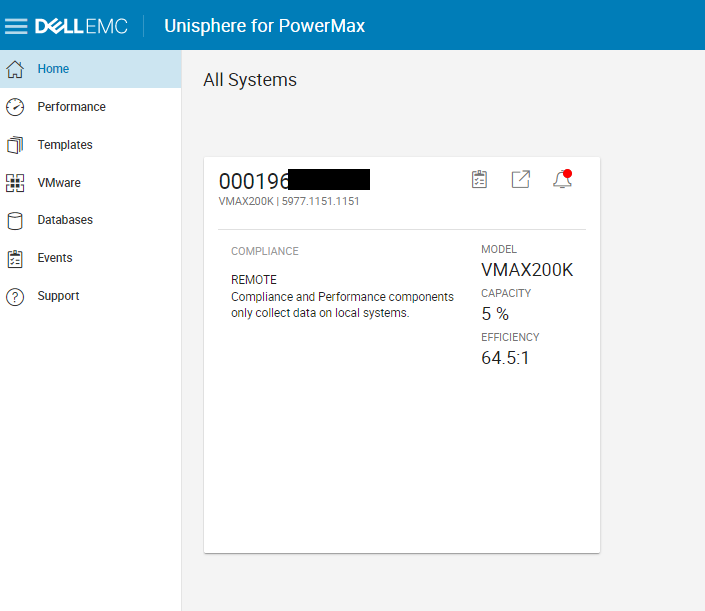
Ran 「syminq」並驗證陣列已設定 GK。
發現陣列同時啟用 symacl 和 symauth
C:\>symcfg list

                                   S Y M M E T R I X

                                              Mcode    Cache      Num Phys  Num Symm
    SymmID       Attachment  Model            Version  Size (MB)  Devices   Devices

    000197XXXXX Local       PowerMax_8000    5978      880640         4      5440
    000197YYYYY Local       PowerMax_8000    5978      880640        14      4476
    000197ZZZZZ Local       VMAX950F         5978      1939456        2      5004
    000196*******  Remote      VMAX200K      5977      446464         0      3879
嘗試以包括smc在內的多個管理員使用者登入,但沒有變更:
Ran 「syminq」並驗證陣列已設定 GK。
發現陣列同時啟用 symacl 和 symauth
Cause
Symacl 存取權限問題
Resolution
如需解決方法,請參閱 LKB# 000204041 。一旦 symacl 問題解決後,我們就能在 Unisphere GUI 上探索本機陣列。
Affected Products
Solutions Enabler, Unisphere for PowerMaxArticle Properties
Article Number: 000204042
Article Type: Solution
Last Modified: 11 Jul 2024
Version: 3
Find answers to your questions from other Dell users
Support Services
Check if your device is covered by Support Services.