PowerProtect Data Manager: When attempting to restore an asset, the File Indexing status shows "In Progress"
Summary: PowerProtect Data Manager: When attempting to restore an asset, the File Indexing status shows "In Progress".
This article applies to
This article does not apply to
This article is not tied to any specific product.
Not all product versions are identified in this article.
Symptoms
After a successful backup of a Virtual Machine, File System or NAS asset in PowerProtect Data Manager, the indexing status of those assets shows "In Progress".
When attempting to restore the data, the Index status shows "In Progress"
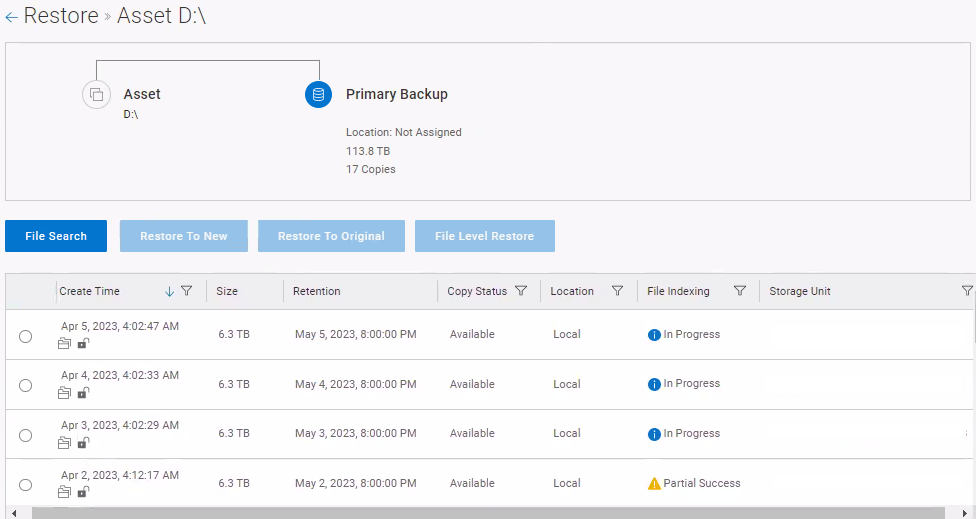
When attempting to perform a file search, the data may or may not be available.
When attempting to restore the data, the Index status shows "In Progress"
When attempting to perform a file search, the data may or may not be available.
Cause
When syncing, the VMDM\File System\NAS asset copies have metaDataIndexing status as Null or Running from last syncLimit days.
If the number of records returned exceeds 10K, it throws an exception which blocks subsequent sync process calls.
If the number of records returned exceeds 10K, it throws an exception which blocks subsequent sync process calls.
Resolution
This issue is resolved in PowerProtect Data Manager 19.14 (19.14.0-1).
PowerProtect Data Manager kits are available for download from https://dell.com/support.
PowerProtect Data Manager kits are available for download from https://dell.com/support.
Article Properties
Article Number: 000213451
Article Type: Solution
Last Modified: 07 Sept 2023
Version: 3
Find answers to your questions from other Dell users
Support Services
Check if your device is covered by Support Services.