NetWorker: AD over SSL user logins not working after adding/updating external auth in NetWorker 19.11
Summary: NetWorker was integrated with external authorities using "AD over SSL" option. The external authentication was either newly added in 19.11 or was created in an earlier integration but was updated in 19.11.x. AD user logins fail with "invalid username or password" even though the credentials are correct. ...
Symptoms
- AD over SSL authentication fails in NetWorker with "invalid username or password"

- Using
authc_mgmtcommands to check user/group membership of AD users reports that it cannot find the user/group.
authc_mgmt -u Administrator -p 'NMC_ADMIN_PASSWORD' -e query-ldap-users-for-group -D query-tenant=TENANT_NAME -D query-domain=DOMAIN_NAME -D group-name=AD_GROUP_NAME
authc_mgmt -u Administrator -p 'NMC_ADMIN_PASSWORD' -e query-groups-for-user -D query-tenant=TENANT_NAME -D query-domain=DOMAIN_NAME -D user-name=AD_USER_NAME
404: Server message: A group/user with the name GROUP/USER_NAME does not exist in authority EXTERNAL_AUTHORITY_RESOURCE_NAME
nve:~ # authc_mgmt -u Administrator -p '!Password1' -e query-ldap-users-for-group -D query-tenant=default -D query-domain=networker.lan -D group-name=NetWorker_Admins
ERROR [main] (DefaultLogger.java:222) - Error while performing Operation:
com.emc.brs.auth.common.exception.BRHttpErrorException: 404 . Server message: A group with the name NetWorker_Admins does not exist in authority LDAPS
        at com.emc.brs.auth.client.template.impl.DefaultBRResponseErrorHandler.handleError(DefaultBRResponseErrorHandler.java:65) ~[auth-cli-with-dependencies.jar:?]
        at org.springframework.web.client.ResponseErrorHandler.handleError(ResponseErrorHandler.java:63) ~[auth-cli-with-dependencies.jar:?]
        at org.springframework.web.client.RestTemplate.handleResponse(RestTemplate.java:825) ~[auth-cli-with-dependencies.jar:?]
        at org.springframework.web.client.RestTemplate.doExecute(RestTemplate.java:783) ~[auth-cli-with-dependencies.jar:?]
        at org.springframework.web.client.RestTemplate.execute(RestTemplate.java:717) ~[auth-cli-with-dependencies.jar:?]
        at org.springframework.web.client.RestTemplate.exchange(RestTemplate.java:637) ~[auth-cli-with-dependencies.jar:?]
        at com.emc.brs.auth.client.service.impl.DefaultBRAdminUserService.getLdapUserListForGroup(DefaultBRAdminUserService.java:239) ~[auth-cli-with-dependencies.jar:?]
        at com.emc.brs.auth.cli.commands.LdapUserGroupCommand.queryUsersForGroup(LdapUserGroupCommand.java:134) ~[auth-cli-with-dependencies.jar:?]
        at com.emc.brs.auth.cli.commands.LdapUserGroupCommand.execute(LdapUserGroupCommand.java:77) ~[auth-cli-with-dependencies.jar:?]
        at com.emc.brs.auth.cli.core.AuthMgmtCmdExecutor.execute(AuthMgmtCmdExecutor.java:142) [auth-cli-with-dependencies.jar:?]
        at com.emc.brs.auth.cli.core.AuthMgmt.executeCommand(AuthMgmt.java:170) [auth-cli-with-dependencies.jar:?]
        at com.emc.brs.auth.cli.core.AuthMgmt.main(AuthMgmt.java:79) [auth-cli-with-dependencies.jar:?]
ERROR [main] (DefaultLogger.java:190) - Error executing command. Failure: 404 . Server message: A group with the name NetWorker_Admins does not exist in authority LDAPS
Error executing command. Failure: 404 . Server message: A group with the name NetWorker_Admins does not exist in authority LDAPS
authc reports do not exist in Active Directory exist. See Additional Info field for commands for verifying directly from the domain server.
- AD over SSL was integrated in 19.11.x following: NetWorker: How to configure "AD over SSL" (LDAPS) from The NetWorker Web User Interface (NWUI)
Cause
This issue was raised to NetWorker engineering.
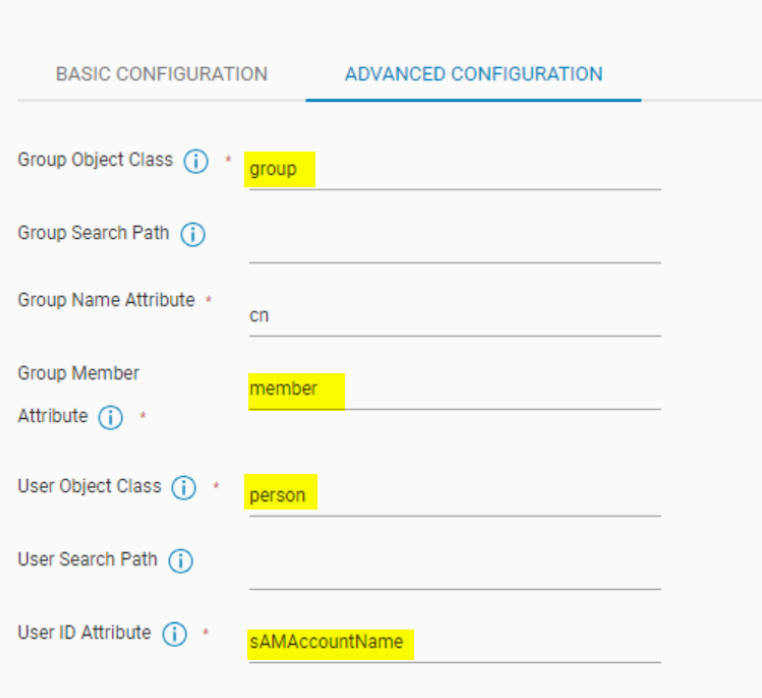
The default parameters used in the Advanced Configuration tab are not typically used by Active Directory:

These values are typically used for Lightweight Directory Access Protocol (LDAP) servers (for example, OpenLDAP). The default values commonly used for Microsoft Active Directory are:
This issue impacts the following NetWorker releases:
- 19.10.0.0 -> 19.10.0.6
- 19.11.0.0 -> 19.11.0.3
Resolution
This issue is addressed in the following NetWorker releases:
- 19.10.0.7
- 19.11.0.4
Software and documentation are available through: https://www.dell.com/support/product-details/product/networker/drivers
Workaround:
Edit the external authority resource from NetWorker Web User Interface (NWUI) to use the default parameters in the Advanced Configuration tab:
- Group Object Class:
group - Group Member Attribute:
member - User Object Class:
personoruser - User ID Attribute:
sAMAccountName
Save the changes and verify if AD over SSL authentication works with NetWorker interfaces such as the NetWorker Management Console (NMC) or NWUI.
Additional Information
NetWorker: How To configure LDAPS Authentication
AD group membership can be confirmed on the domain server using the following PowerShell commands.
Show which AD users belong to a group.
Get-ADGroupMember -Identity "AD_GROUP_NAME" | Select-Object Name, SamAccountName, ObjectClass, DistinguishedName
Show which AD groups a user belongs to:
Get-ADUser -Identity "AD_USER_NAME" -Properties MemberOf | Select-Object -ExpandProperty MemberOf | ForEach-Object { Get-ADGroup $_ | Select-Object Name, ObjectClass, DistinguishedName }