PowerStore: Maintenance Window is automatically enabled for manual maintenance operations
Summary: The maintenance Window (managing Support Notifications) setting is automatically enabled to stop alert notifications when a node or appliance is manually rebooted or shutdown.
This article applies to
This article does not apply to
This article is not tied to any specific product.
Not all product versions are identified in this article.
Symptoms
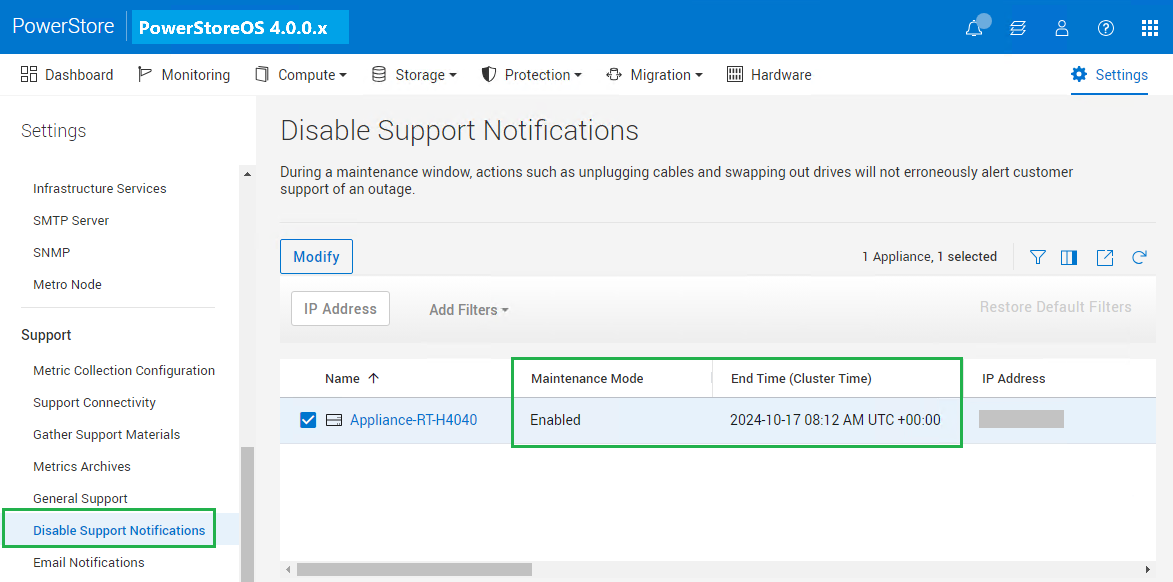
- The Maintenance Window (a.k.a. Maintenance Mode managing Support Notifications) setting is automatically enabled when a node or appliance is manually rebooted or shutdown, and an appliance does not send alert notifications while it is enabled.
- Users may find that this setting is automatically enabled using PowerStore Manager > Settings > Disable Support Notifications tab after manual node or appliance maintenance operations.
Cause
- PowerStoreOS has a feature called Maintenance Window (Maintenance Mode) that allows customers to specify a period in hours to stop sending alert notifications using Support Connectivity, SMTP, and SNMP.
- By design, it is automatically enabled with a pre-defined hours for certain manual maintenance operations as described below either using PowerStore Manager or CLI (serviceability commands), and it remains enabled until one or more pre-defined hours elapse.
- PowerStoreOS 3.6.x and below:
- Node reboot: 1 hour
- Appliance reboot: 1 hour
- Node shutdown: 1 hour
- Appliance shutdown: 1 hour
- PowerStoreOS 4.0.x:
- Node reboot: 1 hour
- Appliance reboot: 1 hour
- Node shutdown: 3 hours
- Appliance shutdown: 48 hours
- PowerStoreOS 3.6.x and below:
- It is also automatically enabled during PowerStoreOS Upgrade (NDU) or Drive Firmware Upgrade (DFU) operations, and in this scenario, it is automatically disabled when these jobs are completed.
Resolution
- This behavior is "as designed."
- Users can manually modify, enable, or disable the Maintenance Window setting from PowerStore Manager > Settings > Support: Disable Support Notifications.
Affected Products
PowerStoreOSArticle Properties
Article Number: 000247828
Article Type: Solution
Last Modified: 20 Feb 2025
Version: 2
Find answers to your questions from other Dell users
Support Services
Check if your device is covered by Support Services.