PowerFlex 3.x: UI에서 디바이스 특성을 사용할 수 없습니다.
Summary: 디바이스에 데이터를 표시해야 하는 모든 필드가 사용할 수 없음을 나타냄 - "N/A"
Symptoms
디바이스 세부 정보 아래의 고급 탭에서 디바이스 특성을 찾을 때 모든 필드가 "N/A"로 표시됩니다.
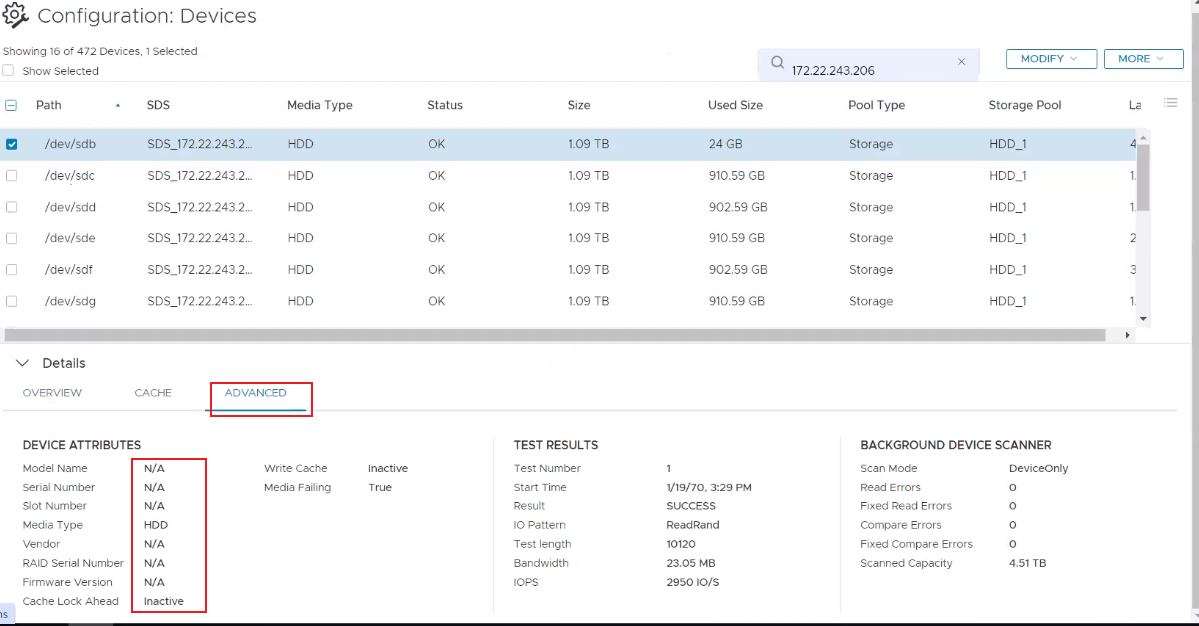
smartd(8)가 예상대로 실행 중이고 SMART 샘플링도 예상대로 작동합니다(아래 출력에서 랜덤 디스크가 테스트됨).
[root@test01 ~]# systemctl status smartd
● smartd.service - Self Monitoring and Reporting Technology (SMART) Daemon
   Loaded: loaded (/usr/lib/systemd/system/smartd.service; enabled; vendor preset: enabled)
   Active: active (running) since Thu 2024-02-29 12:00:24 CST; 2 months 0 days ago
     Docs: man:smartd(8)
           man:smartd.conf(5)
 Main PID: 26261 (smartd)
    Tasks: 1
   Memory: 1020.0K
   CGroup: /system.slice/smartd.service
           └─26261 /usr/sbin/smartd -n -q never
Feb 29 12:00:25 test01 smartd[26261]: Device: /dev/bus/0 [megaraid_disk_15], opened
Feb 29 12:00:25 test01 smartd[26261]: Device: /dev/bus/0 [megaraid_disk_15], [SEAGATE  ST1200MM0099     ST3...20 TB
Feb 29 12:00:25 test01 smartd[26261]: Device: /dev/bus/0 [megaraid_disk_15], is SMART capable. Adding to "m...list.
Feb 29 12:00:26 test01 smartd[26261]: Device: /dev/bus/0 [megaraid_disk_16], opened
Feb 29 12:00:26 test01 smartd[26261]: Device: /dev/bus/0 [megaraid_disk_16], [SEAGATE  ST1200MM0099     ST3...20 TB
Feb 29 12:00:26 test01 smartd[26261]: Device: /dev/bus/0 [megaraid_disk_16], is SMART capable. Adding to "m...list.
Feb 29 12:00:26 test01 smartd[26261]: Device: /dev/bus/0 [megaraid_disk_17], opened
Feb 29 12:00:26 test01 smartd[26261]: Device: /dev/bus/0 [megaraid_disk_17], [SEAGATE  ST1200MM0099     ST3...20 TB
Feb 29 12:00:26 test01 smartd[26261]: Device: /dev/bus/0 [megaraid_disk_17], is SMART capable. Adding to "m...list.
Feb 29 12:00:26 test01 smartd[26261]: Monitoring 0 ATA/SATA, 16 SCSI/SAS and 0 NVMe devices
Hint: Some lines were ellipsized, use -l to show in full.


[root@test01 ~]# smartctl -H /dev/sdp -d megaraid,14
smartctl 6.5 2016-05-07 r4318 [x86_64-linux-3.10.0-862.14.4.el7.x86_64] (local build)
Copyright (C) 2002-16, Bruce Allen, Christian Franke, https://urldefense.com/v3/__http://www.smartmontools.org__;!!LpKI!l_EQHSZQfuw8LzmCchDHpLq7RiZjHuui5lLT4WbBcCBAWWAN2kKy5e6Oo1b6Pf8JXR5s_7u0uQ6uEHpS$ [smartmontools[.]org]=== START OF READ SMART DATA SECTION ===
SMART Health Status: OK


[root@test01 ~]# smartctl -i /dev/sdp -d megaraid,14
smartctl 6.5 2016-05-07 r4318 [x86_64-linux-3.10.0-862.14.4.el7.x86_64] (local build)
Copyright (C) 2002-16, Bruce Allen, Christian Franke, https://urldefense.com/v3/__http://www.smartmontools.org__;!!LpKI!l_EQHSZQfuw8LzmCchDHpLq7RiZjHuui5lLT4WbBcCBAWWAN2kKy5e6Oo1b6Pf8JXR5s_7u0uQ6uEHpS$ [smartmontools[.]org]=== START OF INFORMATION SECTION ===
Vendor:               SEAGATE
Product:              ST1200MM0099
Revision:             ST33
Compliance:           SPC-4
User Capacity:        1,200,243,695,616 bytes [1.20 TB]
Logical block size:   512 bytes
Formatted with type 2 protection
LU is fully provisioned
Rotation Rate:        10000 rpm
Form Factor:          2.5 inches
Logical Unit id:      0x5000c500ce30249f
Serial number:        WFK62AEQ
Device type:          disk
Transport protocol:   SAS (SPL-3)
Local Time is:        Tue Jun 11 13:17:06 2024 CST
SMART support is:     Available - device has SMART capability.
SMART support is:     Enabled
Temperature Warning:  Disabled or Not Supported
LIA(Light Installation Agent) 구성 파일에는 '1'로 설정된 메타데이터 폴링 메커니즘이 활성화되어 있어야 합니다.
[root@test01 ~]# grep "metadata_polling" /opt/emc/scaleio/lia/cfg/conf.txt
tgt_dev__enable_metadata_polling=1|
|
SDS(Storage Data Server) 구성 파일에는 '1'로 설정된 메타데이터 폴링 메커니즘이 활성화되어 있어야 합니다.
|
MDM(Meta Data Manager) 구성 파일에는 기본적으로 '1'로 설정되거나 존재하지 않는 메타데이터 폴링 메커니즘이 활성화되어 있어야 합니다.
매개변수가 존재하고 활성화되어 있습니다.
|
매개변수가 존재하지 않으며 활성화되어 있습니다.
[root@test01 ~]# grep "metadata_polling" /opt/emc/scaleio/mdm/cfg/conf.txt참고: MDM 매개변수 이름은 메타데이터 폴링의 LIA 및 SDS와 다릅니다.
영향: 시각적 정보가 부족합니다. scli 명령은 모든 예상 정보를 표시합니다.
Cause
구성 요소 간의 기존 통신 기능을 사용하여 디스크를 샘플링하고 메타데이터를 UI로 내보내는 기능을 활성화했습니다.
LIA 구성 요소는 각 시스템 노드에서 작동하며 smartd를 사용하여 디바이스에서 메타데이터를 추출합니다. SDS는 이 데이터를 SDS로 전달하고, SDS는 디스크 정보를 저장하고 처리합니다.
MDM은 설정된 간격으로 SDS 노드에서 메타데이터를 요청하여 PS(Presentation Server)가 디바이스 세부 정보 내의 고급 탭 아래 디바이스 특성 섹션에 메타데이터를 채울 수 있도록 합니다.
구성 요소 중 하나라도 제대로 작동하지 않거나 비활성화된 경우 전체 기능이 작동하지 않으며 PS가 필드를 기본값 "N/A"로 채웁니다.
Resolution
위에서 언급한 각 시나리오에 대해 적절한 해결 방법 단계를 실행합니다.
Smartd가 실행되고 있지 않음
다음 명령을 실행하여 서비스를 다시 시작하고 위에서 언급한 명령을 사용하여 디스크를 샘플링하고 있는지 확인합니다.
|
LIA - 메타데이터 폴링 메커니즘 비활성화
파일에 "tgt_dev__enable_metadata_polling=1" 줄을 추가하거나 값을 '1'로 변경합니다.
"pkill lia" 명령을 실행하여 LIA 프로세스를 재시작합니다.
그런 다음 PS(Presentation Server)를 다시 시작하고 디바이스 특성이 실제 데이터로 다시 채워졌는지 확인합니다.
|
SDS - 메타데이터 폴링 메커니즘 비활성화
파일에 "tgt_dev__enable_metadata_polling=1" 줄을 추가하거나 값을 '1'로 변경합니다.
SDS를 IMM(Instant Maintenance Mode)으로 전환하고 "pkill sds" 명령을 실행하여 SDS 프로세스를 재시작하여 SDS를 IMM에서 해제합니다.
그런 다음 PS를 재시작하고 디바이스 특성이 실제 데이터로 다시 채워졌는지 확인합니다.
|
MDM - 메타데이터 폴링 메커니즘 비활성화
매개변수가 존재하고 활성화되지 않은 경우 값을 '1'로 변경하거나 기본적으로 매개변수를 완전히 제거하는 것이 좋습니다.
- 대기 MDM이 있는 경우 해당 MDM으로 시작하고 conf 파일에서 줄을 제거한 다음 "pkill mdm"을 실행합니다.
- 그런 다음 TB MDM에서 하나씩 (다음으로 이동하기 전에 4-5초 정도 기다림) conf 파일에서 줄을 제거하고 "pkill mdm"을 실행합니다.
- 그런 다음 SMDM에서 하나씩 (다음으로 이동하기 전에 4-5초 정도 기다림) conf 파일에서 줄을 제거하고 "pkill mdm"을 실행합니다.
- 그런 다음 PMDM과 SMDM 중 하나를 전환합니다.
- conf 파일의 줄을 제거하고 현재 SMDM인 이전 PMDM에서 "pkill mdm"을 실행합니다.
그런 다음 PS를 재시작하고 디바이스 특성이 실제 데이터로 다시 채워졌는지 확인합니다.
[root@test_ps ~]# systemctl restart mgmt-server.service|
|
Additional Information
영향을 받는 버전
PowerFlex 3.5 이상