PowerFlex 3.x:设备属性在 UI 中不可用
Summary: 应在设备上显示数据的所有字段都表示设备数据不可用 —“N/A”
Symptoms
在“设备详细信息”下的“高级”选项卡中查找设备属性时,所有字段都显示为“不适用”:
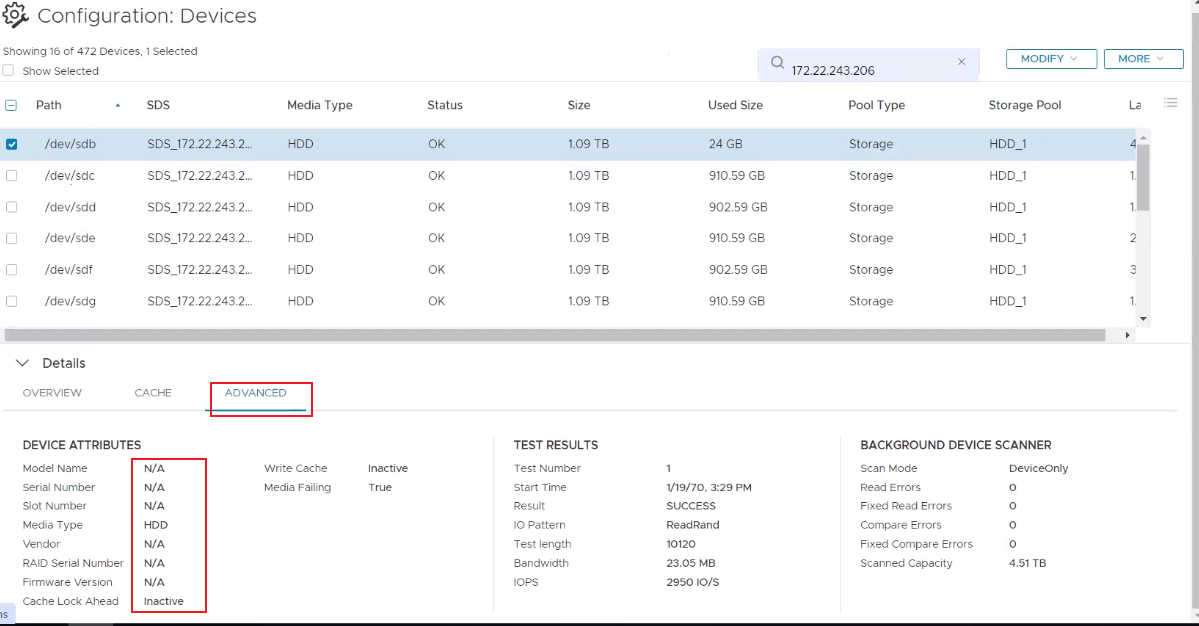
smartd(8) 按预期运行, SMART 采样也按预期运行(在下面的输出中测试了一个随机磁盘):
[root@test01 ~]# systemctl status smartd
● smartd.service - Self Monitoring and Reporting Technology (SMART) Daemon
   Loaded: loaded (/usr/lib/systemd/system/smartd.service; enabled; vendor preset: enabled)
   Active: active (running) since Thu 2024-02-29 12:00:24 CST; 2 months 0 days ago
     Docs: man:smartd(8)
           man:smartd.conf(5)
 Main PID: 26261 (smartd)
    Tasks: 1
   Memory: 1020.0K
   CGroup: /system.slice/smartd.service
           └─26261 /usr/sbin/smartd -n -q never
Feb 29 12:00:25 test01 smartd[26261]: Device: /dev/bus/0 [megaraid_disk_15], opened
Feb 29 12:00:25 test01 smartd[26261]: Device: /dev/bus/0 [megaraid_disk_15], [SEAGATE  ST1200MM0099     ST3...20 TB
Feb 29 12:00:25 test01 smartd[26261]: Device: /dev/bus/0 [megaraid_disk_15], is SMART capable. Adding to "m...list.
Feb 29 12:00:26 test01 smartd[26261]: Device: /dev/bus/0 [megaraid_disk_16], opened
Feb 29 12:00:26 test01 smartd[26261]: Device: /dev/bus/0 [megaraid_disk_16], [SEAGATE  ST1200MM0099     ST3...20 TB
Feb 29 12:00:26 test01 smartd[26261]: Device: /dev/bus/0 [megaraid_disk_16], is SMART capable. Adding to "m...list.
Feb 29 12:00:26 test01 smartd[26261]: Device: /dev/bus/0 [megaraid_disk_17], opened
Feb 29 12:00:26 test01 smartd[26261]: Device: /dev/bus/0 [megaraid_disk_17], [SEAGATE  ST1200MM0099     ST3...20 TB
Feb 29 12:00:26 test01 smartd[26261]: Device: /dev/bus/0 [megaraid_disk_17], is SMART capable. Adding to "m...list.
Feb 29 12:00:26 test01 smartd[26261]: Monitoring 0 ATA/SATA, 16 SCSI/SAS and 0 NVMe devices
Hint: Some lines were ellipsized, use -l to show in full.


[root@test01 ~]# smartctl -H /dev/sdp -d megaraid,14
smartctl 6.5 2016-05-07 r4318 [x86_64-linux-3.10.0-862.14.4.el7.x86_64] (local build)
Copyright (C) 2002-16, Bruce Allen, Christian Franke, https://urldefense.com/v3/__http://www.smartmontools.org__;!!LpKI!l_EQHSZQfuw8LzmCchDHpLq7RiZjHuui5lLT4WbBcCBAWWAN2kKy5e6Oo1b6Pf8JXR5s_7u0uQ6uEHpS$ [smartmontools[.]org]=== START OF READ SMART DATA SECTION ===
SMART Health Status: OK


[root@test01 ~]# smartctl -i /dev/sdp -d megaraid,14
smartctl 6.5 2016-05-07 r4318 [x86_64-linux-3.10.0-862.14.4.el7.x86_64] (local build)
Copyright (C) 2002-16, Bruce Allen, Christian Franke, https://urldefense.com/v3/__http://www.smartmontools.org__;!!LpKI!l_EQHSZQfuw8LzmCchDHpLq7RiZjHuui5lLT4WbBcCBAWWAN2kKy5e6Oo1b6Pf8JXR5s_7u0uQ6uEHpS$ [smartmontools[.]org]=== START OF INFORMATION SECTION ===
Vendor:               SEAGATE
Product:              ST1200MM0099
Revision:             ST33
Compliance:           SPC-4
User Capacity:        1,200,243,695,616 bytes [1.20 TB]
Logical block size:   512 bytes
Formatted with type 2 protection
LU is fully provisioned
Rotation Rate:        10000 rpm
Form Factor:          2.5 inches
Logical Unit id:      0x5000c500ce30249f
Serial number:        WFK62AEQ
Device type:          disk
Transport protocol:   SAS (SPL-3)
Local Time is:        Tue Jun 11 13:17:06 2024 CST
SMART support is:     Available - device has SMART capability.
SMART support is:     Enabled
Temperature Warning:  Disabled or Not Supported
Light Installation Agent (LIA) 配置文件应启用元数据轮询机制,该机制设置为“1”:
[root@test01 ~]# grep "metadata_polling" /opt/emc/scaleio/lia/cfg/conf.txt
tgt_dev__enable_metadata_polling=1|
|
Storage Data Server (SDS) 配置文件应启用元数据轮询机制,即设置为“1”:
|
Meta Data Manager (MDM) 配置文件应启用元数据轮询机制,默认情况下设置为“1”或不存在:
参数存在且已启用。
|
该参数不存在且已启用。
[root@test01 ~]# grep "metadata_polling" /opt/emc/scaleio/mdm/cfg/conf.txt提醒:MDM 参数名称与用于元数据轮询的 LIA 和 SDS 不同。
影响:缺乏视觉信息。Scli 命令显示所有预期信息。
Cause
组件之间的现有通信功能用于启用对磁盘进行采样并将其元数据导出到 UI 的功能。
LIA 组件在每个系统节点上运行,并使用 smartd 从设备中提取元数据。它将此数据转发到 SDS,SDS 存储和处理磁盘信息。
MDM 按设定的时间间隔从 SDS 节点请求元数据,以使 Presentation Server (PS) 能够将其填充到Device details中Advanced选项卡下的Device Attributes部分中。
如果任何组件无法正常工作或被禁用,则整个功能将无法正常工作,并且 PS 将使用默认值“N/A”填充字段。
Resolution
对于上述每个方案,请运行相应的解决方法步骤:
SMARTD 未运行
运行以下命令以重新启动服务,并使用上述命令验证它是否正在对磁盘进行采样:
|
LIA — 元数据轮询机制已禁用
将行“tgt_dev__enable_metadata_polling=1”添加到文件或将值更改为“1”。
通过运行“pkill lia”命令重新启动 LIA 进程。
接下来,重新启动演示服务器 (PS) 并验证设备属性是否已重新填充实际数据:
|
SDS — 元数据轮询机制已禁用
将行“tgt_dev__enable_metadata_polling=1”添加到文件或将值更改为“1”。
将 SDS 置于即时维护模式 (IMM),通过运行“pkill sds”命令重新启动 SDS 进程,然后将 SDS 退出 IMM。
接下来,重新启动 PS 并验证设备属性是否已使用实际数据重新填充:
|
MDM — 元数据轮询机制已禁用
如果该参数存在且未启用,请将该值更改为“1”,或者最好在默认情况下完全删除该参数:
- 如果有备用 MDM,则从它们开始,从 conf 文件中删除行,然后运行“pkill mdm”。
- 接下来,在 TB MDM 上,逐个删除 conf 文件中的行(等待 4-5 秒,然后再转到下一个),然后运行“pkill mdm”。
- 接下来,在 SMDM 上,一个接一个地(等待 4-5 秒,然后再移动到下一个),从 conf 文件中删除行并运行“pkill mdm”。
- 接下来,在 PMDM 与其中一个 SMDM 之间切换。
- 删除 conf 文件的行,并在旧 PMDM(现在是 SMDM)上运行“pkill mdm”。
接下来,重新启动 PS 并验证设备属性是否已使用实际数据重新填充:
[root@test_ps ~]# systemctl restart mgmt-server.service|
|
Additional Information
受影响的版本
PowerFlex 3.5 及更高版本