Microsoft App Agent - 判斷是否需要重新開機
Summary: KB 用於判斷升級或移除 App Agent Microsoft是否需要重新開機。這通常是在啟用了帶有 Itempoint 的「表級別恢復」選項時導致的。
This article applies to
This article does not apply to
This article is not tied to any specific product.
Not all product versions are identified in this article.
Symptoms
解除安裝或升級 Microsoft App Agent 與表層級復原時,需要重新開機。
Cause
由於使用應用程式代理程式表格層級復原所安裝的特定驅動程式Microsoft可能需要重新開機。
Resolution
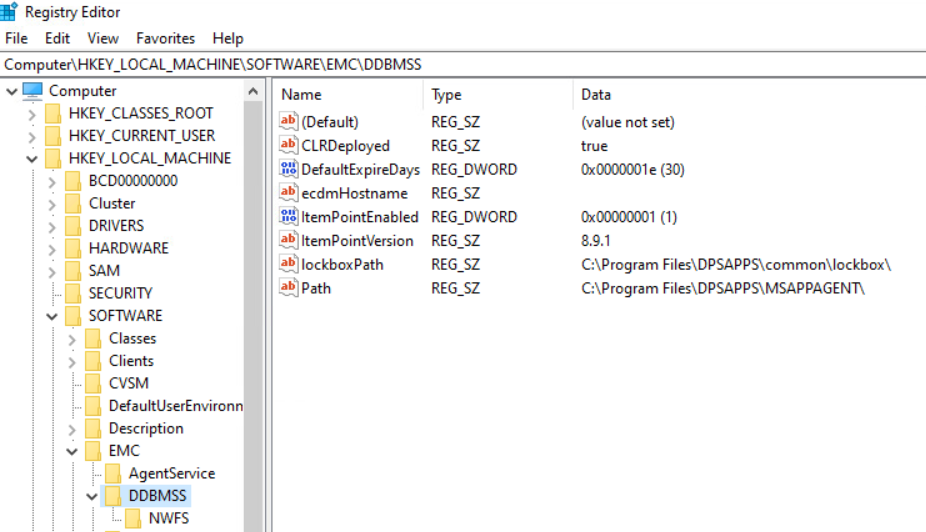
執行提升權限的 PowerShell,並執行下列命令,該命令會根據 itempoint 的安裝情況傳回特定值,因此若解除安裝或在升級期間,伺服器極有可能需要重新開機。(Get-ItemProperty -Path 'HKLM:\SOFTWARE\EMC\DDBMSS' -ErrorAction SilentlyContinue).PSObject.Properties.Name -contains 'ItemPointEnabled'
範例:
PS C:\Users\administrator.AMER> (Get-ItemProperty -Path 'HKLM:\SOFTWARE\EMC\DDBMSS' -ErrorAction SilentlyContinue).PSObject.Properties.Name -contains 'ItemPointEnabled'
False
PS C:\Users\administrator.AMER> (Get-ItemProperty -Path 'HKLM:\SOFTWARE\EMC\DDBMSS' -ErrorAction SilentlyContinue).PSObject.Properties.Name -contains 'ItemPointEnabled'
True
總之,在註冊表中查詢路徑中的該值,如果存在,則顯示 True,否則為 false -。
False = 理想情況下不會重新開機 - 作業系統仍可提示重新開機,但不會以代理程式為基礎**。
True = 極有可能需要重新開機。
Additional Information
Products
Microsoft App Agent, PowerProtect App DirectArticle Properties
Article Number: 000375390
Article Type: Solution
Last Modified: 15 Oct 2025
Version: 2
Find answers to your questions from other Dell users
Support Services
Check if your device is covered by Support Services.