Microsoft App Agent - 재부팅 필요 여부 결정
Summary: KB는 Microsoft App Agent 업그레이드 또는 제거에 재부팅이 필요한지 여부를 결정하는 데 사용됩니다. 이 문제는 일반적으로 Itempoint에서 테이블 수준 복구 옵션이 활성화된 경우에 발생합니다.
This article applies to
This article does not apply to
This article is not tied to any specific product.
Not all product versions are identified in this article.
Symptoms
Table Level Recovery를 사용하여 Microsoft App Agent를 제거하거나 업그레이드하려면 재부팅해야 합니다.
Cause
Microsoft App Agent를 사용한 Table Level Recovery와 함께 설치된 특정 드라이버로 인해 재부팅이 필요할 수 있습니다.
Resolution
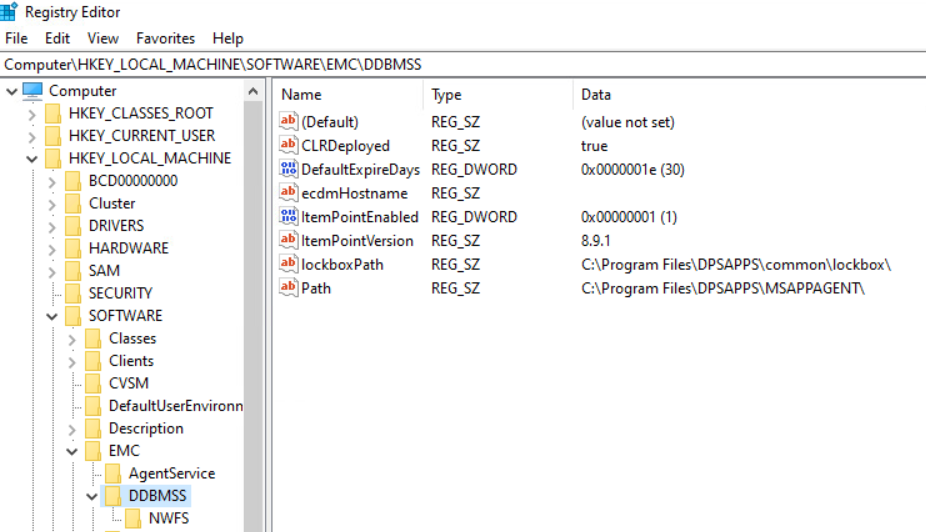
관리자 권한 PowerShell을 실행하고 다음 명령을 실행합니다. 이 명령은 itempoint가 설치되어 있는지 여부에 따라 특정 값을 반환합니다. 따라서 제거된 경우 또는 업그레이드 중에 서버를 재부팅해야 할 가능성이 높습니다.(Get-ItemProperty -Path 'HKLM:\SOFTWARE\EMC\DDBMSS' -ErrorAction SilentlyContinue).PSObject.Properties.Name -contains 'ItemPointEnabled'
예:
PS C:\Users\administrator.AMER> (Get-ItemProperty -Path 'HKLM:\SOFTWARE\EMC\DDBMSS' -ErrorAction SilentlyContinue).PSObject.Properties.Name -contains 'ItemPointEnabled'
False
PS C:\Users\administrator.AMER> (Get-ItemProperty -Path 'HKLM:\SOFTWARE\EMC\DDBMSS' -ErrorAction SilentlyContinue).PSObject.Properties.Name -contains 'ItemPointEnabled'
True
요약하면, 레지스트리에서 경로 내에서 해당 값을 쿼리하고 값이 있으면 True, 그렇지 않으면 false -로 표시됩니다.
False = 이상적으로 재부팅하지 않음 - OS는 여전히 재부팅을 요청할 수 있지만 Agent**를 기반으로 하지 않습니다.
True = 재부팅이 필요할 가능성이 가장 높습니다.
Additional Information
Products
Microsoft App Agent, PowerProtect App DirectArticle Properties
Article Number: 000375390
Article Type: Solution
Last Modified: 15 Oct 2025
Version: 2
Find answers to your questions from other Dell users
Support Services
Check if your device is covered by Support Services.